 Chris Wanstrath
A short guide to mastering keyboard shortcuts on GitHub
Say goodbye to constant mouse clicking and hello to seamless navigation with GitHub shortcuts.
We've just added site-wide token based authentication. You can find your API token in your account page, front and center. Simply pass login and token to any URL which requires…
We’ve just added site-wide token based authentication. You can find your API token in your account page, front and center.
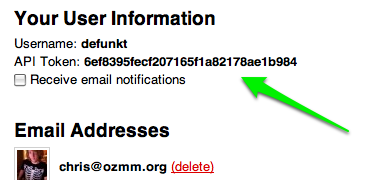
Simply pass login and token to any URL which requires authentication.
For example:
curl -F 'repository[name]=API_Hotness' -F 'login=defunkt' -F 'token=6ef8395fecf207165f1a82178ae1b984' http://github.com/repositoriesWe’ll be enhancing the API soon, but in the meantime you can use this to more easily build tools and automation around GitHub. Enjoy.
Say goodbye to constant mouse clicking and hello to seamless navigation with GitHub shortcuts.

GitHub-hosted runners now support Azure private networking. Plus, we've added 2 vCPU Linux, 4 vCPU Windows, macOS L, macOS XL, and GPU hosted runners to our runner fleet.

Unlock the secret to organization and collaboration magic with our GitHub Projects tips and tricks roundup.


