SmartFlying.lua

Current version 0.84a
SmartFlying is a hack to make possible formation flying using SmartCopilot. In order for it to works, the new version 3.1.4 of SmartCopilot is needed.
Install the script in FWL's Scripts directory and make sure to have AMS in your Modules directory. Smartflying has been tested with version 1.3 of AMS.
SmartFlying needs a configuration file (smartcopilot.cfg) that has to be installed in the aircraft's root directory.
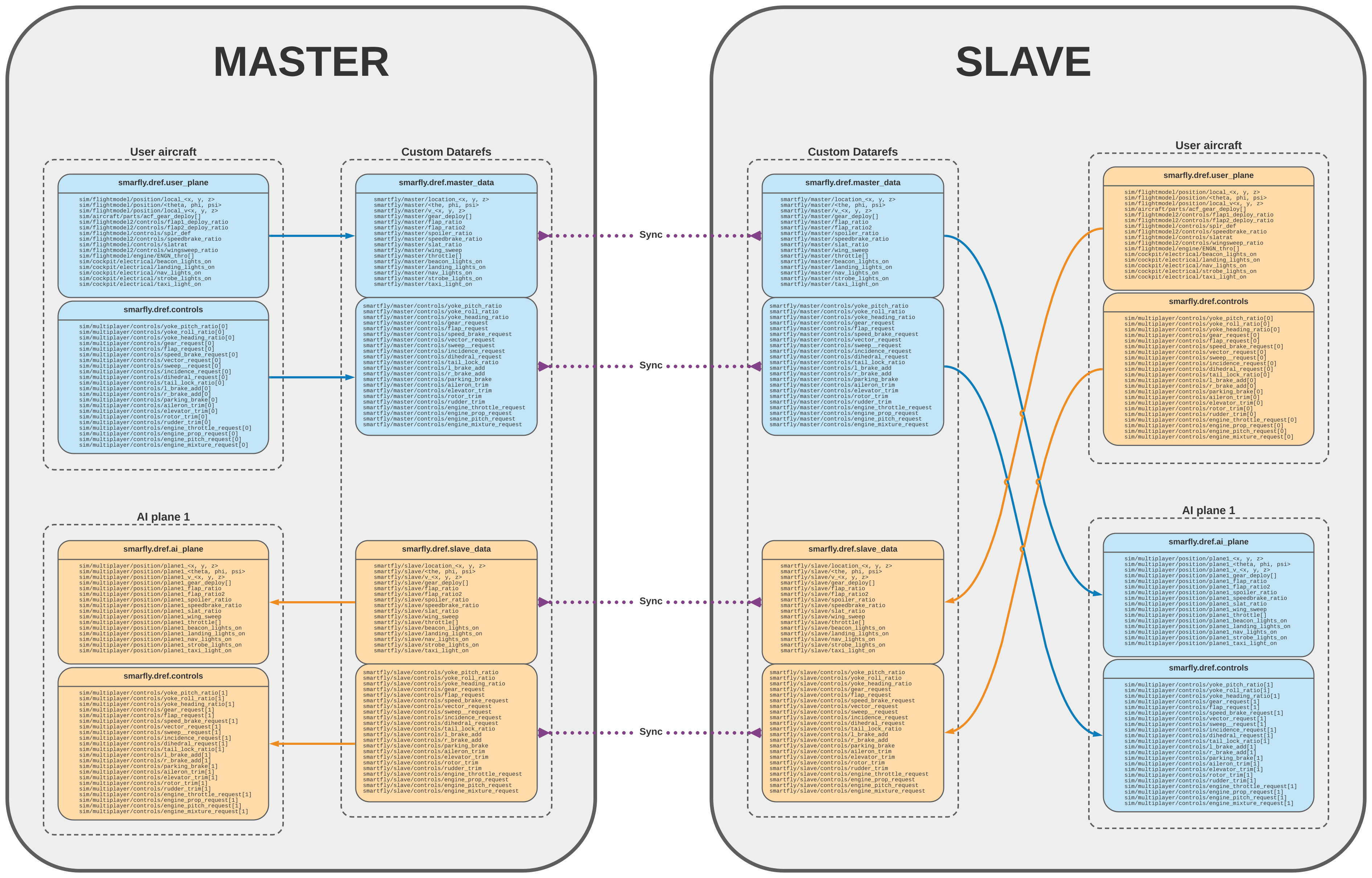
The entire data structure that SmartFlying uses is collected in one single Lua table that contains also all the functions.
The structure is organized following the standard guidelines for AMS scripts (see >wiki page needed<):
smartfly = {					-- **General variables**
	version,				-- current version of SmartFlying.lua
	stage,					-- current development stage
	_inited,				-- if the script, thus the data, have been initialized
	enabled,				-- is SmartCopilot enabled?
	is_master, 				-- if the user is the master (1) or the slave (2)

	CONF = {				-- **Configuration values**
		SCP_MASTER,			-- SmartCopilot dataref for 'master' (generally `scp/api/ismaster`)
	},

	dref = {				-- **Referenced Datarefs**
		master_data = {...},		-- contains all the custom dataref for the master plane
		slave_data = {...}, 		-- contains all the custom dataref for the slave plane
		user_plane = {...}, 		-- contains all the dataref for the user plane
		ai_plane_local = {...},		-- contains the datarefs for the AI plane local position [issue #4]
		ai_plane = {...}, 		-- contains all the dataref for the first AI plane
		controls = {...}, 		-- contains the multiplayer control's dataref (`sim/multiplayer/controls/...`)
		plane_data_size = {...}, 	-- contains the size of some dataref arrays
	},
}SmartFlying defines the following functions:
-
smartfly.init()- to initialize all the data-structures; it's executed automatically bysmartfly.loop.idle(). -
smartfly.release_all()- to release the controlled AI-Planes once the formation flying session is terminated. -
smartfly.loop.idle()- the idle loop, waiting for SmartCopilot to establish a connection. -
smartfly.loop.update_all()- the active loop that synchronizes all the data, once SmartCopilot has established a valid connection.
 To get a larger image, right-click and open the above image in a new tab. Alternatively download the above chart in:
- SVG format - 'SmartFlying Dataflow.svg'
- PDF format - 'SmartFlying Dataflow.pdf'

-
There is an error in the handling of the local position datarefs. An issue has been open for this [issue #4](fixed). - In X-Plane the AI controlled aircraft looks sometimes quite jerky, especially if the two planes are going fast while flying close. This is a known issue and depends on X-Planes itself. Hopefully in the near future Laminar will fix it.
- There is no datatef (known) to control the propeller of the AI aircraft, thus the remote plane will always look as it has the engine running, even if it's cold and dark.
- Some planes use custom datarefs or standard datarefs that are not present in the AI-plane set. If both the user and the remote plane use the same aircraft model, it can happen that some parts of the AI-plane moves according to the user plane movements. This is the case, for instance, of the ailerons of the Yak-55. Neither SmartFlying nor SmartCopilot can do anything to fix this problem.
- AMS Scripts Repository (private)
- SmartFlying Discussion (private)
- SmartFlying Lua code (private)
- 'smartcopilot.cfg' for SmartFlying
- SmartFlying Dataflow SVG file
- SmartFlying Dataflow PDF file
- SmartCopilot Home Page (external link)