

Dragonframe is the premier stop motion animation software used by professional studios and independent animators worldwide. It serves as a comprehensive tool for creating frame-by-frame animations with precision and creativity. Whether you're working on a short film, commercial, or personal project, Dragonframe provides the essential features needed to bring your vision to life.
With Dragonframe, animators can leverage advanced onion skinning, voice recording, timeline editing, and robust camera controls. The software supports a wide range of high-end cameras and offers motion control integration for complex shots. Its intuitive interface and powerful workflow tools make it the top choice for stop motion professionals.
Dragonframe is trusted by major studios for its reliability and feature-rich environment. It simplifies the animation process while offering the depth required for professional productions. From character animation to visual effects, Dragonframe empowers creators to produce high-quality stop motion content efficiently.
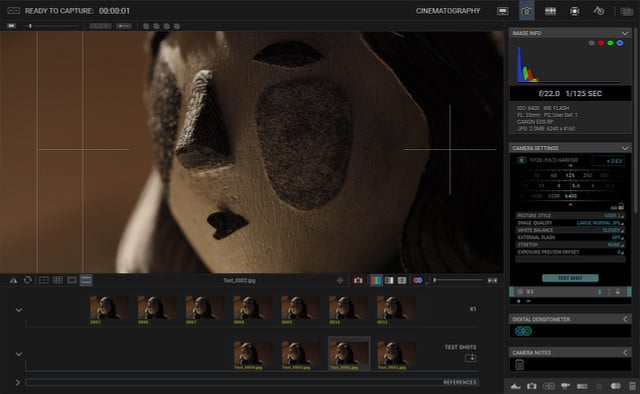
| Feature | Description |
|---|---|
| 🎬 Stop Motion Animation | Create precise frame-by-frame animations with professional tools. |
| 🧅 Advanced Onion Skinning | Visualize previous and upcoming frames for smooth animation. |
| 🎤 Voice Recording | Record and sync audio directly within the software. |
| ⏱ Timeline Editing | Manage frames, scenes, and sequences with an intuitive timeline. |
| 📷 Camera Support | Compatible with DSLR, cinema, and industrial cameras. |
| 🎮 Motion Control Integration | Automate camera and puppet movements for complex shots. |
| 💡 Lightweight Performance | Optimized for stable performance during long animation sessions. |
| 🖥 User-Friendly Interface | Easy-to-navigate workspace for animators of all skill levels. |
| 🌐 Professional Software | Industry-standard tool used by major animation studios. |
- Enhanced camera compatibility with newer models.
- Improved onion skinning visualization.
- Better audio syncing capabilities.
- Updated user interface for smoother workflow.
- Fixes for timeline performance issues.
- Independent Animators – Create professional stop motion projects with ease.
- Film Studios – Produce high-quality animations for commercials and films.
- Educators – Teach animation techniques with industry-standard software.
- Hobbyists – Explore stop motion as a creative outlet.
- Download Dragonframe from the official website.
- Install and launch the application.
- Connect your camera and configure settings.
- Start a new project and begin animating.
- Use timeline and onion skinning for precision.
| Parameter | Requirement |
|---|---|
| OS | Windows 10/11, macOS 10.14+, Ubuntu 18.04+ |
| Processor | 2.0 GHz Intel/AMD or higher |
| RAM | 4 GB (8 GB recommended) |
| Storage | 500 MB free space |
| GPU | OpenGL 3.2 compatible graphics card |
| Display | 1280x720 minimum resolution |
| Other | Compatible camera and internet for activation |
dragonframe stop motion software • dragonframe animation premium • dragonframe professional • dragonframe stop motion • dragonframe animation software • dragonframe video • dragonframe camera • dragonframe onion skinning • dragonframe timeline • dragonframe motion control • dragonframe studio • dragonframe download • dragonframe tutorial • dragonframe license • dragonframe workflow • dragonframe film • dragonframe creator • dragonframe animator • dragonframe production • dragonframe cinematic