
🎥 WATCH THE USAGE EXAMPLE VIDEO BY CLICKING ON THE IMAGE BELOW 🎥
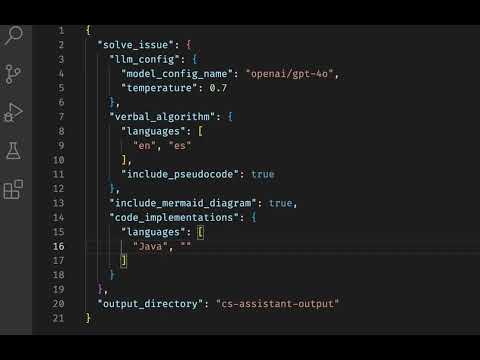
CS Assistant is a command-line tool that helps solve computer science problems by leveraging large language models. It can generate algorithmic explanations, pseudocode, code implementations in multiple programming languages, and visual diagrams.
- Generate verbal explanations of algorithms in multiple languages
- Create pseudocode representations of solutions
- Implement complete code solutions in various programming languages (Python, Java, etc.)
- Generate Mermaid diagrams visualizing the solution
- Support for multiple LLM providers (OpenAI, Google, Anthropic)
- Configurable output directory and formatting options
- Python 3.8 or higher
- API keys for at least one of the supported LLM providers (OpenAI, Google, Anthropic)
Install the package directly from PyPI:
pip install cs-assistantThe first run will automatically create a .config/cs_assistant/.csarc template file in your home directory.
- Clone the repository
- Run the setup script:
./setup.shThis will:
- Create a virtual environment
- Install all dependencies
- Create a template .env file for your API keys
- Activate the virtual environment:
source venv/bin/activate- Edit the
.envfile with your API keys (The first run of the application will also automatically create a.config/cs_assistant/.csarctemplate file)
- Clone the repository
- Create and activate a virtual environment:
python -m venv venv
source venv/bin/activate # On Windows: venv\Scripts\activate- Install the dependencies:
pip install -r requirements.txt- The first run of the application will automatically create a
.config/cs_assistant/.csarcfile in your home directory. Edit this file with your API keys:
OPENAI_API_KEY="your_openai_api_key_here"
GOOGLE_API_KEY="your_google_api_key_here"
ANTHROPIC_API_KEY="your_anthropic_api_key_here"
If installed from PyPI:
# Create a default configuration file
cs-assistant create-config -o config.json

# Solve a coding problem
cs-assistant solve "Write an algorithm to find the longest common subsequence of two strings"

# Solve a problem with specific configuration file
cs-assistant -c config.json solve "Implement a binary search tree"
If installed from source:
# Create a default configuration file
python -m src.main create-config -o config.json

# Solve a coding problem
python -m src.main solve "Write an algorithm to find the longest common subsequence of two strings"

# Solve a problem with specific configuration file
python -m src.main -c config.json solve "Implement a binary search tree"usage: CS Assistant [-h] [-c CONFIG] [-o OUTPUT_DIRECTORY] {create-config,solve} ...
options:
-h, --help show this help message and exit
-c CONFIG, --config CONFIG
Path to the configuration file (config.json). If provided, command-line arguments will be ignored.
-o OUTPUT_DIRECTORY, --output-directory OUTPUT_DIRECTORY
Directory where solution files will be saved.
Available commands:
{create-config,solve}
create-config Create a new configuration file with default settings.
solve Solve a given coding issue.
usage: CS Assistant solve [-h] [-m LLM_MODEL] [-t TEMPERATURE] [-v | --verbal-algorithm | --no-verbal-algorithm]
                             [-l VERBAL_ALGORITHM_LANGUAGES [VERBAL_ALGORITHM_LANGUAGES ...]]
                             [-p | --verbal-algorithm-include-pseudocode | --no-verbal-algorithm-include-pseudocode]
                             [-d | --include-mermaid-diagram | --no-include-mermaid-diagram]
                             [-i | --code-implementations | --no-code-implementations]
                             [-L CODE_IMPLEMENTATIONS_LANGUAGES [CODE_IMPLEMENTATIONS_LANGUAGES ...]]
                             issue_description

positional arguments:
  issue_description     The description of the coding issue.

options:
  -h, --help            show this help message and exit
  -m LLM_MODEL, --llm-model LLM_MODEL
                        The identifier for the large language model to be used. Format: 'vendor/model_name' where vendor (e.g., 'google', 'openai') represents
                        the company providing the LLM.
  -t TEMPERATURE, --temperature TEMPERATURE
                        Controls the randomness of the model's output (0.0 to 1.0).

Verbal Algorithm Options:
  -v, --verbal-algorithm, --no-verbal-algorithm
                        Enable/disable verbal algorithm explanations.
  -l VERBAL_ALGORITHM_LANGUAGES [VERBAL_ALGORITHM_LANGUAGES ...], --verbal-algorithm-languages VERBAL_ALGORITHM_LANGUAGES [VERBAL_ALGORITHM_LANGUAGES ...]
                        List of languages for verbal explanations.
  -p, --verbal-algorithm-include-pseudocode, --no-verbal-algorithm-include-pseudocode
                        Include/exclude pseudocode in the output.

  -d, --include-mermaid-diagram, --no-include-mermaid-diagram
                        Include/exclude a Mermaid diagram in the output.

Code Implementation Options:
  -i, --code-implementations, --no-code-implementations
                        Enable/disable code implementation generation.
  -L CODE_IMPLEMENTATIONS_LANGUAGES [CODE_IMPLEMENTATIONS_LANGUAGES ...], --code-implementations-languages CODE_IMPLEMENTATIONS_LANGUAGES [CODE_IMPLEMENTATIONS_LANGUAGES ...]
                        List of programming languages for code implementations.
# Generate a solution for finding prime numbers in Python and JavaScript
cs-assistant solve -L Python JavaScript "Write an algorithm to find all prime numbers up to n using the Sieve of Eratosthenes"You can customize the behavior of CS Assistant using a configuration file. Create a default configuration with:
cs-assistant create-config -o config.jsonThis will generate a JSON file with default settings that you can modify:
{
  "solve_issue": {
    "llm_config": {
      "model_config_name": "openai/gpt-4o",
      "temperature": 0.7
    },
    "verbal_algorithm": {
      "languages": [
        "en"
      ],
      "include_pseudocode": true
    },
    "include_mermaid_diagram": true,
    "code_implementations": {
      "implementation_languages": [
        "Python"
      ]
    }
  },
  "output_directory": "cs-assistant-output"
}The tool creates a directory structure for each problem in the specified output directory:
cs-assistant-output/
└── solve/
    └── find_prime_numbers/
        ├── verbal_algorithm.md      # Contains algorithm explanation and pseudocode
        ├── sieve_of_eratosthenes.py # Python implementation
        ├── SieveOfEratosthenes.js   # JavaScript implementation
        └── find_prime_numbers-diagram.md # Contains Mermaid diagram
You need to set up API keys for the LLM providers you want to use. These can be provided in one of two ways:
- In a
.csarcfile located at~/.config/cs_assistant/.csarc - As environment variables
Example .csarc file:
OPENAI_API_KEY="sk-..."
GOOGLE_API_KEY="..."
ANTHROPIC_API_KEY="sk-ant-..."
The first run of the application will automatically create this file with template values that you can replace with your actual API keys.
See the LICENSE file for details.
Here's a summary of the latest updates:
1a22ccd: Updated solution output path to include asolvedirectory (e.g.,cs-assistant-output/solve/problem_name/). Also fixed a missing newline at the end ofsrc/solve.py.3c71c2b: Refactored internal code by renamingsrc/issue_solver.pytosrc/solve.py. Unused imports were also removed fromsrc/solve.py.857729f: Renamed the primary command fromsolve-issuetosolve. For example, you now runcs-assistant solve "your problem"instead ofcs-assistant solve-issue "your problem".