
This is the time tracking app I'm developing in Python. I was developing it for some time, now I'm uploading it to GitHub.
How it looks (version 0.7):
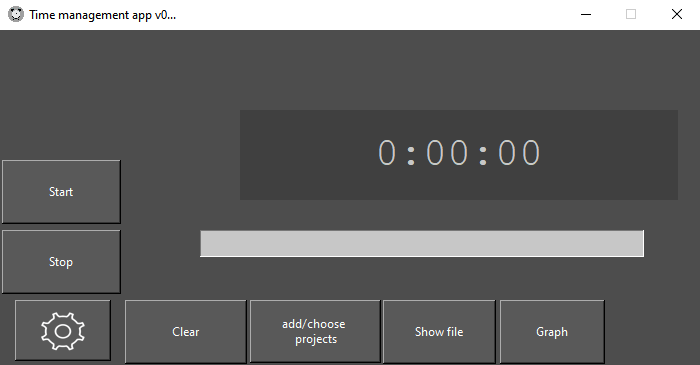

- Choose between light and dark mode.
- Add a project by clicking in the add/choose projects button, writing the name of the pj, then clicking add.
- Double click the name in the list below, this will choose the project and close the window.
- Click start, it will start counting.
- Click stop, it will stop counting, calculate and store the data. The data stored is: the name of the task, and the time spent doing it.
- Now go to show file(for a text file containing all tasks and time spent) or graph(it will show a pie graph with the tasks of the day))
- Summary of how it works is: You create a project, then start the clock, when you are done, stop the clock. It will save the name of the task and time spent.
- On the first initialization, the script will create 2 files, one txt, and a .db file.
- If you spend time on a project now then later, it will add the times.
- I recommend cloning the whole repository and getting the folder, this build is developed enough that the program is almost usable.
- Task names must only use symbols present in English. Words like à,ç,é,í may not work properly.
- I only tested it on Windows 10.
- Python 3.9.6
- The main libraries are:
- tkinter -- 8.6
- Pillow -- 9.0.0
- sqlite3 -- 3.35.5
- time, datetime, sys
- I was able to turn it into a .exe with cx_freeze without much trouble, so I recommend that.
- To visualize databases I recommend this https://sqlitebrowser.org/
- Clicking buttons at random in the middle of an operation may result in corrupt databases.
- The error divisionByZero, is probably related to a added task that was not used, a project created but with no time spent.
- Clicking on show file before any project is created, will result in an error.
- You can change the name of the .db files
- The .db files can be on other folders (in /databases/ for example)
- The only folders needed to really run the app are: /assets and /packages and the files in the main folder.