


Beacon gives Subnautica 2 IP/port multiplayer: players join through the Beacon desktop app, hosts run a Beacon server package next to Subnautica 2, and worlds stay on the server with snapshots, rollback, admin tools, server query, and mod support. No friend-code lobby, no peer-to-peer handoff, no four-player ceiling.
Every player must install Beacon to join a Beacon server. Stock Subnautica 2 cannot connect to Beacon servers directly.
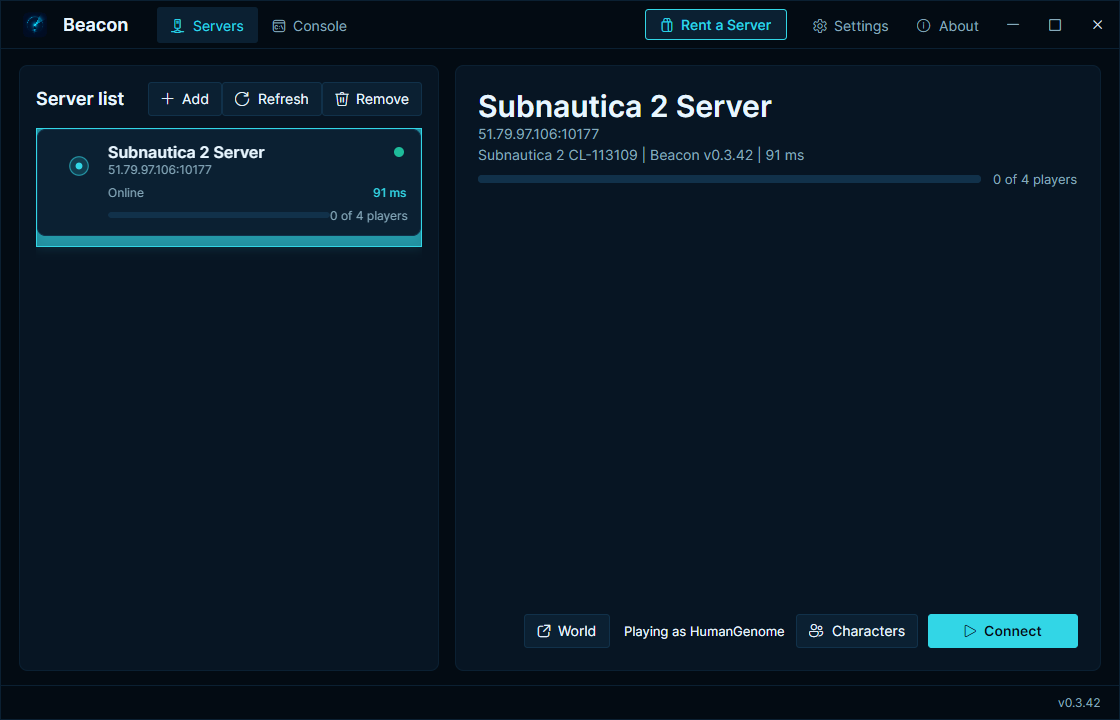
Add a server address once, pick your character, and connect straight into the hosted world.
Beacon removes the stock four-player lobby limit. Larger groups are supported by the Beacon transport path, though Subnautica 2's pacing is still balanced around smaller crews.
The world lives on the host machine. The server can keep running after a player leaves, and save snapshots give admins a recovery point before major changes.
Admins can take snapshots, list saved worlds, and restore a previous world from Beacon's world tools or RCON.
Players can keep separate characters per server. Beacon remembers the character you used for each saved server.
BeaconServer exposes Source RCON on the server's RCON port for commands like help, status, players, ping, save snapshot, and save list.
BeaconServer answers Source A2S query so server lists, monitoring tools, and bots can read status and player counts.
Beacon uses UE4SS for Lua and C++ mod loading on the client and host runtime.
The shortest path is SurvivalServers.com Subnautica 2 hosting. Beacon is already installed, ports are handled, and the panel shows a one-click Beacon setup link for players.
- Download
BeaconSetup-<version>.exefrom the latest release. - Run the installer. Windows SmartScreen may warn because the installer is not code-signed yet; choose More info then Run anyway.
- Open Beacon, add the server address, select or create a character, and click Connect.
Beacon also checks for launcher updates automatically on launch and while it is running.
- Download
Beacon-Server-Windows-x64-v<version>.zipfrom the latest release. - Extract it on the Windows host.
- Edit
BeaconServer\appsettings.json. - Forward/open the gameplay UDP port, query UDP port, RCON TCP port, and admin HTTP TCP port.
- Run
BeaconServer\BeaconServer.exe.
Full server setup, settings, source query examples, RCON commands, and build instructions live in HumanGenome/BeaconServer.
The public release page is intentionally simple:
BeaconSetup-<version>.exe— installer for playersBeacon-Server-Windows-x64-v<version>.zip— server package for hostschecksums.txt— hashes for the release assets
Source archives are generated by GitHub automatically for tags.
BeaconServer source is open at HumanGenome/BeaconServer.
This repo is the public download and documentation hub for the Beacon client app and release assets.
Beacon is a community project and is not affiliated with or endorsed by the developers of Subnautica 2.
See LICENSE.