
Python Expert Gemini Agent A full-stack web application built with Django that leverages the Gemini API to create a specialized chatbot. The agent's persona is a Python programming expert, and it is integrated with real-time tools to provide dynamic information.
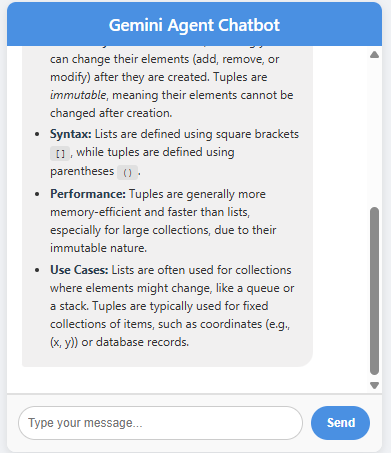
Key Features Python Programming Expertise: The agent's system prompt is configured to act as a Python programming specialist, providing expert advice, code examples, and debugging assistance.
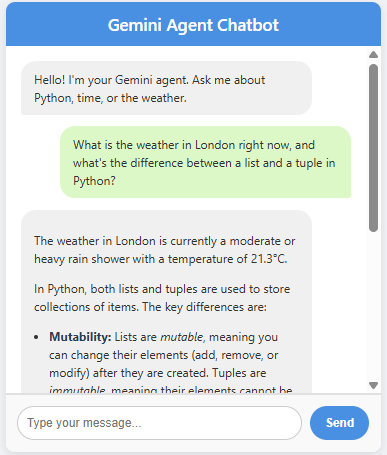
Tool Use Integration: The agent can access external tools to fetch real-time data, including:
The current time.
The current weather for any specified city.
Full-Stack Implementation: The project demonstrates a complete web application, including:
A backend built with the Django framework.
A REST API endpoint for agent communication.
A clean, modern frontend with HTML, CSS, and JavaScript.
Conversational Memory: The agent maintains a persistent chat history within a session, allowing for coherent and context-aware conversations.
Responsive UI: The chat interface is designed to be user-friendly and functional on both desktop and mobile devices.
Demo Here is a quick demonstration of the agent in action, showing a multi-part query and the formatted response.
Technologies Used Backend: Python, Django
AI/API: Google Gemini API (google-generativeai library)
Frontend: HTML, CSS, JavaScript
Tools: python-dotenv, requests
Package Management: pip with a requirements.txt file
Getting Started Follow these steps to set up and run the project locally.
-
Clone the repository git clone https://github.com/Mohammedr4/python-ai-expert-agent.git cd python-ai-expert-agent
-
Set up the Python virtual environment python -m venv djangovenv source djangovenv/Scripts/activate # On Windows Git Bash
-
Install dependencies Create a requirements.txt file in the project root with the following content:
django google-generativeai python-dotenv requests
Then run:
pip install -r requirements.txt
- Configure API Keys Create a .env file in the project root with your API keys. You can get these from the Google AI Studio and WeatherAPI.com.
GEMINI_API_KEY="YOUR_GEMINI_API_KEY" WEATHERAPI_KEY="YOUR_WEATHERAPI_KEY"
- Run the Django server python manage.py runserver
The application will be available at http://127.0.0.1:8000/.
Usage Open your browser and navigate to the application URL.
Start a conversation with the chatbot.
Ask it questions about Python.
Ask for the current time or the weather in a specific city.