You signed in with another tab or window. Reload to refresh your session.You signed out in another tab or window. Reload to refresh your session.You switched accounts on another tab or window. Reload to refresh your session.Dismiss alert
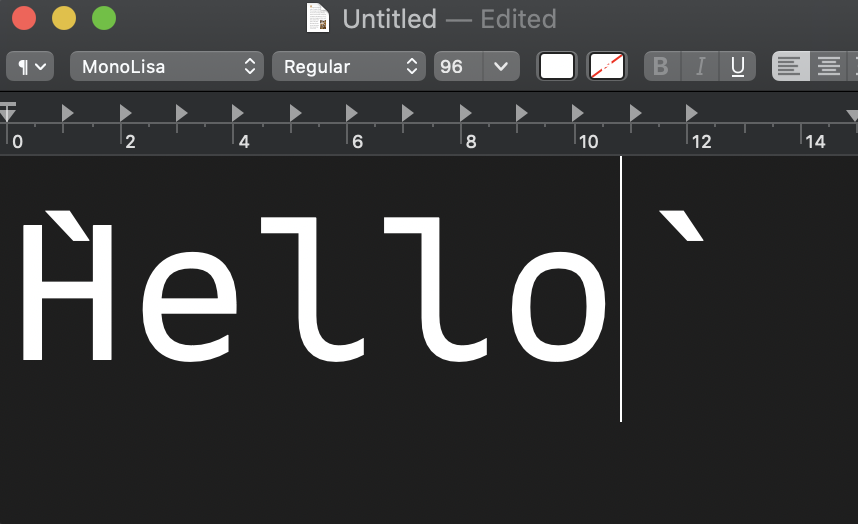
I encountered a problem with your font! When I'm using Backticks (`), there is a display error (I'm using the latest available version). I have attached the evidence below, I also tested this anomaly on your site, and it behaves on you as well.
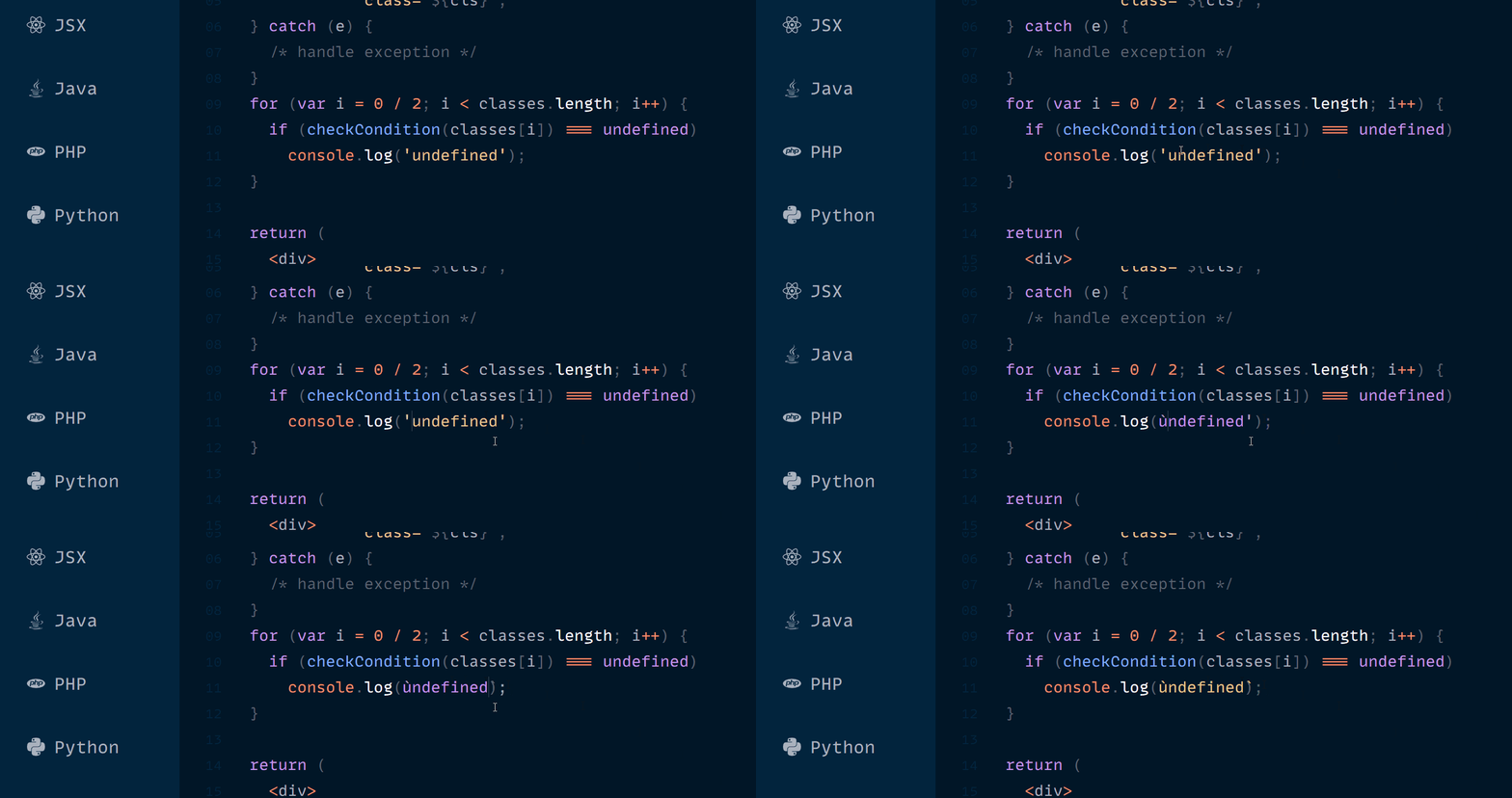
Hi, I'm the one who reported this. The problem is tested on the operating systems: macOS High Sierra & Windows 10 as well as on your website (Playground).
I have attached some more animated images.
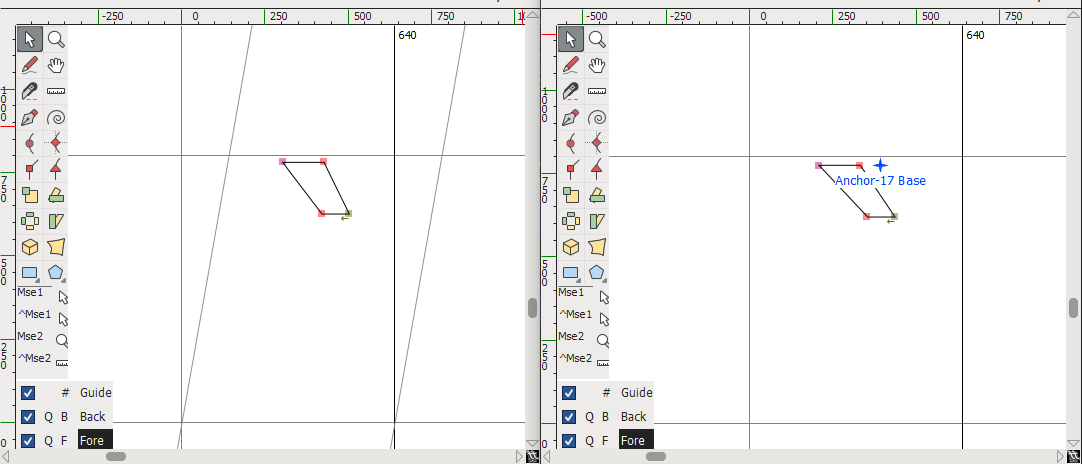
Backticks (`) work correctly in italics. In the below photos, you can see it's a big difference in the glyph (left one is Regulat Italic, right one is just Regular).
Hi,
Just to verify, if you change the font in the playground, does it give the expected result (separate characters)? If not, that would imply some replacement on the system level.
On 27.01.2021, at 21:13, Ţandără Petrişor-Alexandru ***@***.***> wrote:
Hi, I'm the one who reported this. The problem is tested on the operating systems: macOS High Sierra & Windows 10 as well as on your website (Playground).
I have attached some more animated images.
Backticks (`) work correctly in italics. In the below photos, you can see it's a big difference in the glyph (left one is Regulat Italic, right one is just Regular).
—
You are receiving this because you authored the thread.
Reply to this email directly, view it on GitHub, or unsubscribe.
For another data point, I'm on a Mac (Catalina) and backticks work as expected in both playground and my editor (emacs 28). No issues for this Mac user.
I don't know, I think this is on a system level. I tested it on my Android phone and my laptop (Windows & Ubuntu) and the playground works well, but the same issue in VS Code.
If I'm interpreting right, it's doing a replacement for the diacritic character ù on your system. I don't understand why this doesn't happen for the other font families, though.
Thanks, it will be great if you recommend some settings for Windows as well.
joi, 28 ian. 2021, 18:50 Juho Vepsäläinen <notifications@github.com> a
scris:
I think that's fine but the way it's modified is coming from the issue tracker, which while a user-provided solution is still a likely course of action for many users given NERD icons were an early request in #57
@kkirsche Yup, what I mean is that it's not completely clear if we can find a fix for modifications done on top of the shipped version as it's difficult to tell what the tool is doing and why it would break this particular case. It's possible there's something wrong in the base font still.
Hello, there's already an open issue and a PR with a fix in the nerd fonts repository for this backtick issue.
Until it gets merged, you can self-patch the font from the command-line using the options suggested in this comment (& by following the instructions in this comment).
Hello, there's already an open issue and a PR with a fix in the nerd fonts repository for this backtick issue.
Until it gets merged, you can self-patch the font from the command-line using the options suggested in this comment (& by following the instructions in this comment).
Its merged now. You can now patch the font using -
the command-line approach mentioned in my previous reply until their next release (v2.2.0)
(or)
If possible, when closing this issue, can you add a note in your FAQ advising users to use nerd fonts >=v2.2.2 when patching the font manually.
Alternatively, instead of patching MonoLisa, users can now install Symbols Nerd Font (mono) from nerd fonts and use that as a fallback font if their terminal or application supports it.
For Ex:
kitty terminal: Using symbols_map in kitty.conf as suggested in kitty's FAQ symbol_map <Unicode codepoints> Symbols Nerd Font
VS Code terminal: Using font fallback in settings.json "terminal.integrated.fontFamily": "'MonoLisa', 'Symbols Nerd Font'"
Reacted by Kevin Kirsche, Miguel Montalvo, zhang rui, Luke, Hans Jakob Emmel, Vyacheslav Gorbov, Anubhav and Przemek Ciąćka
I wonder if there's some way to "merge" another font with Symbols Nerd Font to generate a single file as that would provide another way to patch.
Well, that is the whole purpose of Nerd Fonts. To give users a patcher script that takes an arbitrary font and creates a patched version. For convenience Nerd Fonts also supplies some already patched versions of popular fonts.
The Symbols Nerd Font was just a byproduct. It uses the same patcher script but an empty input font. It is for use cases where font substitution (by the OS's font system) is good enough.
(Usually (at least on Linux) the system selects another (any other) font that has a required glyph, if it is not available in the current font. More advanced settings can be found here: https://github.com/ryanoasis/nerd-fonts/wiki/Font-Substitution-&-Fallback)
(The 'problem' with merging is that you want to scale the symbols to somehow match the to-be-patched font.)
Well, that is the whole purpose of Nerd Fonts. To give users a patcher script that takes an arbitrary font and creates a patched version. For convenience Nerd Fonts also supplies some already patched versions of popular fonts.
Yup, what I found out is that it doesn't work against variable fonts, though, as some underlying dependency doesn't support this type of patching.
It's not exactly clear to me how to handle Nerd Fonts for the variable case but Symbols Nerd Font seems to address the problem.
(The 'problem' with merging is that you want to scale the symbols to somehow match the to-be-patched font.)


Activity
bebraw commentedon Jan 27, 2021
Based on the user report it's on MacOS but I cannot reproduce this one on my system (Big Sur). Please comment here if you can reproduce it.
petrisoralexandru commentedon Jan 27, 2021
Hi, I'm the one who reported this. The problem is tested on the operating systems: macOS High Sierra & Windows 10 as well as on your website (Playground).
I have attached some more animated images.
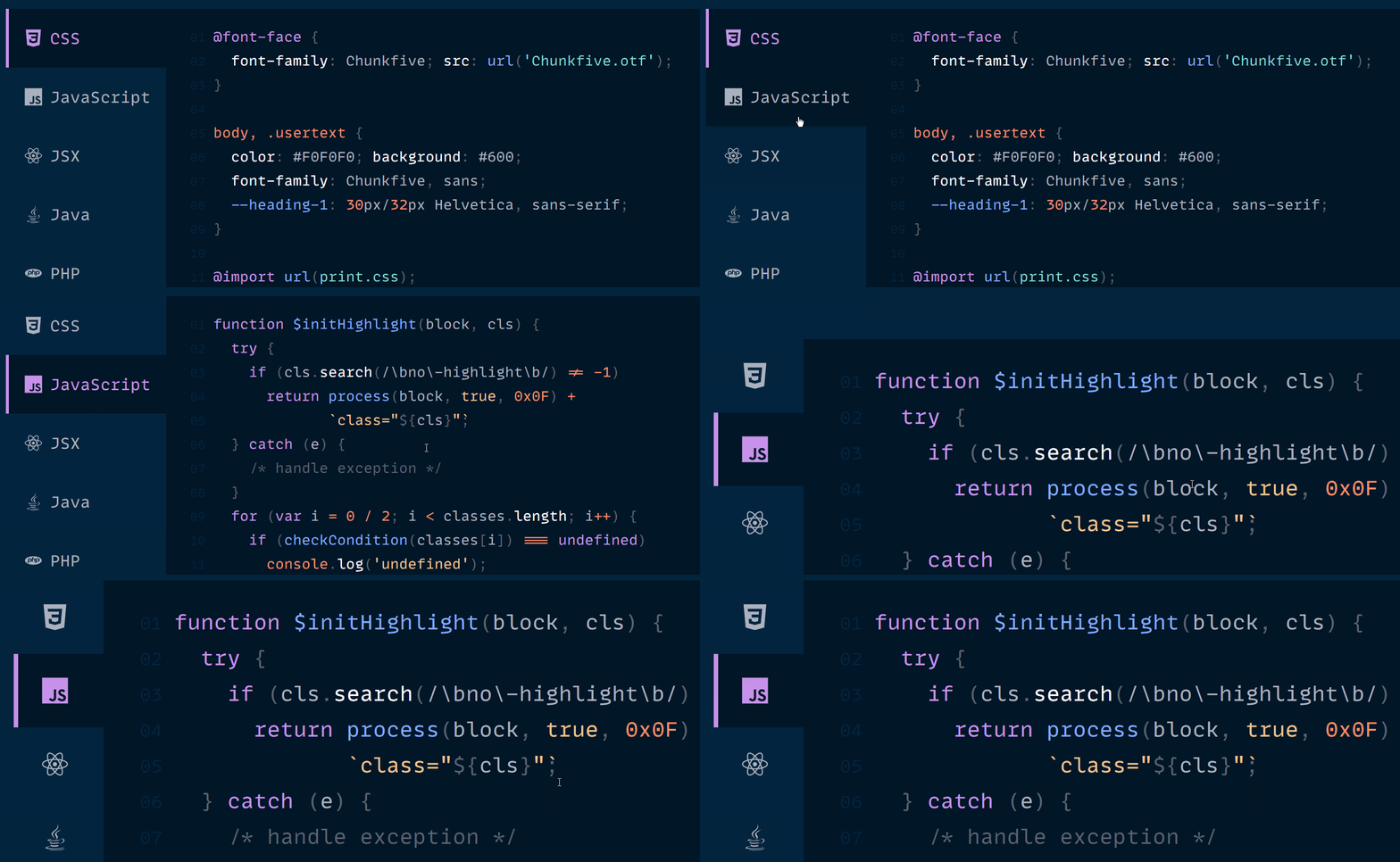
Backticks (`) work correctly in italics. In the below photos, you can see it's a big difference in the glyph (left one is Regulat Italic, right one is just Regular).
bebraw commentedon Jan 27, 2021
@MarcusSterz Is it possible there's some automatic replacement causing this? Can you reproduce the issue?
bebraw commentedon Jan 27, 2021
petrisoralexandru commentedon Jan 27, 2021
Sure!
pkazmier commentedon Jan 28, 2021
For another data point, I'm on a Mac (Catalina) and backticks work as expected in both playground and my editor (emacs 28). No issues for this Mac user.
petrisoralexandru commentedon Jan 28, 2021
I don't know, I think this is on a system level. I tested it on my Android phone and my laptop (Windows & Ubuntu) and the playground works well, but the same issue in VS Code.
MarcusSterz commentedon Jan 28, 2021
Cannot reproduce this in playground in any browser so far. Looks good in VS Code, too.
petrisoralexandru commentedon Jan 28, 2021
Maybe is from keyboard?
microsoft/vscode#93567 (comment)
petrisoralexandru commentedon Jan 28, 2021
@bebraw What replacement on the system level do you recommend?
bebraw commentedon Jan 28, 2021
@petrisoralexandru You could try https://stackoverflow.com/a/12759063/228885 . I wonder if this is related to input source.
If I'm interpreting right, it's doing a replacement for the diacritic character ù on your system. I don't understand why this doesn't happen for the other font families, though.
petrisoralexandru commentedon Jan 28, 2021
bebraw commentedon Jan 28, 2021
@petrisoralexandru https://superuser.com/questions/1236768/how-do-i-disable-automatic-diacritics seems related for Windows. It looks like there may be some automation in place as well that's causing the behavior.
22 remaining items
kkirsche commentedon Aug 11, 2022
I think that's fine but the way it's modified is coming from the issue tracker, which while a user-provided solution is still a likely course of action for many users given NERD icons were an early request in #57
bebraw commentedon Aug 11, 2022
@kkirsche Yup, what I mean is that it's not completely clear if we can find a fix for modifications done on top of the shipped version as it's difficult to tell what the tool is doing and why it would break this particular case. It's possible there's something wrong in the base font still.
krish-r commentedon Aug 17, 2022
Hello, there's already an open issue and a PR with a fix in the nerd fonts repository for this backtick issue.
Until it gets merged, you can self-patch the font from the command-line using the options suggested in this comment (& by following the instructions in this comment).
krish-r commentedon Aug 19, 2022
Its merged now. You can now patch the font using -
(or)
Finii commentedon Aug 26, 2022
There is a new release 🎉 https://github.com/ryanoasis/nerd-fonts/releases/tag/v2.2.0
;)
bebraw commentedon Dec 3, 2022
I wonder what to do with this one. Given they've patched Nerd Fonts, should we simply close this issue?
krish-r commentedon Dec 3, 2022
Hi,
If possible, when closing this issue, can you add a note in your FAQ advising users to use nerd fonts
>=v2.2.2when patching the font manually.Alternatively, instead of patching MonoLisa, users can now install
Symbols Nerd Font (mono)from nerd fonts and use that as a fallback font if their terminal or application supports it.For Ex:
kitty terminal: Using
symbols_mapinkitty.confas suggested in kitty's FAQsymbol_map <Unicode codepoints> Symbols Nerd FontVS Code terminal: Using font fallback in
settings.json"terminal.integrated.fontFamily": "'MonoLisa', 'Symbols Nerd Font'"bebraw commentedon Dec 3, 2022
@krish-r Great info, added.
I wonder if there's some way to "merge" another font with
Symbols Nerd Fontto generate a single file as that would provide another way to patch.Finii commentedon Dec 3, 2022
Well, that is the whole purpose of Nerd Fonts. To give users a patcher script that takes an arbitrary font and creates a patched version. For convenience Nerd Fonts also supplies some already patched versions of popular fonts.
https://github.com/ryanoasis/nerd-fonts#font-patcher
The
Symbols Nerd Fontwas just a byproduct. It uses the same patcher script but an empty input font. It is for use cases where font substitution (by the OS's font system) is good enough.(Usually (at least on Linux) the system selects another (any other) font that has a required glyph, if it is not available in the current font. More advanced settings can be found here: https://github.com/ryanoasis/nerd-fonts/wiki/Font-Substitution-&-Fallback)
(The 'problem' with merging is that you want to scale the symbols to somehow match the to-be-patched font.)
Edit: Add link to font fallback wiki entry)
bebraw commentedon Dec 3, 2022
Yup, what I found out is that it doesn't work against variable fonts, though, as some underlying dependency doesn't support this type of patching.
It's not exactly clear to me how to handle Nerd Fonts for the variable case but
Symbols Nerd Fontseems to address the problem.That's a great point.
bebraw commentedon Dec 3, 2022
For future reference or anyone that's interested, it seems the way to include Nerd Fonts to a variable font has been documented at https://github.com/ryanoasis/nerd-fonts/blob/master/patched-fonts/Inconsolata/font-info.md#inconsolata . This works only if you have access to the original Glyphs file, however.
Finii commentedon Dec 3, 2022
That is most probably just font fallback. The is handled transparently by the OS's font subsystem.
bebraw commentedon Dec 3, 2022
I forgot to close this issue now that it has been documented at the FAQ. Thanks for the info.