
CommonMark Markdown to ANSI-escaped terminal output
Marcli converts Markdown into styled terminal text using ANSI escape sequences. It parses via comrak and renders headings, lists, code blocks, inline formatting, links, images, and more as richly styled output for terminal emulators.
Syntax highlighting for fenced code blocks is provided by syntect.
This is a Rust port of the Elixir marcli library.
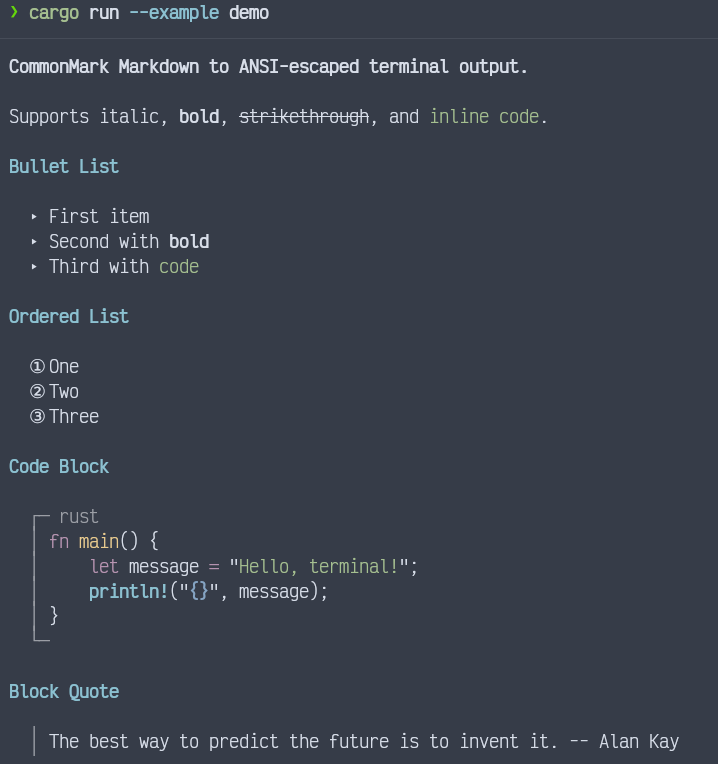
- Headings (h1: bold yellow, h2: bold cyan, h3+: bold white)
- Bold, italic, strikethrough, inline code
- Bullet lists (triangle markers) and ordered lists (circled numbers)
- Code blocks with optional language headers (syntax-highlighted via syntect)
- Block quotes (vertical bar prefix)
- Thematic breaks (horizontal rules)
- Links (underlined blue with dimmed URL)
- Images (bracketed alt text with URL)
- Task list items (checkbox markers)
- Tables with box-drawing borders
Add marcli to your Cargo.toml:
[dependencies]
marcli = "0.1"// Basic rendering
let output = marcli::render("# Hello\n\nSome **bold** text.", &Default::default());
println!("{}", output);
// With CRLF line endings (e.g. for xterm.js)
let opts = marcli::RenderOptions {
newline: "\r\n".into(),
..Default::default()
};
let output = marcli::render(markdown, &opts);Fenced code blocks tagged with a language identifier are automatically syntax-highlighted using ANSI escape sequences via syntect's built-in syntax definitions. No extra configuration is needed.
If no matching syntax definition is found for the specified language, the block renders without highlighting.
Syntax highlighting can be disabled per-theme:
let mut theme = marcli::Theme::default();
theme.syntax_highlight = false;
let opts = marcli::RenderOptions { theme, ..Default::default() };All visual aspects of the output are controlled by the Theme struct.
A theme can be loaded from a TOML file:
let theme = marcli::Theme::load(".marcli.toml").unwrap_or_default();
let opts = marcli::RenderOptions { theme, ..Default::default() };
let output = marcli::render(markdown, &opts);newline-- the line ending to use (default:"\n"). Pass"\r\n"for xterm.js or other terminals that require CRLF.theme-- aThemestruct controlling all visual styles (default:Theme::default()).escape_sequences-- whenfalse, strips all ANSI escape sequences from the output (default:true).
Created as part of the Oeditus code quality tooling ecosystem.
MIT