


Synfig Studio is a free and open-source 2D animation software designed for creating high-quality animations with fewer keyframes. Using vector and bitmap artwork, Synfig Studio allows artists to produce smooth, film-quality animations using advanced tweening and bone rigging systems. It eliminates the need to draw every single frame, saving time and effort while delivering professional results.
Whether you're an indie animator, educator, or studio professional, Synfig Studio offers a powerful and flexible toolset for bringing your creative visions to life. It supports layers, filters, gradients, and real-time preview, making it a versatile choice for a wide range of animation projects.
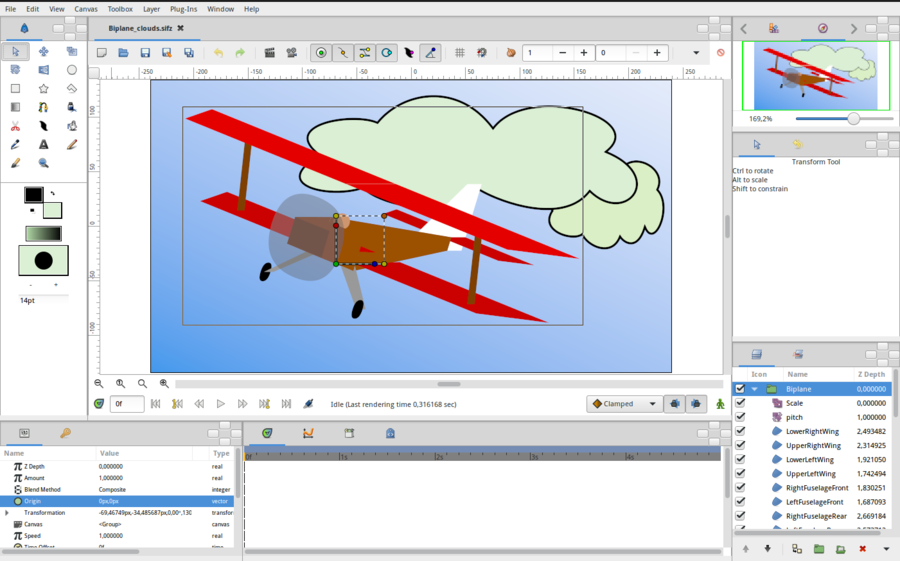
| Feature | Description |
|---|---|
| 🎨 Vector Tweening | Create smooth animations with automatic in-between frames. |
| 🦴 Bone Rigging System | Manipulate characters easily with a powerful bone structure. |
| 🧩 Layers & Filters | Use multiple layers and visual effects for complex scenes. |
| ⏱ Time-Saving Workflow | Reduce manual drawing with automated interpolation. |
| 🆓 Free & Open Source | No cost, no subscriptions—fully open-source. |
| 🌍 Cross-Platform | Runs on Windows, macOS, and Linux. |
| 🎞 High-Quality Output | Export in multiple formats including MP4, GIF, and image sequences. |
| 👨💻 Community-Driven | Active community support and regular updates. |
- Improved performance and stability.
- Enhanced bone system for better character animation.
- New brush and drawing tools.
- Better Linux and macOS support.
- Updated user interface for smoother workflow.
- Indie Animators – Create cartoons and short films without a budget.
- Game Developers – Design 2D assets and animated sprites.
- Educators – Teach animation in classrooms with free tools.
- Content Creators – Produce YouTube videos and explainer animations.
- Download Synfig Studio from the official website.
- Install and launch the application.
- Create a new project and import assets.
- Use layers and bones to build your animation.
- Export your final animation in your preferred format.
| Parameter | Requirement |
|---|---|
| OS | Windows 10/11, macOS 10.14+, Linux |
| Processor | 2 GHz dual-core or higher |
| RAM | 4 GB (8 GB recommended) |
| Storage | 500 MB free space |
| GPU | OpenGL 3.3 compatible |
| Display | 1280x768 minimum resolution |
synfig studio • synfig software • 2d animation software • free animation software • vector animation • bone rigging synfig • synfig studio download • synfig tutorial • open source animation • synfig alternative • 2d animation tool • synfig studio free • synfig studio windows • synfig studio mac • synfig studio linux • synfig animation • synfig studio pro • synfig studio software • synfig studio app