A searchable historical archive of U.S. presidential assassination attempts, plots, and security incidents, built for researchers, students, journalists, and history readers.
It uses React 19, TypeScript, TanStack Start, TanStack Router, Vite, Tailwind CSS, Leaflet, Recharts, and an OpenAI-backed chat assistant to turn a structured dataset into an editorial web experience.
Use it to filter events, compare eras, inspect locations on a map, and read confidence-labeled records from 1835 to the present.
This is a dataset-driven web app with SEO-friendly routes, an interactive timeline, charts, person profiles, and AI-assisted historical Q&A.
- Production: https://assassination.aisuretech.com
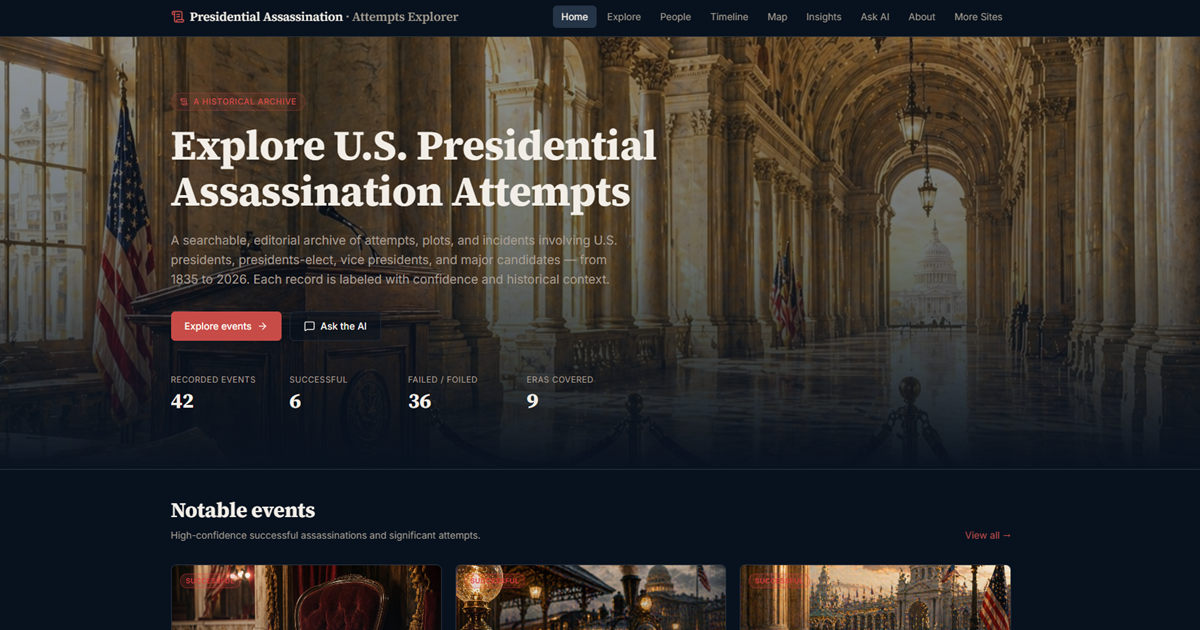
- Uses high-intent search terms such as U.S. presidential history, assassination attempts, political violence, and historical archive.
- Ships with indexable routes for events, timeline, map, insights, people, FAQ, and AI chat.
- Includes structured metadata, canonical URLs, Open Graph tags, Twitter cards, and an XML sitemap for SEO.
- Combines a clearly scoped historical dataset with modern React, TanStack Start, and TypeScript tooling.
- Features
- Tech Stack
- Quick Start
- Project Structure
- Environment Variables
- Architecture
- Learning Modules
- Deployment
- SEO and Performance
- Screenshots
- Use Cases
- Roadmap
- Contributing
- FAQ
- Suggested GitHub Topics
- Links
- License
- Search a curated archive of presidential assassination attempts, plots, threats, and related incidents from 1835 to the present.
- Explore a chronological timeline that groups events by era and highlights outcome status.
- Browse an interactive map to see where incidents occurred and how they cluster geographically.
- Ask Dr. Claire Whitmore natural-language questions about the archive, comparisons, and historical context.
- Build on a TanStack Start route-based architecture with shared data helpers in
src/lib. - Filter the archive by role, outcome, method, era, confidence, and keyword search using URL-backed state.
- Stream AI chat responses from a single server endpoint at
POST /api/chatwith OpenAI. - Benefit from SEO metadata, JSON-LD on key pages, and a sitemap-friendly information architecture.
- Frontend: TanStack Start, React 19, TypeScript, TanStack Router, Tailwind CSS v4, Lucide React, Recharts, Leaflet, React Markdown.
- Runtime/Platform: Bun, Vite, Nitro, Vercel-ready deployment, with Cloudflare-compatible server entry support.
- Analytics and Monitoring: Google Analytics 4 via
gtag, plus server-side error logging for the AI route. - Testing: ESLint, TypeScript, and production build validation with
bun run build. - PWA: Web app manifest in
public/manifest.jsonwith standalone app icons and install metadata.
- Bun 1.x
- An OpenAI API key for the chat endpoint if you want to use
/chatlocally
bun install
bun run dev
Open the local Vite URL shown in the terminal, usually http://localhost:5173
bun run build
bun run lint.
|-- docs/
| |-- assets-checklist.md
| |-- claire.md
| |-- image-generation-checklist.md
| |-- README.md
|-- public/
| |-- manifest.json
| |-- og-image.png
| |-- screenshots/
|-- src/
| |-- components/
| | |-- site/
| | |-- ui/
| |-- data/
| |-- lib/
| |-- routes/
| |-- types/
|-- bun.lockb
|-- package.json
|-- tsconfig.json
|-- vercel.json
|-- vite.config.ts
|-- wrangler.jsonc
Create a .env file in the project root:
OPENAI_API_KEY=your_openai_api_key
OPENAI_MODEL=gpt-4o-miniThe app is organized as a route-first TanStack Start site with shared dataset helpers, static public assets, and one streaming AI endpoint.
- Route modules in
src/routesrender the homepage, explorer, timeline, map, insights, people pages, and legal pages. - Shared data loaders in
src/libread the JSON datasets and expose filtering, lookup, statistics, and AI summary helpers. - The Explore, Timeline, Map, and Insights pages present the archive in different formats while reusing the same records.
- The
/api/chatserver route validates messages, injects dataset context, and streams OpenAI completions as SSE. - SEO metadata, canonical URLs, OG images, JSON-LD, and sitemap routes make the site easy to share and index.
Browser
  -> TanStack Start route
  -> shared dataset helpers in src/lib
  -> event/person JSON data in src/data
  -> UI components in src/components
  -> optional POST /api/chat
  -> OpenAI streaming response
- Event discovery and keyword search across a historically scoped archive.
- Timeline reading and era-based pattern recognition.
- Geographic analysis with map-based incident placement.
- AI-assisted historical Q&A grounded in curated dataset summaries.
Recommended deployment target: Vercel
bun install
NITRO_PRESET=vercel bun run build
vercel deploy
Production URL:
- Route-level titles, descriptions, canonical links, and Open Graph tags support search and social sharing.
- The root layout includes Twitter metadata, structured social previews, and Google Analytics 4.
- An XML sitemap and sitemap page help search engines discover the archive.
- Dataset-driven pages keep content readable, indexable, and easy to crawl.
- The map view is lazy-loaded so the main experience stays lighter on first paint.
- Static assets in
public/keep images and icons fast to serve and cache.
| Feature | Preview |
|---|---|
| Home hero |  |
| Dr. Claire Whitmore |  |
- Academic research into U.S. presidential security and political violence.
- Classroom teaching for modern American history, media studies, and civic education.
- Journalistic background research for timelines, context, and source cross-checking.
- Product and UX reference for route-based archives, maps, charts, and AI-assisted search.
- Expand source annotations for lower-confidence entries.
- Add export options for filtered event lists.
- Add side-by-side comparison tools for two events or people.
- Add richer context panels for map, timeline, and people pages.
Contributions are welcome.
- Fork the repository
- Create a feature branch: git checkout -b feature/your-feature
- Commit your changes
- Push to your branch
- Open a pull request
It is a data-driven historical archive of U.S. presidential assassination attempts, plots, threats, and related security incidents. The site is designed for research, teaching, and public reference, not entertainment.
No. It is a curated dataset with documented coverage from 1835 to the present, but it is not a claim to capture every possible rumor, allegation, or obscure historical mention.
No for browsing, search, and reading the archive. Yes if you want the /chat endpoint to work locally, because the AI assistant depends on OPENAI_API_KEY.
Not really. The app has one custom application endpoint at POST /api/chat, plus sitemap generation. The rest of the site is route-driven front end and shared data helpers.
Add these in repository settings for discoverability:
- us-history
- historical-archive
- tanstack-start
- react
- typescript
- vite
- leaflet
- openai
- GitHub Organization: https://github.com/aisuretech/
- Website: https://assassination.aisuretech.com
- Contact: info@AISureTech.com
Proprietary