A comprehensive tool for analyzing the quality of NLP datasets using Great Expectations and advanced diversity metrics. NLPBench provides detailed quality assessments, diversity measurements, beautiful reports, and actionable recommendations for improving your datasets.
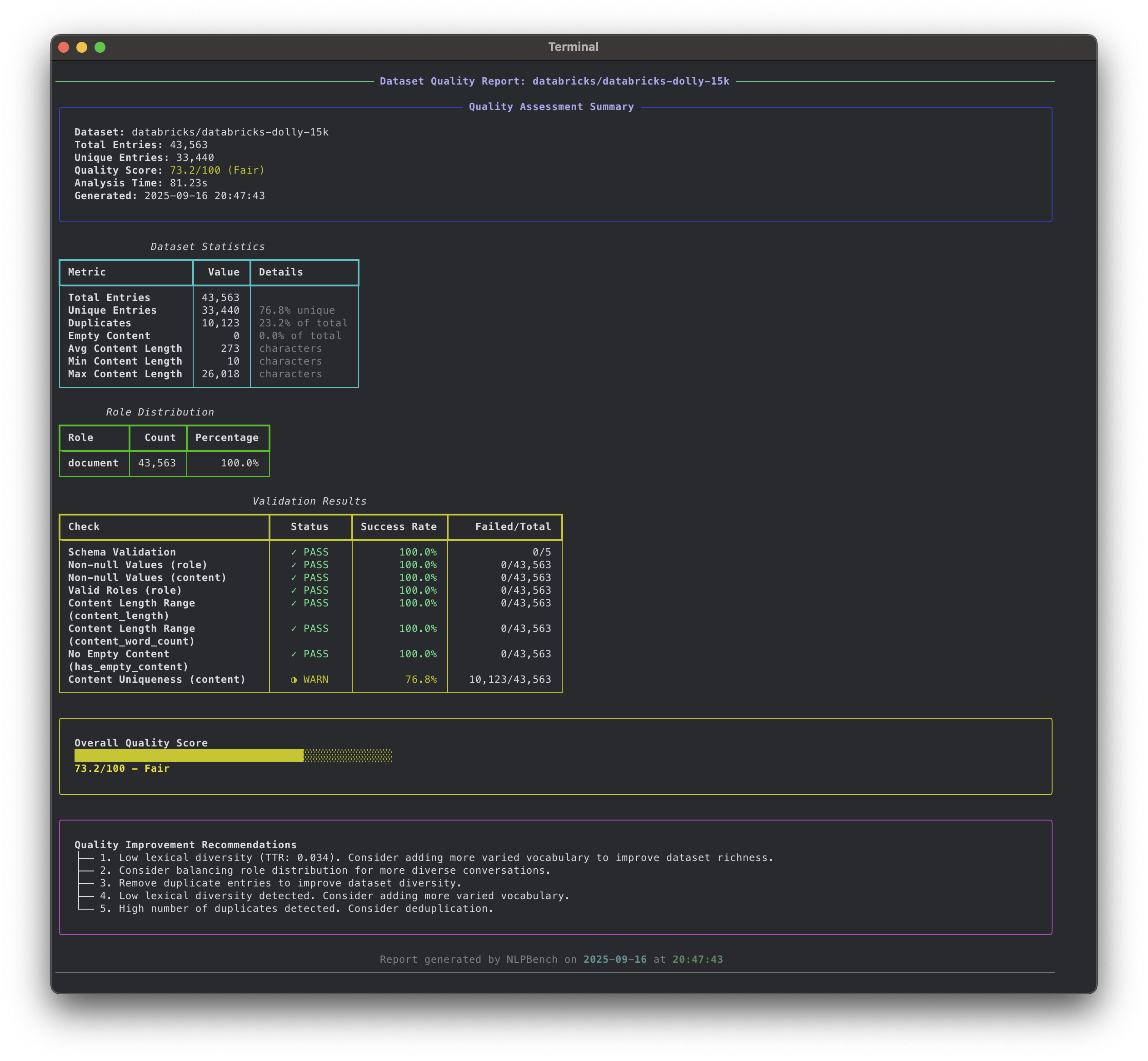
- Comprehensive Quality Analysis: Validates schema, content length, role consistency, duplicates, and more
- Advanced Diversity Metrics: Measures lexical, semantic, syntactic, and topic diversity with tiered analysis
- Great Expectations Integration: Robust data validation framework with custom NLP expectations
- Multiple Dataset Formats: Supports conversations, instruction-following, Q&A, and other common formats
- Rich Console Output: Beautiful CLI interface with progress bars and colored output
- Multiple Report Formats: Generate reports in console, JSON, or HTML format
- Configurable Validation Rules: Customize quality thresholds and validation parameters
- Hugging Face Integration: Direct integration with the Hugging Face Hub
- Optional Enhanced Metrics: Advanced NLP analysis with sentence transformers, spaCy, and topic modeling
- Clone the repository:
git clone <repository-url>
cd nlpbench- Install with uv:
# Install dependencies
uv sync

# Install with enhanced diversity metrics (optional)
uv sync --extra diversity

# For development (includes dev dependencies)
uv sync --group dev# Clone and install
git clone <repository-url>
cd nlpbench
pip install -e .
# Install with enhanced diversity metrics
pip install -e ".[diversity]"
# Or install from PyPI (when available)
pip install nlpbench
pip install "nlpbench[diversity]" # with enhanced metricsAnalyze a dataset with default settings:
nlpbench --hf-repo databricks/databricks-dolly-15knlpbench --hf-repo microsoft/DialoGPT-medium --output-format html --output-file report.html# Create a default config file
nlpbench init-config
# Use custom configuration
nlpbench --hf-repo org/dataset --config .nlpbench.jsonAnalyze a Hugging Face dataset for quality issues.
nlpbench analyze --hf-repo REPO_ID [OPTIONS]Options:
--hf-repo: Hugging Face dataset repository (required)--config: Path to configuration file--config-name: Dataset configuration name--split: Dataset split to analyze (default: train)--output-format: Output format (console/json/html/all)--output-file: Output file path--cache-dir: Cache directory for datasets--token: Hugging Face authentication token
Quickly inspect a dataset without running full analysis:
nlpbench inspect --hf-repo REPO_ID [OPTIONS]# Create default configuration
nlpbench init-config
# Show example configuration
nlpbench show-configNLPBench uses a JSON configuration file to customize validation rules. Create a default configuration:
nlpbench init-configExample configuration:
{
  "min_content_length": 10,
  "max_content_length": 50000,
  "allowed_roles": ["user", "assistant", "system"],
  "duplicate_threshold": 0.05,
  "empty_content_threshold": 0.01,
  "quality_thresholds": {
    "excellent": 95.0,
    "good": 85.0,
    "fair": 70.0,
    "poor": 50.0
  }
}NLPBench automatically detects and handles various dataset formats:
-
Conversations Format:
{"conversations": [{"role": "user", "content": "..."}, {"role": "assistant", "content": "..."}]} -
Messages Format:
{"messages": [{"role": "user", "content": "..."}, {"role": "assistant", "content": "..."}]} -
Instruction-Following Format:
{"instruction": "...", "input": "...", "output": "..."} -
Q&A Format:
{"question": "...", "answer": "..."} -
Prompt-Response Format:
{"prompt": "...", "response": "..."}
NLPBench evaluates datasets across multiple dimensions:
- Required columns presence
- Data types consistency
- Non-null value validation
- Content length distribution
- Empty content detection
- Role consistency validation
- Duplicate detection
- Uniqueness validation
- Role distribution analysis
- Lexical Diversity: Type-Token Ratio (TTR), vocabulary richness
- Role Distribution: Balance across conversation roles
- Length Variation: Content length diversity and coefficient of variation
- Character Diversity: Character set distribution and entropy
- Semantic Diversity: Embedding-based clustering and similarity analysis
- Syntactic Diversity: Part-of-speech patterns and dependency structures
- Topic Diversity: LDA-based topic modeling and distribution
- Advanced Lexical: MTLD, MATTR, and readability scores
- Weighted quality score (0-100)
- Diversity score (0-100)
- Quality level classification
- Actionable recommendations for improvement
- Python 3.8+
- datasets >= 2.14.0
- great-expectations >= 0.18.0
- pydantic >= 2.0.0
- click >= 8.0.0
- rich >= 13.0.0
- tqdm >= 4.65.0
- pandas >= 2.0.0
- numpy >= 1.21.0
- sentence-transformers >= 2.2.0 (semantic analysis)
- torch >= 1.9.0 (neural embeddings)
- scikit-learn >= 1.0.0 (clustering and metrics)
- nltk >= 3.7 (advanced lexical analysis)
- textstat >= 0.7.0 (readability metrics)
- spacy >= 3.4.0 (syntactic analysis)
- gensim >= 4.2.0 (topic modeling)
- umap-learn >= 0.5.0 (dimensionality reduction)
# Install with development dependencies
uv sync --group dev

# Or using make
make dev-setup# Using uv
uv run pytest
# With coverage
uv run pytest --cov=src --cov-report=html
# Using make
make test
make test-cov# Linting
uv run ruff check .
make lint
# Auto-fix linting issues
uv run ruff check --fix .
make lint-fix
# Formatting
uv run ruff format .
make format
# Type checking
uv run mypy src/
make type-check
# Run all checks
make checkmake help # Show available commands
make install # Install dependencies
make install-dev # Install with dev dependencies
make test # Run tests
make test-cov # Run tests with coverage
make lint # Run linting
make format # Format code
make check # Run all quality checks
make clean # Clean temporary files
make build # Build the package
make demo # Run demo analysis
make demo-html # Generate HTML demo report- Fork the repository
- Create a feature branch
- Add tests for new functionality
- Run the test suite
- Submit a pull request
This project is licensed under the MIT License.