Self-contained, pretty and versatile .tmux.conf configuration file.

black:   '#000000'
red:     '#CC3E28'
green:   '#216609'
yellow:  '#B58900'
blue:    '#1E6FCC'
magenta: '#5C21A5'
cyan:    '#158C86'
white:   '#AAAAAA'
black:   '#555555'
red:     '#CC3E28'
green:   '#216609'
yellow:  '#B58900'
blue:    '#1E6FCC'
magenta: '#5C21A5'
cyan:    '#158C86'
white:   '#AAAAAA'
Requirements:
- tmux
>= 3.0running inside Linux - outside of tmux,
$TERMmust be set toxterm-256color
- Clone this repository
- Copy
.tmux.confto your home directory - Run
tmux source-file ~/.tmux.conf
Installing in ~:
$ cd
$ git clone https://github.com/ayanul/tmux.git
$ cp .tmux/.tmux.conf ~/.tmux.conf
// or create link
$ ln -s -f .tmux/.tmux.conf ~/.tmux.conf
If you're a Vim user, setting the $EDITOR environment variable to vim will
enable and further customize the vi-style key bindings (see tmux manual).
If you're new to tmux, I recommend you to read Welcome to tmux!.
tmux may be controlled from an attached client by using a key combination of a
prefix key, followed by a command key. This configuration uses C-a as a
secondary prefix while keeping C-b as the default prefix. In the following
list of key bindings:
<prefix>means you have to either hit Ctrl + a or Ctrl + b<prefix> cmeans you have to hit Ctrl + a or Ctrl + b followed by c<prefix> C-cmeans you have to hit Ctrl + a or Ctrl + b followed by Ctrl + c
The following custom configurations are used:
| Key Binding | Command | Action |
|---|---|---|
<prefix> + a |
send-prefix | Prefix key |
<prefix> + e |
setw synchronize-panes on | Synchronize panes on |
<prefix> + E |
setw synchronize-panes off | Synchronize panes off |
<prefix> + R |
refresh-client | Refresh client |
<prefix> + r |
source-file ~/.tmux.conf | Reloaded tmux config. |
<prefix> + q |
confirm-before kill-pane | Kill pane and window confirmation |
<prefix> + Q |
confirm-before kill-window | Kill pane and window confirmation |
<prefix> + C-q |
confirm-before kill-session | Kill session confirmation |
<prefix> + M-t |
new-session | New session |
<prefix> + t |
new-window | New window |
<prefix> + c,C-t |
New window with and split horizontally | |
<prefix> + _ |
split-window -l 20 -c "#{pane_current_path}" node | Open panel with NodeJS |
<prefix> + g,C-g,_ |
split-window | Splits the current pane vertically |
<prefix> + h,C-h, |
split-window -h | |
<prefix> + n,C-n |
next-window | Select the next window. |
<prefix> + C-p |
previous-window | Select the previous window (by default) |
<prefix> + C-a |
last-window | Select the last window |
<prefix> + C-O |
rotate-window | Rotate window |
<prefix> + space |
select-pane -t:.+ | Select pane by mouse click |
Ctrl + h,j,k,l |
tmux select-pane -L,U,L,R |
Let you navigate panes ala Vim |
<prefix> + H,J,K,L |
resize-pane -L,U,L,R 50 |
Resize the pane down by 50 |
<prefix> + up,down,leftright |
resize-pane -L,U,L,R 5 |
Resize the pane down by 5 |
<prefix> + M-o |
display-panes | display a visible indicator of each pane shown by target-client. |
<prefix> + C-l |
Clear console | |
<prefix> + b |
list-buffers | List buffers |
<prefix> + P |
choose-buffer | Lets you choose the paste-buffer to paste from |
<prefix> + x |
delete-buffer | Delete buffer |
<prefix> + ? |
List key bindings (by default) | |
Additionally, copy-mode-vi matches my own Vim configuration
Bindings for copy-mode-vi:
- space begins selection / visual mode
- H jumps to the start of line
- L jumps to the end of line
- enter copies the selection to the top paste-buffer
- Escape cancels the current operation
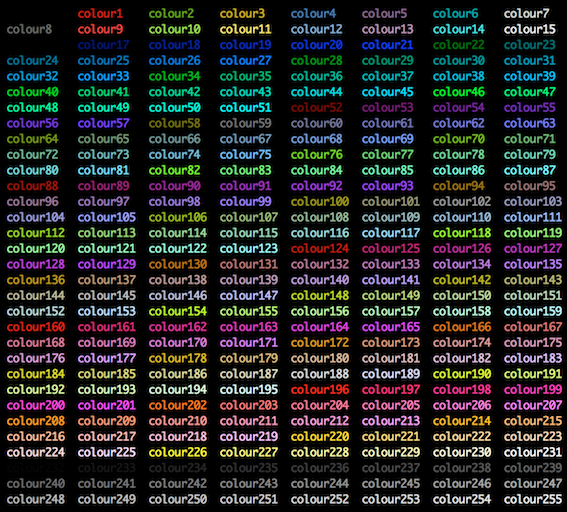
color_orange="colour166"
color_purple="colour135"
color_green="colour076"
color_blue="colour39"
color_yellow="colour220"
color_red="colour160"
color_black="colour234"
color_white="colour253"
color_gray="colour253"
The top panel is configured here
set -g status-left "$wg_session"
set -g status-right "#{prefix_highlight} $wg_is_keys_off $wg_is_zoomed #{sysstat_cpu} | #{sysstat_mem} | #{sysstat_swap} | #{sysstat_loadavg}"
prefix + I
- Installs new plugins from GitHub or any other git repository
- Refreshes TMUX environment
prefix + U
- updates plugin(s)
prefix + alt + u
- remove/uninstall plugins not on the plugin list
| Plugin | Description | Link |
|---|---|---|
| tmux-plugins/tpm | Tmux Plugin Manager | https://github.com/tmux-plugins/tpm |
| tmux-plugins/tmux-prefix-highlight | Highlight Tmux prefix key | https://github.com/tmux-plugins/tmux-prefix-highlight |
| tmux-plugins/tmux-open | Open highlighted file or url | https://github.com/tmux-plugins/tmux-open |
| samoshkin/tmux-plugin-sysstat | Show system stats in Tmux status bar | https://github.com/samoshkin/tmux-plugin-sysstat |
| tmux-plugins/tmux-copycat | Enhance Tmux search | https://github.com/tmux-plugins/tmux-copycat |
| tmux-plugins/tmux-yank | Copy to system clipboard | https://github.com/tmux-plugins/tmux-yank |
| tmux-plugins/tmux-resurrect | Save and restore Tmux sessions | https://github.com/tmux-plugins/tmux-resurrect |
| tmux-plugins/tmux-continuum | Continuous saving of Tmux environment | https://github.com/tmux-plugins/tmux-continuum |
| tmux-plugins/tmux-sensible | Basic Tmux settings | https://github.com/tmux-plugins/tmux-sensible |
You can output the stream to different panels (original post)
node app.js 1>/dev/pts/32 2>/dev/pts/37
1 - info output
2 - error output
