Setup Guide
You can download the latest jar on BukkitDev or here on GitHub. Just place the jar in your plugins folder and restart the server.
This plugin sends statistical information to mcstats.org to create graphs like the one displayed below. To disable this, change the line opt-out: false to opt-out: true in the config.yml inside the PluginMetrics folder in your plugins folder.

There is an optional resource pack for this plugin which makes the GUI look a bit better. To enable the resource pack, you'll have to change the line useRetexturedBarriers: false to useRetexturedBarriers: true in the ThreeSquareMeals config.
| With | Without |
|---|---|
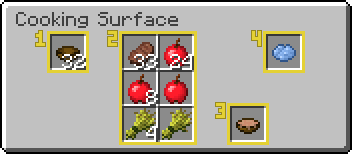 |
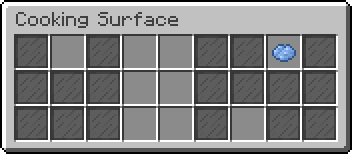 |
useRetexturedBarriers: true |
useRetexturedBarriers: false |
Details about the plugin configuration are found on the Configuration page.
- Setup Guide
- Commands & Permissions
- Configuration
- Changelog
- Localization
- Resource Pack