Skip to content

When viewing graph previews, clicking Go or Refresh prevents calendars from working #3505

Closed

Description

@yingbaiibm

To Reproduce

Steps to reproduce the behavior:

  1. Go to Graph - preview page

  2. Choose calendar and click refresh, calendar can work well -- ok

  3. Choose calendar and click go, after that calendar can not work well, no response. '

Desktop (please complete the following information)

  • OS: rhel 7 x64

  • Browser FF

  • Version Cacti 1.2.11

Activity

  1. yingbaiibm commented on Apr 26, 2020

    @yingbaiibm
    Author

    Screen Shot 2020-04-26 at 10 40 40 AM

    Screen Shot 2020-04-26 at 10 40 59 AM

    Screen Shot 2020-04-26 at 10 41 34 AM

  2. added a commit that references this issue on Apr 26, 2020
  3. added and removed
    unverifiedSome days we don't have a clue
    on Apr 26, 2020
  4. added this to the 1.2.12 milestone on Apr 26, 2020
  5. changed the title [-]Calendar can not work after click go in graph page [/-] [+]When viewing graph previews, clicking Go or Refresh prevents calendars from working[/+] on May 3, 2020
  6. ddb4github commented on May 14, 2020

    @ddb4github
    Contributor

    Until Cacti 1.2.4, datepicker box can be auto-hide when click anywhere on page.
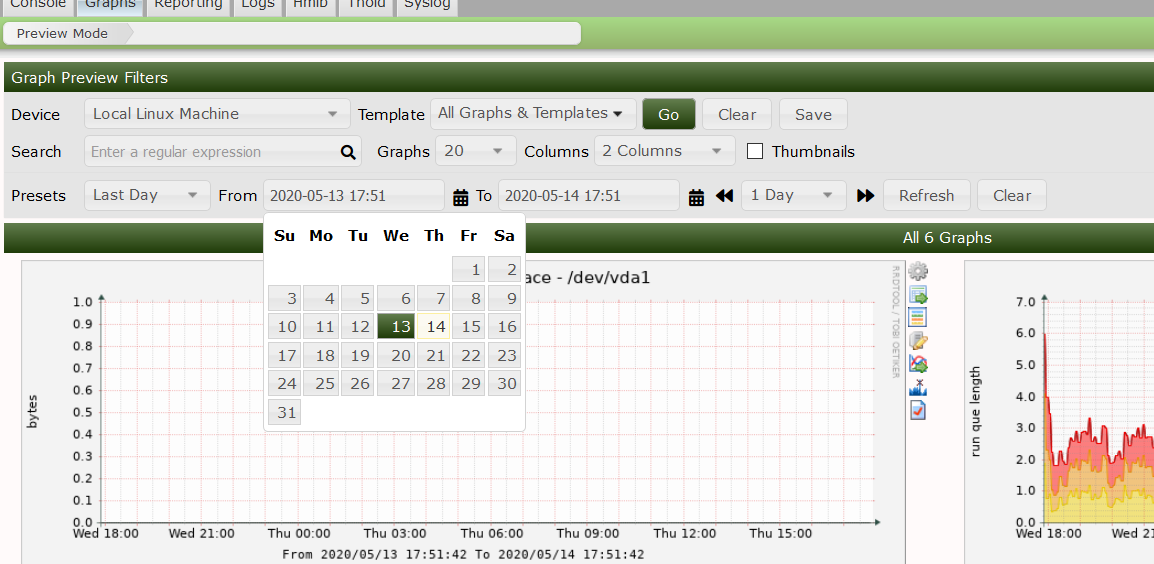
    The latest 1.2.x branch, datepicker box can not be easily hide.
    image

    Reproduce Steps

    1. Click any date input field, popup datepicker
    2. Refresh page by ajax mode, exception "Click 'Refresh' Button". For example
      • No touching, waiting for auto-refresh (From cacti 1.2.4 - 1.2.13)
      • Select Device, Graphs, .... field fields (From cacti 1.2.10 - 1.2.13)
      • Click Go, Clear(both two 'Clear') button (From cacti 1.2.10 - 1.2.13)
    3. See error, datepicker lost header/bottom as above screenshot.

    Workaround

    Until Cacti 1.2.4( not test 1.2.5 - 1.2.9)

    • Click anywhere on page, datepicker hide, issue workaround

    Since Cacti 1.2.10, even 1.2.x(today)

    1. Click date field or 'cal' icon again, to show a complete datepicker box.
    2. Press esc key, or click 'cal' icon again, or click Refresh button
    3. datepicker hide, issue workaround
  7. added a commit that references this issue on May 14, 2020
  8. TheWitness commented on May 14, 2020

    @TheWitness
    Member

    Okay, I'm made additional changes. The reason that the document click was removed was due to the nature of the number of elements causing slow page response. We need to limit the number of elements that receive the click event.

  9. locked and limited conversation to collaborators on Aug 13, 2020
Sign up for free to join this conversation on GitHub. Already have an account? Sign in to comment

Metadata

Metadata

Assignees

No one assigned

    Labels

    bugUndesired behaviourconfirmedBug is confirm by dev teamresolvedA fixed issue

    Type

    No type

    Projects

    No projects

      Milestone

      Relationships

      None yet

      Development

      No branches or pull requests

      Issue actions