Official implementation of Split, Merge, and Refine: Fitting Tight Bounding Boxes via Over-Segmentation and Iterative Search, 3DV 2024.
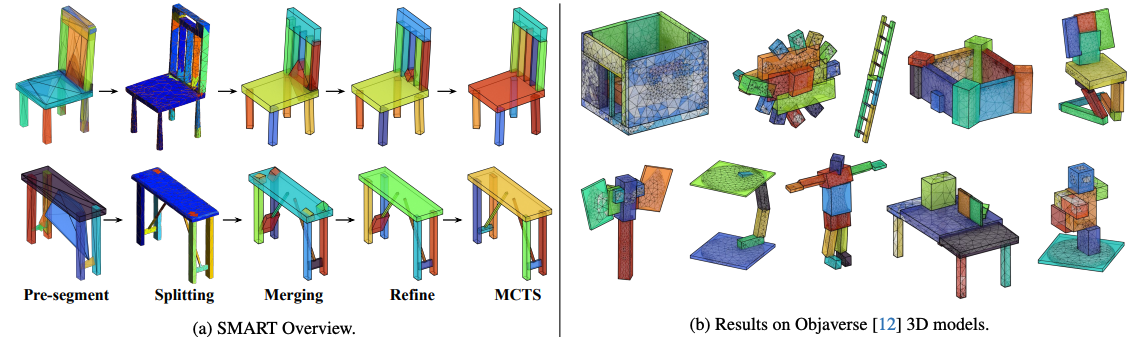
Paper | arXiv | Quickstart | Pipeline | Package Docs | All Docs
Chanhyeok Park and Minhyuk Sung
SMART fits a compact set of tight 3D bounding boxes to a mesh without human supervision. The package uses a Python CLI/API with a native C++ SMART core and the fixed vendored Manifold backend.
- Paper-style pipeline: normalize mesh, tetrahedralize, pre-segment, merge, refine, run MCTS, render, and evaluate.
- Native C++ backend for the SMART core through
smart._cppandsmart-cpp-native. - Fixed vendored Manifold source is kept unchanged for exact geometry operations.
- Python API and CLI for reproducible experiments and package use.
- ShapeNet airplane/chair/table reproduction configs are included.
Install the package:
python -m pip install "smart-bbox[pipeline]"Install from source:
git clone https://github.com/chpark1111/SMART.git
cd SMART
python -m pip install -e ".[pipeline]"
Verify the install:
smart --config configs/smoke_5.yaml doctor
smart-cpp-native --help
For the complete install and reproduction path, see
docs/QUICKSTART.md.
Main user docs:
- Quickstart: install, verify, prepare tools/data, and run a small reproduction.
- Pipeline: stage order, config control, rendering, failure handling, and parameter overrides.
- Python Package: CLI, Python API, native executable, packaged configs, and library usage.
- Tetra Failure Playbook: why Mesh2Tet/fTetWild fails, how SMART records failures, and which repair knobs to try.
- Repository Structure: public release layout versus ignored local data, runs, external tools, and experiments.
Maintainer and research docs:
- Release Guide: local release preflight, wheel checks, tags, and PyPI publishing.
- Release Notes 0.1.0: current release scope and verification notes.
- Research Plan: RL/deep learning priors, MCTS upgrade, memory/table-based search, and promotion rules.
If this checkout already has local ShapeNet meshes under data/, create a
3-per-category example set and run it:
bash examples/prepare_sample_shapes.sh
bash examples/run_example_3x3.sh
The example meshes are copied to examples/sample_shapes/, which is ignored by
git and excluded from packages.
SMART expects ShapeNet-style mesh folders:
data/shapenet_airplane/<model_id>/model.obj
data/shapenet_chair/<model_id>/model.obj
data/shapenet_table/<model_id>/model.obj
Paper category synsets:
airplane  02691156
chair     03001627
table     04379243
Prepare zipped category archives:
python scripts/prepare_shapenet_samples.py \
  --archive-dir /path/to/shapenet_zips \
  --output-root data/expanded \
  --categories airplane chair table \
  --limit 100000 \
  --normalize preserve
SMART writes normalized meshes under runs/<profile>/normalized/; it does not
modify the downloaded meshes in data/.
Full reproduction from raw meshes requires Mesh2Tet tools, CoACD, and the fixed Manifold runtime. In a source checkout:
smart --config configs/smoke_5.yaml build-toolsAfter installing from a wheel, run the same setup in a writable project/cache directory:
export SMART_TOOLS_ROOT="$PWD/.smart-tools"
smart --config smoke_5.yaml build-tools
pip install installs the SMART Python package and the bundled native SMART
C++ extension/executable from wheels. It intentionally does not clone and
compile Mesh2Tet/fTetWild/ManifoldPlus during installation. Those external
builds are large, platform-specific, and can require local compiler/system
packages, so SMART exposes them as an explicit smart build-tools step
instead. That one command prepares ManifoldPlus, fTetWild, the CoACD Python CLI
runtime, the fixed Manifold runtime, and the local smart._cpp/
smart-cpp-native build for a source checkout.
It is idempotent: if CoACD already probes successfully, SMART skips the slow
editable install; if source editable installation fails, SMART tries the PyPI
CoACD runtime and only fails the command when no working coacd CLI is found.
Use smart --config configs/smoke_5.yaml build-cpp only when you need to
rebuild the SMART C++ extension/executable without rebuilding external tools.
Prebuilt binaries can also be supplied:
export SMART_MANIFOLDPLUS_BIN=/path/to/ManifoldPlus/build/manifold
export SMART_FTETWILD_BIN=/path/to/fTetWild/build/FloatTetwild_bin
export SMART_COACD_BIN=/path/to/coacd
export SMART_MANIFOLD_PYTHON=/path/to/smart/vendor/manifold/build/bindings/pythonMesh2Tet can fail on noisy ShapeNet meshes because the input OBJ may be non-watertight, self-intersecting, degenerate, or split into awkward components. SMART handles this per mesh, not as a fatal dataset error:
- logs each ManifoldPlus/fTetWild attempt under
runs/<profile>/logs/tetra/; - retries with finer settings, coarser settings,
--coarsen, and robust winding number settings; - validates that
tetra.mshandtetra.msh__sf.objexist and are usable; - records failed attempts in the tetra manifest, then skips downstream stages for that mesh while continuing the rest of the dataset.
Before tetrahedralization, SMART runs conservative mesh cleanup. The tetra stage also classifies failures and queues targeted repair retries automatically:
| Detected failure | Likely cause | Automatic SMART response |
|---|---|---|
surface is not watertight |
holes or open mesh boundaries | retry with a temporary fill_holes=true repaired input |
| fTetWild/ManifoldPlus timeout or crash | self-intersection, very thin parts, degenerate faces, non-manifold edges | retry with conservative repaired input and robust/coarser parameter attempts |
tetra element count below minimum |
tetra parameters too fine/coarse or damaged repair output | keep fine/coarse retry schedule and record the failed parameters |
| disconnected components | true multi-part shape or small detached fragments | only use keep_largest_component=true if explicitly enabled, because it can delete real parts |
Repaired inputs are written under runs/<profile>/logs/tetra/...; SMART never
mutates the original data/ OBJ. More destructive rescue, such as
keep_largest_component=true, is available in config but is off by default
because it can remove real disconnected shape parts. A failed mesh is therefore
usually recoverable by either enabling a stronger repair variant or
loosening/coarsening the tetra parameters, but SMART will not silently corrupt
the shape just to force success.
See docs/TETRA_FAILURE_PLAYBOOK.md for
debug commands and stronger repair options.
Smoke run through the Python pipeline:
smart --config configs/smoke_5.yaml run
smart --config configs/smoke_5.yaml summary
Run one mesh through the native C++ executable:
smart-cpp-native run-pipeline \
  --input data/shapenet_airplane/<model_id>/model.obj \
  --work_dir runs/native_one/<model_id> \
  --manifoldplus_bin external/mesh2tet/ManifoldPlus/build/manifold \
  --ftetwild_bin external/mesh2tet/fTetWild/build/FloatTetwild_bin \
  --coacd_bin external/CoACD/python/package/bin/coacd \
  --epsilon 0.002 \
  --edge_length 0.1 \
  --refine_max_step 2000 \
  --mcts_iter 3000
Run a native batch:
smart-cpp-native run-batch \
  --data_root data \
  --categories shapenet_airplane,shapenet_chair,shapenet_table \
  --limit_per_category 1 \
  --output_root runs/native_batch \
  --manifoldplus_bin external/mesh2tet/ManifoldPlus/build/manifold \
  --ftetwild_bin external/mesh2tet/fTetWild/build/FloatTetwild_bin \
  --coacd_bin external/CoACD/python/package/bin/coacd \
  --jobs auto \
  --reuse_existing \
  --resume_success

smart-cpp-native batch-summary \
  --manifest runs/native_batch/native_pipeline.jsonl
Evaluate bbox outputs with the paper metrics:
smart --config configs/smoke_5.yaml evaluateRender final boxes:
smart --config configs/smoke_5.yaml render \
  --set render.transparent=true \
  --set render.joint_mesh=false
The default renderer is the packaged software preview renderer so macOS does
not launch Blender during normal runs. The adapted paper Blender renderer is
still packaged under smart/legacy/renderer and can be enabled explicitly:
smart --config configs/smoke_5.yaml --set render.backend=blender renderimport smart
cfg = smart.load_config("configs/smoke_5.yaml")
records = smart.run(cfg)
print(records[-1])Package/API details are in docs/PYTHON_PACKAGE.md.
smart/        Python package, CLI/API, configs, pipeline wrappers
cpp/          Native C++ SMART core and smart-cpp-native executable
configs/      Source-checkout YAML profiles
examples/     Public shell examples; local sample meshes are ignored
scripts/      Supported data prep, release, and reproduction utilities
tests/        Package/native/release tests
docs/         User docs, paper assets, and release notes
experiments/  Ignored local research configs, scripts, assets, and tests
data/         Local ShapeNet data only; not packaged
runs/         Local outputs only; not packaged
external/     Downloaded Mesh2Tet/CoACD tools; not packaged
past_codes/   Original research archive; reference only
See docs/REPOSITORY_STRUCTURE.md for more
detail.
Recommended public configs:
configs/smoke_5.yaml: fast local smoke test.configs/example_3x3.yaml: 3 meshes per paper category from local example data.configs/demo.yaml: small demo profile.configs/paper_like.yaml: paper-style parameters.configs/expanded_full.yaml: larger local ShapeNet layout.
Experimental RL, pruning, and acceleration profiles are local-only under
experiments/configs/; they are ignored by git and excluded from release
packages.
Research directions for learned policy/value agents, MCTS priors,
local-minimum escape policies, and memory/table-based search are tracked in
docs/RESEARCH_PLAN.md.
pymesh.py is a compatibility shim, not the external PyMesh package. It keeps
legacy SMART code that imports pymesh working by forwarding to
smart.pymesh_compat. New code should import smart.pymesh_compat directly.
Build and validate release artifacts:
smart-release-preflight \
  --dist-dir /private/tmp/smart_release_check \
  --venv-dir /private/tmp/smart_release_venv \
  --recreate-venv \
  --run-asan-smoke
Release notes and publishing steps are in docs/RELEASE.md.
@inproceedings{park2024smart,
  title = {Split, Merge, and Refine: Fitting Tight Bounding Boxes via Over-Segmentation and Iterative Search},
  author = {Park, Chanhyeok and Sung, Minhyuk},
  booktitle = {International Conference on 3D Vision (3DV)},
  year = {2024}
}This project is released for non-commercial research under
CC BY-NC-SA 4.0. See LICENSE.