
Open-source management layer for AI coding agents. Overlord persists work as missions with structured objectives, routes execution to the right device, and records delivery summaries and the files each objective changed so every agent session builds on the last.
To sign up for a hosted account, visit Overlord | AI Agent Management
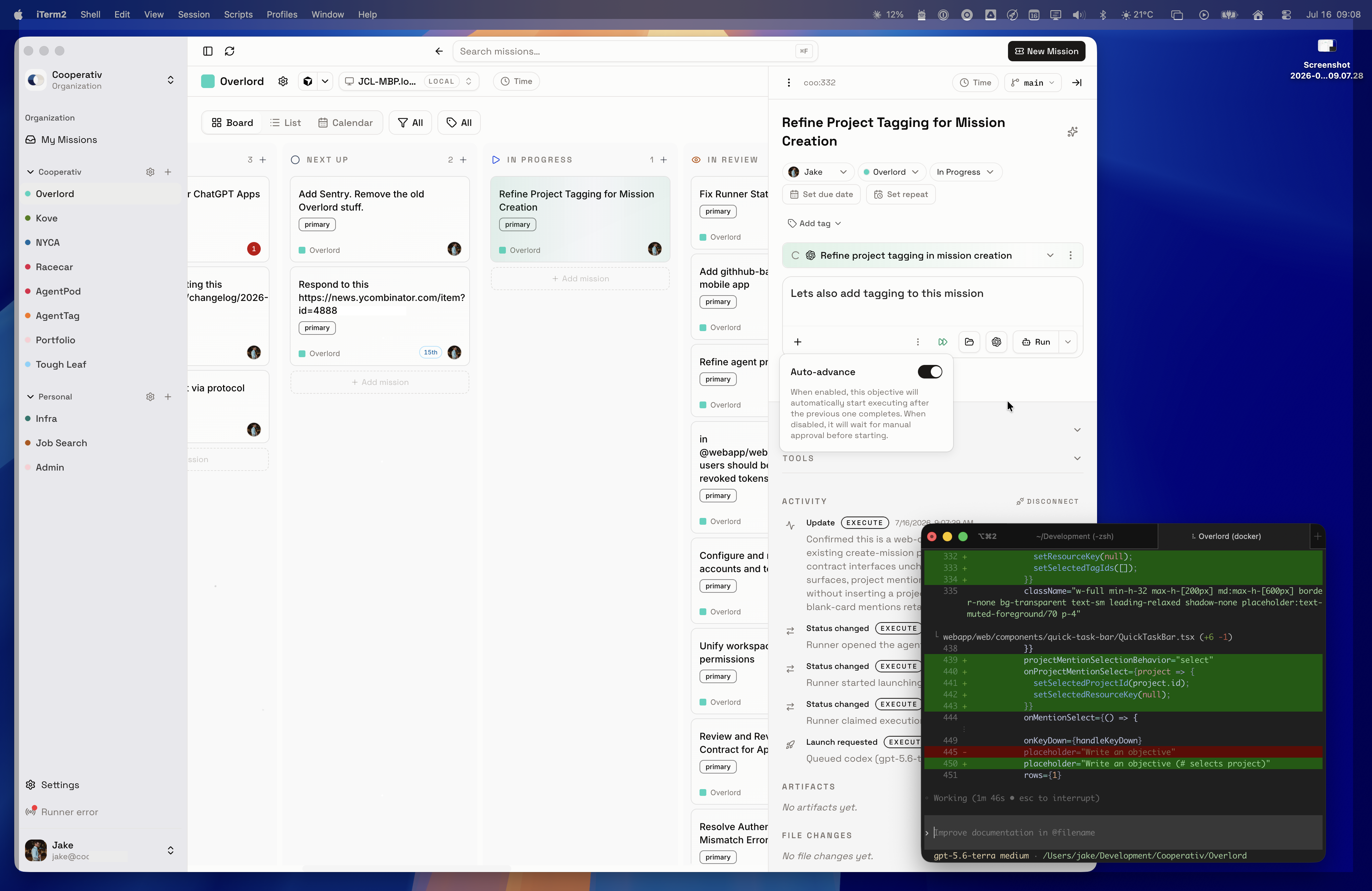
Overlord is a project management layer for AI coding agents (Claude Code, Codex, Cursor, OpenCode, Antigravity, and others). Instead of treating each agent session as a one-shot, throwaway interaction, Overlord persists work as missions with structured objectives, accumulates shared context as work progresses, and routes execution to the right device for the job — your laptop, a remote workstation, or a cloud runner.
The result is a Kanban-style workflow where humans plan and agents execute, with every session producing a delivery summary, artifacts, a changed-file list, and history that the next session inherits.
| Challenge | Overlord Solution |
|---|---|
| Users lose track of context between prompts | Structured Kanban workflow lets you thoroughly plan prompts and prompt sequences |
| Agent sessions lose context between runs | Missions persist objectives, history, attachments, and shared state in the backend |
| Hard to track what an agent actually changed and why | Connector hooks record the files each objective changed, and the agent's delivery summary explains the change by behavior |
| Plans, missions, and code drift apart | One mission holds many ordered objectives sharing the same context and artifacts |
| Agent lock-in: hard to switch between different agents between each turn | Assign any agent you want to each objective. |
You can use Overlord locally on MacOS for free by following these steps:
- Download the Desktop App
- Download the CLI:
npm install -g overlord-cli. - Open the desktop app and create an account with an email and password
- Create a project and link a repository
- Run
ovld setupin your terminal to configure and log into the CLI - run
ovld runner startto make sure the CLI automatically picks up queued work.
Now, you can create "missions" in the desktop app, select your preferred agent, and click "Run". In a few moments you will see the agent open in your terminal and begin working. Agents launched by Overlord use your existing Claude, Codex, Cursor, or PI provider configuration.
New to Overlord? Follow the Getting Started guide —
ten minutes from a fresh ovld install to your first delivered mission.
Forked Overlord and standing up your own instance? Start with
Setting Up a Custom Overlord Instance — the
ordered list of questions (which database, which schema groups, what goes in
overlord.toml) to answer before you configure anything. It doubles as the
interview script for an agent asked to set Overlord up for you.
Per-instance configuration (gitignored, like .env.local). Generate with
ovld init or copy overlord.toml.example. It sets the instance name,
backend_mode / backend_url, optional SQL Studio settings, and default
agent/model options.
Backend URL precedence (highest first): explicit shell export of
OVERLORD_BACKEND_URL (or OVERLORD_BACKEND_URL_DEV in dev) → overlord.toml
→ .env.local / .env.prod default → hardcoded fallback. Dev and production
use separate env vars (OVERLORD_BACKEND_URL_DEV vs OVERLORD_BACKEND_URL) so
yarn dev and Desktop can run side by side.
In-repo development uses .env.local and yarn ovld:dev; an installed
overlord-cli package never reads the dev channel. See
Getting Started and
Custom Instance Setup for full detail.
Key relationship: one objective maps to one agent session. A mission is home to one or more objectives plus their shared context. Missions live inside a project, and a project is mapped to a git repository (and optionally a working device).
graph LR
    subgraph Project["📁 Project"]


        Resources["Resources & Config"]

    end
    subgraph Mission["🎫 Mission"]
        direction TB
        O1["Objective 1"]
        O2["Objective 2"]
        O3["Objective 3"]
        SC["📝 Shared Context"]
        O1 --> O2 --> O3 --> SC
    end

    S1["🤖 Agent Session 1"]
    S2["🤖 Agent Session 2"]
    S3["🤖 Agent Session 3"]

    Project --> Mission
    O1 --> S1
    O2 --> S2
    O3 --> S3
The top-level container. A project is mapped to a git repository and a local working directory. Projects route missions to the correct codebase and define which devices and resources are available for execution.
A unit of work, identified like 1:1204 (<workspace>:<sequence>). A mission represents a feature, bug, or goal that may take one or many steps to complete. Missions hold the shared state that every objective beneath them can read and contribute to: history, attachments, artifacts, human-only notes, and the files each objective changed.
A single step inside a mission — one objective equals one agent prompt. Objectives have a lifecycle (draft → submitted → executing → delivered) and execute sequentially. If a feature needs planning, implementation, and docs, that is three objectives on one mission, not three missions.
The live attachment between an agent (Claude Code, Codex, Cursor, etc.) and an objective. A session is created when an agent calls ovld protocol attach, persists updates while the work runs, and closes when the agent calls deliver. Sessions carry a sessionKey that authenticates subsequent protocol calls.
Everything attached to the mission that survives across objectives: write-context entries, uploaded attachments, recorded artifacts, prior session history, delivery summaries, and changed-file evidence. The next agent session inherits all of it.
At deliver, the agent writes a narrative summary of what changed, why, and how it was verified, organized by behavior or component. Alongside it, Overlord shows a cumulative list of the files changed during the objective, captured by connector hooks (with any shell or script outputs the agent declares), so reviewers can see both the story and the footprint long after the session ends.
sequenceDiagram
    participant Human
    participant Overlord
    participant Agent
    participant Repo as Git Repo

    Human->>Overlord: Create mission + objectives
    Human->>Overlord: Launch agent on objective
    Overlord->>Agent: ovld protocol attach
    Agent->>Overlord: Read context, history, artifacts
    Agent->>Repo: Read / edit files
    Agent->>Overlord: ovld protocol update (progress)
    Agent->>Repo: Continue work
    Agent->>Overlord: ovld protocol deliver<br/>(summary; file evidence syncs separately)
    Overlord->>Human: Mission advances to next objective or done
| Surface | Role |
|---|---|
CLI (ovld) |
Primary product surface: management, ovld protocol, runner, config |
| Web app | Control center bundled with the backend (local or hosted) |
| Desktop | Optional Electron shell supervising the local backend |
| Connectors | Agent harness plugins (Claude, Codex, Cursor, PI) — see connectors/ |
| Database | SQLite (local) or Postgres (cloud) behind the backend — see database/ |
All surfaces share one contract: CONTRACT.md (version 0).
This repo is a single Yarn 4 workspace: the auth,
automations, database, cli, webapp, and optional desktop packages
alongside the root. One install at the root bootstraps everything — there are
no per-package installs to remember. Yarn is pinned via packageManager in
package.json and a committed binary at .yarn/releases/ (see yarnPath in
.yarnrc.yml). After cloning, run yarn install from the repo root — yarn
delegates to that binary automatically.
To upgrade Yarn: yarn set version <version> --yarn-path, then commit
package.json, .yarnrc.yml, the new .yarn/releases/*.cjs, and remove the
old release file. Docker and Vercel read yarnPath from .yarnrc.yml; no
Dockerfile edits are needed on bump.
yarn setup   # install, build, start the local DB, and regenerate DB types
yarn dev     # run the webapp (API server + Vite)
yarn check   # lint + typecheck + test — the "am I done?" command
Production/package defaults live in .env.prod (read by bundled production and
yarn desktop:package:prod). Development settings belong in .env.local (copy
.env.local.example) — source yarn dev, db:*, and yarn ovld:dev read
that file only.
| Production / Desktop | In-repo development | |
|---|---|---|
| Config | .env.prod + overlord.toml |
.env.local |
| Data dir | ~/.ovld |
database/.local/dev-home (gitignored) |
| API port | 4310 |
4320 |
| Vite port | — | 5173 |
| CLI target | OVERLORD_BACKEND_URL=http://127.0.0.1:4310 |
OVERLORD_BACKEND_URL_DEV=http://127.0.0.1:4320 |
With .env.local in place, yarn dev and the global Desktop app can run
simultaneously without sharing a database or port. yarn test uses throwaway
temp homes so tests never touch either instance.
cp .env.local.example .env.local
yarn db:start    # init the dev database once
yarn dev         # API :4320 + Vite :5173
yarn ovld:dev protocol help   # in-repo CLI → dev instance
Common tasks (every command is run from the repo root):
| Command | What it does |
|---|---|
yarn build:prod |
Build all workspaces (database, auth, automations, core, CLI, webapp) |
yarn test / yarn test:watch |
Run all tests / watch the root suite |
yarn typecheck |
Typecheck all workspaces |
yarn db:start |
Launch the local SQLite database |
yarn db:reset |
Wipe local state and relaunch the database |
yarn db:codegen |
Regenerate packages/core/types/db.ts from the local schema |
yarn pack:cli:prod |
Produce the publishable overlord-cli tarball |
To work inside a single package, use yarn workspace <name> <script>
(e.g. yarn workspace @overlord/webapp dev). Because the tree is synced across
macOS and Linux (Syncthing), re-run yarn install after switching machines so
native dependencies used by the local backend/Desktop build are rebuilt for the
current host. The published npm CLI does not include native database
dependencies.
- CLI-first: The CLI is the primary interface for users and agents. The web app is a secondary interface.
- Contract-first: The contract is the primary source of truth for how modules interact.
- Modular: The system is organized as independent modules connected via the contract. Each module is self-contained and includes its own tests and documentation to help agents and users understand how to use the system.
- Extensible: The system is designed to be extensible and can be extended with new modules.
Overlord is organized as independent modules connected via the contract.
Each module owns its code, tests, and documentation; this README is the table of
contents. The normative spec for how modules interact is
CONTRACT.md — read it before any change that crosses a module
boundary.
Documentation map → developer-instructions/README.md is the front door to
every documentation surface (user guides, the
architecture series in reading order, module specs,
planning, and security audits), and records where each kind of doc lives.
| Module | Purpose | Contract component(s) |
|---|---|---|
| packages/core/ | Shared protocol/service core: service functions, repository helpers, and generated database types (the @overlord/core workspace package) |
protocol / service layer |
| database/ | SQLite/Postgres persistence, migrations, and schema extension system used behind local/cloud backends | database, extension |
| cli/ | The client-only ovld command surface: config, backend API client, agent protocol forwarding, and local runner/launcher |
cli, protocol, runner |
| auth/ | Mix-and-match authentication (tokens) and RBAC authorization (the @overlord/auth workspace package — runtime in auth/src/) |
auth |
| webapp/ | Web control center + REST/realtime API | rest |
| mcp/ | Optional hosted MCP server surface for cloud agents | mcp |
| connectors/ | Agent harness connectors: core, plugins, adapters, hooks | connector |
| automations/ | Optional AI automations (Gemini summarization, objective titles) (the @overlord/automations workspace package — runtime in automations/src/) |
automations |
| desktop/ | Optional Electron desktop shell wrapping the webapp (the @overlord/desktop workspace package) — not built by default |
desktop |
| contract/ | The connecting spec — machine-readable counterparts to CONTRACT.md |
(spec) |
Behavior specs live under
<module>/docs/. Planning notes are inplanning/feature-plans/. Convention: colocate new code and tests inside the owning module.
If you run a customized OpenOverlord distribution and need to keep adopting changes from upstream, use the contract-first workflow in Adopting Upstream Changes in Customized Instances.
The master test strategy is TEST_PLAN.md: a five-layer test pyramid whose centerpiece is a cross-module contract conformance suite that proves every module adheres to CONTRACT.md. Per-module test plans are colocated under each module's docs/testing.md (database, cli, auth, connectors, webapp), following the same code-and-tests colocation convention as the rest of the repo.
- OAuth consent/token management for hosted MCP connections is
still phased; the initial MCP endpoint and metadata are implemented behind
OVERLORD_MCP_ENABLED=true.