Repository navigation
Taxi edges #2306

Description

Issue type
Feature request
Description of new feature
For hierarchical, bundled edges (curve-style: taxi):
A taxi edge (curve-style: taxi) is drawn as a series of right-angled lines (i.e. in taxicab geometry). The edge has a primary direction along either the x-axis or y-axis, which can be used to bundle edges in a hierarchy. That is, taxi edges are appropriate for trees and DAGs that are laid out in a hierarchical manner.
A taxi edge has at most two visible turns: Starting from the source node, the edge goes in the primary direction for the specified distance. The edge then turns, going towards the target along the secondary axis. The first turn can be specified in order to bundle the edges of outgoing nodes. The second turn is implicit, based on the first turn, going the remaining distance along the main axis.
When a taxi edge would be impossible to draw along the regular turning plan --- i.e. one or more turns is too close the source or target --- it is re-routed. The re-routing is carried out on a best-effort basis: Re-routing prioritises the specified direction for bundling over the specified turn distance. A downward edge, for example, will avoid going in the upward direction where possible. In practice, re-routing should not take place for graphs that are well laid out.
taxi-direction: The main direction of the edge, the direction starting out from the source node; may be one of:auto: Automatically useverticalorhorizontal, based on whether the vertical or horizontal distance is largest.vertical: Automatically usedownwardorupward, based on the vertical direction from source to target.downward: Bundle outgoers downwards.upward: Bundle outgoers upwards.horizontal: Automatically userighwardorleftward, based on the horizontal direction from source to target.rightward: Bundle outgoers righwards.leftward: Bundle outgoers leftwards.
taxi-turn: The distance along the primary axis where the first turn is applied.- This value may be an absolute distance (e.g.
20px) or it may be a relative distance between the source and target (e.g.50%). - Note that bundling may not work with an explicit direction (
upward,downward,leftward, orrightward) in tandem with a turn distance specified in percent units.
- This value may be an absolute distance (e.g.
taxi-turn-min-distance: The minimum distance along the primary axis that is maintained between the nodes and the turns.- This value only takes on absolute values (e.g.
5px). - This property makes the taxi edge be re-routed when the turns would be otherwise too close to the source or target. As such, it also helps to avoid turns overlapping edge endpoint arrows.
- This value only takes on absolute values (e.g.
edge-distances: With valueintersection(default), the distances (taxi-turnandtaxi-turn-min-distance) are considered from the outside of the source's bounds to the outside of the target's bounds. With valuenode-position, the distances are considered from the source position to the target position. Thenode-positionoption makes calculating edge points easier --- but it should be used carefully because you can create invalid points thatintersectionwould have automatically corrected.
Motivation for new feature
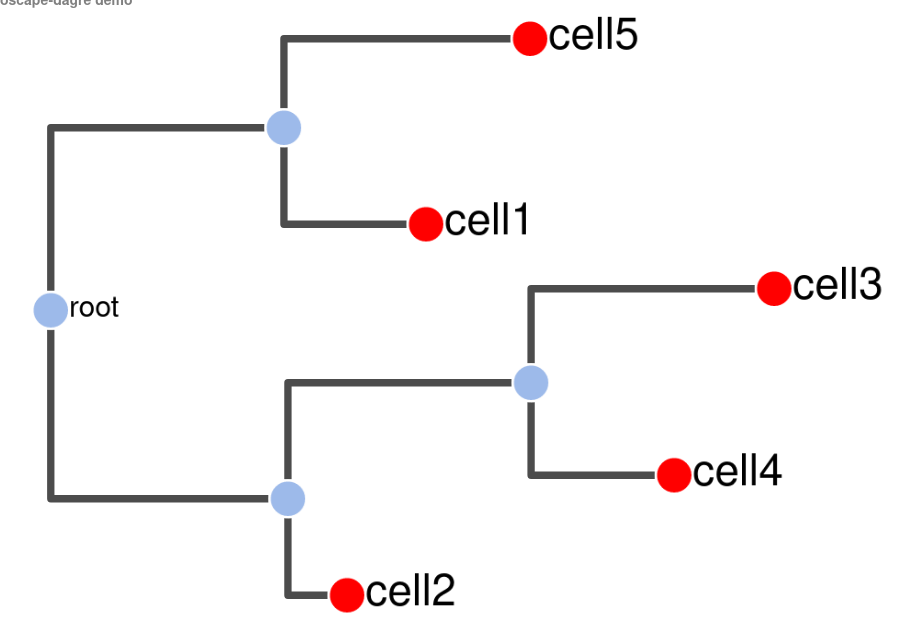
It would be nice to create graphs that have right-angled edges that work well with hierarchies. That is, the specification for the edge properties should be simple so that when a hierarchical layout is applied, the edges are automatically routed in a sensible manner, e.g.:

Activity
Taxi edges
Add taxi edge example to the debug page
Improvements to taxi docs
Improve taxi edge when it has an explicit direction (e.g. downward) a…
Georgva commentedon Jul 2, 2020
Hi, I don't know if still someone is reading this but I need to create phylogenetic trees and for this it would be necessary to define the length of the secondary line @maxkfranz . It should look like in the attached picture: