Welcome developers, security and database administrators, site reliability engineers, and operators.
This open-source project, DataStax Astra DB Plugin for HashiCorp Vault, adds robust token lifecycle management features for Astra DB. For those who may not be familiar, Astra DB is a serverless, multi-cloud native DBaaS built on Apache Cassandra®. Due to the nature of the Astra DB object hierarchy, by default, API tokens are not associated with specific users and currently the tokens do not have metadata descriptions.
Without the plugin, it's easy to lose track of:
- Who created tokens
- The purpose of each token
- Which tokens are being used actively
Consequently, there's no audit trail of who has downloaded and used tokens, and there's no tracking regarding who may have manually shared tokens with others.
Astra DB Plugin for HashiCorp Vault solves these security management issues. To ensure that your token ownership and usage are well understood, the plugin gives you the ability to associate metadata with tokens -- such as the user who created each token, and what it is being used for -- and logs who has accessed the tokens.
Astra DB Plugin for HashiCorp Vault also gives you the ability to create and manage dynamic tokens outside of Astra Portal, which can then be used by your client applications that access Astra DB data. Using vault commands, authorized administrators can rotate tokens based on a token's lifetime lease. Specifically, you can:
- Define a default lease time
- Create new tokens with lease settings
- List tokens by each one's Client ID
- View lease details
- List all leases
- Renew a lease
- Specify a lease duration during renewal
- Revoke a lease before it expires
- Delete a token
HashiCorp Vault is a widely-used solution across the tech industry. It's an identity-based secrets and encryption management system. HashiCorp Vault provides key-value encryption services that are gated by authentication and authorization methods. Access to tokens, secrets, and other sensitive data are securely stored, managed, and tightly controlled. Audit trails are provided. HashiCorp Vault is also extensible via a variety of interfaces, allowing plugins (including Astra DB Plugin for HashiCorp Vault) to contribute to this ecosystem.
Astra DB Plugin for HashiCorp Vault is offered under the open-source Apache 2.0 license.
Astra DB Plugin for HashiCorp Vault supports two caller modes, which determine the behavior of the plugin when creating tokens:
-
Standard: Designed for applications that call the API directly without using a Vault agent. This mode is the default behavior.
-
Sidecar: Designed for Vault agents running in a sidecar container. In this mode, the plugin API behaves as described in the Vault Sidecar agent documentation.
The major differences between the standard and sidecar caller modes:
- In
standardmode, thevault writecommand generates new tokens. Thesidecarmode does not support thevault writecommand. - In
standardmode, thevault readcommand gets an existing token's information from vault (also known as reading a token). Thesidecarmode uses thevault readcommand to generate new tokens. - The
sidecarmode does not support fetching the existing token's information.
You can use Astra DB Plugin for HashiCorp Vault to:
- Log access to Astra DB tokens
- Create and revoke Astra DB tokens
- Associate metadata with Astra DB tokens for tracking purposes, in effect annotating each token's ownership & purpose
- Rotate tokens based on a token's lifetime lease, using
vaultcommands to set token lease defaults, expirations, renewals, and revocations to match your security requirements
For related details, see the HashiCorp Vault documentation.
Check out this introductory, YouTube-hosted video on the DataStax Developers channel:
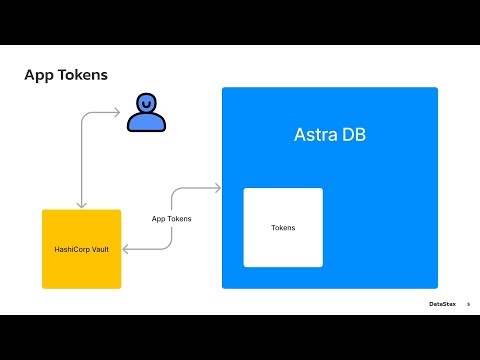
Running time: 4:32
If you haven't already, clone this GitHub repo.
You will need:
- Golang v1.17.9+ installed.
- A fully functional configured HashiCorp Vault instance, including the ability to run the
vaultcommand. - An Astra DB account with an administrator's role - see Roles and Permissions.
- A root token for each Astra DB organization that HashiCorp Vault will manage; the steps are covered in this topic.
You will need:
- An Astra DB account with an admin role - see Roles and Permissions.
- A root token for each Astra DB organization that HashiCorp Vault will manage; the steps are covered in this topic.
Astra DB Plugin for HashiCorp Vault will use the root token (per organization) to subsequently generate additional tokens. Sample vault commands are presented in this topic.
For information first on how to generate tokens with Astra DB, see:
To create root tokens that are then authorized to create new tokens, your Astra DB account must have an admin role.
Any of the following Astra DB roles can create root tokens:
- Organization Administrator (recommended)
- Database Administrator
- Service Account Administrator
- User Administrator
For more, see user roles and permissions.
Astra DB Plugin for HashiCorp Vault is free. See the HashiCorp Platform Vault site for its enterprise pricing details.
To optionally build the plugin from Go modules in our GitHub repo, follow these steps. Otherwise, you can use the provided binary.
-
Build the plugin:
CGO_ENABLED=0 go build -o vault/plugins/vault-plugin-secrets-datastax-astra cmd/vault-plugin-secrets-datastax-astra/main.go
NOTE: We recommend you set
CGO_ENABLEDto0to build a statically-linked binary, particularly in Kubernetes. If unset, the binary is dynamically-linked, and it may fail to register with Vault in some environments, such as Kubernetes. A statically-linked binary relies only on the system calls provided by the OS kernel and has no dependency on any shared libraries provided by the OS. -
Enable the plugin in your Vault instance:
vault secrets enable -path=astra vault-plugin-secrets-datastax-astraOutput:
Success! Enabled the vault-plugin-secrets-datastax-astra secrets engine at: astra/ -
In this step, configure the credentials Vault uses to generate tokens. Add a root token for each Astra DB organization. Specify the caller mode of the plugin (
standardorsidecar). Standard is the default.Standard caller mode example:
vault write astra/config org_id="<ORG ID>" astra_token="<YOUR ASTRA ADMINISTRATOR APP TOKEN>"
  url="https://api.astra.datastax.com" logical_name="<YOUR LOGICAL NAME>" caller_mode="standard"
Sidecar caller mode example:
vault write astra/config org_id="<ORG ID>" astra_token="<YOUR ASTRA ADMINISTRATOR APP TOKEN>"
  url="https://api.astra.datastax.com" logical_name="<YOUR LOGICAL NAME>" caller_mode="sidecar"
Output:
Success! Data written to astra/configs
-
Create a plugin's directory where HashiCorp Vault finds the plugin. Example:
./vault/plugins.IMPORTANT: Do not specify a symlinked directory.
-
Download the latest release Astra DB Plugin for HashiCorp Vault package for your operating system. In GitHub, navigate to the following directory, and click the relevant tarball to download it. Example:
https://github.com/datastax/vault-plugin-secrets-datastax-astra/releases/tag/v2.0.0
-
Unpack the binary and move its files to your plugin directory.
-
Start Vault by using the server command. Example in a dev environment:
vault server -dev -dev-root-token-id=root -dev-plugin-dir=./vault/plugins -log-level=debug
NOTE: This example is for development environments. Do not start the HashiCorp Vault server in
-devmode in production.You may need to also set up the following environment variable:
export VAULT_ADDR='http://127.0.0.1:8200'
-
Get the SHA-256 checksum of the plugin binary:
SHA256=$(sha256sum /private/etc/vault/plugins/vault-plugin-secrets-datastax-astra_2.0.0 | cut -d' ' -f1) -
Register the
vault-plugin-secrets-datastax-astraplugin in the Vault system catalog, and use the version of the plugin you just downloaded:vault plugin register -sha256=${SHA256} \ -command=vault-plugin-secrets-datastax-astra_2.0.0 \ -version=v2.0.0 \ secret vault-plugin-secrets-datastax-astraOutput:
Success! Data written to: sys/plugins/catalog/secret/vault-plugin-secrets-datastax-astra -
Enable the plugin in your Vault instance:
vault secrets enable -path=astra vault-plugin-secrets-datastax-astraOutput:
Success! Enabled the vault-plugin-secrets-datastax-astra secrets engine at: astra/
At this point, HashiCorp Vault and Astra DB Plugin for HashiCorp Vault are set up and ready to use.
There are several tasks you can submit with HashiCorp Vault commands:
- Add a root token for each Astra DB organization
- Read and list configurations
- Generate HashiCorp Vault roles from Astra DB roles
- Generate new tokens, set the lease time, and attach meaningful custom metadata for your company's tracking and auditing purposes. Features include the ability to:
- Define a default lease time
- Create new tokens with lease settings
- Renew a lease
- Revoke a token/lease before the lease expires
- Delete a token
- In addition, you can:
- List a token by Client ID
- List lease details
- List all leases
In this example, assume a company has three Astra DB organizations:
- A retail org
- A wholesale org
- An internal usage org
IMPORTANT: As noted previously in this topic, here are the differences between standard and sidecar caller modes:
- In
standardmode, thevault writecommand generates new tokens. Thesidecarmode does not support thevault writecommand. - In
standardmode, thevault readcommand gets an existing token's information from vault (also known as reading a token). Thesidecarmode uses thevault readcommand to generate new tokens. - The
sidecarmode does not support fetching the existing token's information.
Follow these steps for standard mode. For the steps in sidecar mode, see this section, which appears later in this topic.
-
If you haven't already, add a root token for each Astra DB organization.
Format:
vault write astra/config org_id="<ORG ID>" astra_token="<YOUR ASTRA ADMINISTRATOR APP TOKEN>" \ url="https://api.astra.datastax.com" logical_name="<YOUR LOGICAL NAME>" caller_mode="standard"
TIP: To get your
astra_tokenvalue, in Astra Portal, login and go to Organization Settings > Token Management > Select Role: Organization Administrator. Click Generate Token. Copy the generated token from the resulting dialog. Example:
Here's an example
vaultcommand to create a root token for the first organization:vault write astra/config org_id="ccd999999_facd_4ad3_bbb99903d999999999999999d" \ astra_token="AstraCS:ONqZCOAAAAAAAAAAAAAAAAe:608ba9999999999999190219" \ url="https://api.astra.datastax.com" logical_name="retailOrg" caller_mode="standard"
Output:
Success! Data written to astra/configsHashiCorp Vault then uses the created root token for further token operations within this organization.
-
List the created organization/token configurations:
vault list astra/configs
Sample output:
ccd999999_facd_4ad3_bbb99903d999999999999999d Some0therOrgId_aaa999999_bbbb_4ad3_ccc99903dd Y3tAnotherOrgId_aaa777777_bbbb_4ad3_ccc77777d
-
Referring to the listed IDs, you can then submit read operation to get the defined properties. Example searching by
org_id:vault read astra/config org_id="ccd999999_facd_4ad3_bbb99903d999999999999999d"
Sample output:
Key Value --- ----- astra_token AstraCS:ABcDeFg... caller_mode standard logical_name org1 org_id ccd999999_facd_4ad3_bbb99903d999999999999999d url https://api.astra.datastax.com
You can also use the
vault read astra/config...command to search bylogical_name. -
Use the installed token to automatically generate HashiCorp Vault roles from Astra DB roles:
You can get a list of
role_idvalues for an Astra DB organization by using the DataStax DevOps API. Example:curl --request GET \ --url 'https://api.astra.datastax.com/v2/organizations/roles' \ --header 'Accept: application/json' \ --header 'Authorization: Bearer <application_token>'
You can also run the update_roles.sh script, available in our GitHub repo. The script adds all the Astra DB roles (default and custom) and their IDs to HashiCorp Vault. The update_roles.sh script generates Vault roles from Astra DB roles with default
ttlandmax_ttlvalues (86400 seconds). Example:sh vault/plugins/vault-plugin-secrets-datastax-astra/update_roles.sh
-
To list the roles created across all your Astra DB organizations:
vault list astra/roles
You can also return the metadata for a specific role. Example:
vault read astra/role org_id="<ORG ID>" role_name="<ROLE NAME>"
The
vault delete astra/role org_id="<ORG ID>" role_name="<ROLE NAME>"command is also available. -
To write a role, specify the
ttlandmax_ttl. The token for that role lives until thettlexpires for that role, and the token can be renewed until themax_ttlvalue is reached. If you do not specify thettlormax_ttl, or their values are set to0, the defaultttlandmax_ttlvalues will be86400seconds. Example:vault write astra/role role_name="R_W_User" role_id="946cfbde-24cc-4953-9355-d57bfd61bf39" \ org_id="ccd999999_facd_4ad3_bbb99903d999999999999999d" ttl=3600 max_ttl=36000
Output:
Success! Data written to: astra/roleNOTE: After the role is created, you can change the defined
ttlandmax_ttlvalues by calling the same API with the samerole_nameandorg_idarguments, and newttland/ormax_ttlvalue(s). -
To read a role:
vault read astra/role org_id="ccd999999_facd_4ad3_bbb99903d999999999999999d" role_name="api_r_w_user"
Output:
max_ttl 10h0m0s org_id ccd999999_facd_4ad3_bbb99903d999999999999999d role_id 946cfbde-24cc-4953-9355-d57bfd61bf39 role_name api_r_w_user ttl 1h0m0s
-
To generate a token:
vault write astra/org/token org_id="<ORG ID>" role_name="<ROLE NAME>" logical_name="<LOGICAL NAME>"
NOTE: Each token must have a unique combination of
org_id,role_name, andlogical_name.Output:
Key Value --- ----- lease_id astra/org/token/ove4ll9sshXFL3qK6I1qPezb lease_duration 1h lease_renewable true clientId DTEUyKUZZrvFzzLzPGCbrbHO generatedOn 2022-09-21T17:48:15.260897295Z logicalName org1 metadata <nil> orgId ccd999999_facd_4ad3_bbb99903d999999999999999d roleName r_w_user token AstraCS:DTEUyKUZZrvFzzLzPGCbrbHO:4ebdef6dbbcada2f4618c9e4b6800c17b10c...
After the lease expires, the token is automatically revoked; it's deleted from the Vault and from Astra DB.
-
To read a generated token using
client_idandorg_id:vault read astra/org/token client_id="ZenclHmfKBenxQZjRNhRUbLc" org_id="ccd999999_facd_4ad3_bbb99903d999999999999999d"
Output:
clientId ZenclHmfKBenxQZjRNhRUbLc generatedOn 2022-09-21T17:40:29.265975403Z logicalName org1 metadata <nil> orgId ccd999999_facd_4ad3_bbb99903d999999999999999d roleName r_w_user token AstraCS:ZenclHmfKBenxQZjRNhRUbLc:a4bf8ca1bf164698e2631d353a295be27187e5750afc4080a4749fcc68f99f38
-
To read a token using
org_id,role_name, andlogical_name:vault read astra/org/token org_id=”ccd999999_facd_4ad3_bbb99903d999999999999999d” \ role_name=”r_w_user” logical_name=”org1”Output:
clientId ZenclHmfKBenxQZjRNhRUbLc generatedOn 2022-09-21T17:40:29.265975403Z logicalName org1 metadata <nil> orgId ccd999999_facd_4ad3_bbb99903d999999999999999d roleName r_w_user token AstraCS:ZenclHmfKBenxQZjRNhRUbLc:a4bf8ca1bf164698e2631d353a295be27187e5750afc4080a4749fcc68f99f38
-
To list all Astra DB tokens:
vault list astra/org/tokens
Output:
CtQUkZlxYDzoxydARnbhjlji YZZcEggpHvLPZQnnioYbZqLc rGQajQDqoPNyjtiokNNrIgPK
-
To force revoke a token before the lease expires:
vault lease revoke <lease_id>
The token is revoked; it's deleted from the Vault and from Astra DB.
-
To renew a token before the lease expires:
vault lease renew -increment=3600 <lease_id>
Output:
Key Value --- ----- lease_id astra/org/token/ove4ll9sshXFL3qK6I1qPezb lease_duration 1h lease_renewable trueNOTE: The token can be renewed to a value no greater than
max_ttl.

This section assumes you're using the plugin binary or you have optionally built the plugin from source (optional), using the steps described earlier in this topic.
REMINDER: As previously noted:
- In
standardmode, thevault writecommand generates new tokens. Thesidecarmode does not support thevault writecommand. - In
standardmode, thevault readcommand gets an existing token's information from vault (also known as reading a token). Thesidecarmode uses thevault readcommand to generate new tokens. - The
sidecarmode does not support fetching the existing token's information.
Given those differences, in this section we'll walk through the relevant steps and commands for users operating in sidecar mode. See the previous section for the commands in standard mode.
- If you haven't already, add a root token for each Astra DB organization. In this section, notice we're specifying the
caller_modeassidecar.
Format:
```bash
vault write astra/config org_id="<ORG ID>" astra_token="<YOUR ASTRA ADMINISTRATOR APP TOKEN>" \
url="https://api.astra.datastax.com" logical_name="<YOUR LOGICAL NAME>" caller_mode="sidecar"
```
**TIP:** To get your `astra_token` value, in [Astra Portal](https://astra.datastax.com), login and go to Organization Settings > Token Management > Select Role: Organization Administrator. Click **Generate Token**. Copy the generated token from the resulting dialog. Example:

Here's an example `vault` command to create a root token for the first organization:
```bash
vault write astra/config org_id="ccd999999_facd_4ad3_bbb99903d999999999999999d" \
astra_token="AstraCS:ONqZCOAAAAAAAAAAAAAAAAe:608ba9999999999999190219" \
url="https://api.astra.datastax.com" logical_name="retailOrg" caller_mode="sidecar"
```
**Output:**
```bash
Success! Data written to astra/configs
```
The created root token will be used by HashiCorp Vault for further token operations within this organization.
-
Read the config information by
org_id:vault read astra/config org_id="ccd999999_facd_4ad3_bbb99903d999999999999999d"
Sample output:
Key Value --- ----- astra_token AstraCS:ABcDeFg... caller_mode sidecar logical_name org1 org_id ccd999999_facd_4ad3_bbb99903d999999999999999d url https://api.astra.datastax.com
You can also use the
vault read astra/config...command to search bylogical_name. -
Generate Vault roles from Astra DB roles with default
ttlandmax_ttlvalues (86400 seconds):sh vault/plugins/vault-plugin-secrets-datastax-astra/update_roles.sh
-
To list the roles created across all your Astra DB organizations:
vault list astra/roles
-
To write a role, specify the
ttlandmax_ttl. The token for that role lives until thettlexpires for that role, and the token can be renewed until themax_ttlvalue is reached. If you do not specify thettlormax_ttl, or their values are set to0, the defaultttlandmax_ttlvalues will be86400seconds. Example:vault write astra/role role_name="R_W_User" role_id="946cfbde-24cc-4953-9355-d57bfd61bf39" \ org_id="ccd999999_facd_4ad3_bbb99903d999999999999999d" ttl=3600 max_ttl=36000
Output:
Success! Data written to: astra/roleNOTE: After creating the role, you can change the defined
ttlandmax_ttlvalues by calling the same API with the samerole_nameandorg_idarguments, and newttland/ormax_ttlvalue(s). -
To read a role:
vault read astra/role org_id="ccd999999_facd_4ad3_bbb99903d999999999999999d" role_name="api_r_w_user"
Output:
max_ttl 10h0m0s org_id ccd999999_facd_4ad3_bbb99903d999999999999999d role_id 946cfbde-24cc-4953-9355-d57bfd61bf39 role_name api_r_w_user ttl 1h0m0s
-
To generate a token, note how we use
vault read... insidecarmode:vault read astra/org/token org_id="<ORG ID>" role_name="<ROLE NAME>" logical_name="<LOGICAL NAME>"
NOTE: Each token must have a unique combination of
org_id,role_name, andlogical_name.Output:
Key Value --- ----- lease_id astra/org/token/ove4ll9sshXFL3qK6I1qPezb lease_duration 1h lease_renewable true clientId DTEUyKUZZrvFzzLzPGCbrbHO generatedOn 2022-09-21T17:48:15.260897295Z logicalName org1 metadata <nil> orgId ccd999999_facd_4ad3_bbb99903d999999999999999d roleName r_w_user token AstraCS:DTEUyKUZZrvFzzLzPGCbrbHO:4ebdef6dbbcada2f4618c9e4b6800c17b10c...
After the lease expires, the token is automatically revoked; it's deleted from the Vault and from Astra DB.
-
To list all Astra DB tokens:
vault list astra/org/tokens
Output:
CtQUkZlxYDzoxydARnbhjlji YZZcEggpHvLPZQnnioYbZqLc rGQajQDqoPNyjtiokNNrIgPK
-
To force revoke a token before the lease expires:
vault lease revoke <lease_id>
The token is revoked; it's deleted from the Vault and from Astra DB.
-
To renew a token before the lease expires:
vault lease renew -increment=3600 <lease_id>
Output:
Key Value --- ----- lease_id astra/org/token/ove4ll9sshXFL3qK6I1qPezb lease_duration 1h lease_renewable trueNOTE: The token can be renewed to a value no greater than
max_ttl.
Plugin versioning was introduced in Vault 1.12, allowing for a smooth upgrade of the plugin that has been mounted at a path on a running Vault server. These steps assume you have already registered the plugins as outlined under "Setup plugin from binary distribution".
-
To upgrade the plugin, register a newer version of the plugin. You must use the same plugin type (secret) and name (vault-plugin-secrets-datastax-astra) as the plugin being upgraded:
vault plugin register -sha256=${SHA256} \ -command=vault-plugin-secrets-datastax-astra_2.0.0 \ -version=v2.0.0 \ secret vault-plugin-secrets-datastax-astra -
Tune the existing mount to configure it to use the newly registered version:
vault secrets tune -plugin-version=v2.0.0 vault-plugin-secrets-datastax-astra
-
You can check the updated configuration. Notice the "Version" is now different from the "Running Version":
vault secrets list -detailed
-
As the final step, trigger a plugin reload. This reloads all mounted backends using that plugin:
vault plugin reload -plugin vault-plugin-secrets-datastax-astra
HashiCorp Vault has a full understanding of the historical token specifics, for control and auditing purposes, including when the tokens were used and by whom, along with a free-form role name and any custom metadata you may have associated with the tokens. For example, HashiCorp Vault's data knows the details of the token delete operation through its identity management and access control data; whereas Astra DB is only aware that a token of a particular clientId was generated on a date, and has since been deleted.
Astra DB Plugin for HashiCorp Vault is an open source project. In this GitHub repo, use Issues to report a problem or share an idea. You may suggest ideas for improvement or bug fixes. Clone the repo and submit a Pull Request (PR) on a separate fork and working branch. This OSS project is a community effort - we encourage and appreciate contributions!
See the following resources:
- Video introduction on YouTube
- HashiCorp Vault documentation
- How to generate tokens in Astra DB
- Astra DB user permissions