VS Code c# extension not working due to omnisharp not finding the reference assemblies for .NETFramework,Version = v4.7.1 #4986

Description

Environment data
dotnet --info output:
.NET SDK (reflecting any global.json):
Version: 6.0.101
Commit: ef49f6213a
Runtime Environment:
OS Name: Windows
OS Version: 10.0.18363
OS Platform: Windows
RID: win10-x64
Base Path: D:\Program Files\dotnet\sdk\6.0.101\
Host (useful for support):
Version: 6.0.1
Commit: 3a25a7f1cc
.NET SDKs installed:
6.0.101 [D:\Program Files\dotnet\sdk]
.NET runtimes installed:
Microsoft.AspNetCore.App 6.0.1 [D:\Program Files\dotnet\shared\Microsoft.AspNetCore.App]
Microsoft.NETCore.App 6.0.1 [D:\Program Files\dotnet\shared\Microsoft.NETCore.App]
Microsoft.WindowsDesktop.App 6.0.1 [D:\Program Files\dotnet\shared\Microsoft.WindowsDesktop.App]
To install additional .NET runtimes or SDKs:
https://aka.ms/dotnet-download
VS Code version: 1.63
C# Extension version: 1.23.17
OmniSharp log
Starting OmniSharp server at 1/1/2022, 3:51:28 PM
Target: d:\Users\admin\Snowboarder\Snowboarder.sln
OmniSharp server started.
Path: c:\Users\admin.vscode\extensions\ms-dotnettools.csharp-1.23.17.omnisharp\1.37.17\OmniSharp.exe
PID: 18028
Starting OmniSharp on Windows 6.2.9200.0 (x64)
info: OmniSharp.Services.DotNetCliService
Checking the 'DOTNET_ROOT' environment variable to find a .NET SDK
info: OmniSharp.Services.DotNetCliService
Using the 'dotnet' on the PATH.
info: OmniSharp.Services.DotNetCliService
DotNetPath set to dotnet
info: OmniSharp.MSBuild.Discovery.MSBuildLocator
Located 1 MSBuild instance(s)
1: StandAlone 17.0.0 - "c:\Users\admin.vscode\extensions\ms-dotnettools.csharp-1.23.17.omnisharp\1.37.17.msbuild\Current\Bin"
info: OmniSharp.MSBuild.Discovery.MSBuildLocator
MSBUILD_EXE_PATH environment variable set to 'c:\Users\admin.vscode\extensions\ms-dotnettools.csharp-1.23.17.omnisharp\1.37.17.msbuild\Current\Bin\MSBuild.exe'
info: OmniSharp.MSBuild.Discovery.MSBuildLocator
Registered MSBuild instance: StandAlone 17.0.0 - "c:\Users\admin.vscode\extensions\ms-dotnettools.csharp-1.23.17.omnisharp\1.37.17.msbuild\Current\Bin"
CscToolExe = csc.exe
CscToolPath = c:\Users\admin.vscode\extensions\ms-dotnettools.csharp-1.23.17.omnisharp\1.37.17.msbuild\Current\Bin\Roslyn
MSBuildExtensionsPath = c:\Users\admin.vscode\extensions\ms-dotnettools.csharp-1.23.17.omnisharp\1.37.17.msbuild
MSBuildToolsPath = c:\Users\admin.vscode\extensions\ms-dotnettools.csharp-1.23.17.omnisharp\1.37.17.msbuild\Current\Bin
info: OmniSharp.WorkspaceInitializer
Invoking Workspace Options Provider: OmniSharp.Roslyn.CSharp.Services.CSharpFormattingWorkspaceOptionsProvider, Order: 0
info: OmniSharp.WorkspaceInitializer
Invoking Workspace Options Provider: OmniSharp.Roslyn.CSharp.Services.Completion.CompletionOptionsProvider, Order: 0
info: OmniSharp.WorkspaceInitializer
Invoking Workspace Options Provider: OmniSharp.Roslyn.CSharp.Services.RenameWorkspaceOptionsProvider, Order: 100
info: OmniSharp.WorkspaceInitializer
Invoking Workspace Options Provider: OmniSharp.Roslyn.CSharp.Services.ImplementTypeWorkspaceOptionsProvider, Order: 110
info: OmniSharp.WorkspaceInitializer
Invoking Workspace Options Provider: OmniSharp.Roslyn.CSharp.Services.BlockStructureWorkspaceOptionsProvider, Order: 140
info: OmniSharp.Cake.CakeProjectSystem
Detecting Cake files in 'd:\Users\admin\Snowboarder'.
info: OmniSharp.Cake.CakeProjectSystem
Could not find any Cake files
info: OmniSharp.MSBuild.ProjectSystem
Detecting projects in 'd:\Users\admin\Snowboarder\Snowboarder.sln'.
info: OmniSharp.MSBuild.ProjectManager
Queue project update for 'd:\Users\admin\Snowboarder\Assembly-CSharp.csproj'
info: OmniSharp.Script.ScriptProjectSystem
Detecting CSX files in 'd:\Users\admin\Snowboarder'.
info: OmniSharp.Script.ScriptProjectSystem
Could not find any CSX files
info: OmniSharp.WorkspaceInitializer
Configuration finished.
info: OmniSharp.Stdio.Host
Omnisharp server running using Stdio at location 'd:\Users\admin\Snowboarder' on host 9976.
info: OmniSharp.MSBuild.ProjectManager
Loading project: d:\Users\admin\Snowboarder\Assembly-CSharp.csproj
fail: OmniSharp.MSBuild.ProjectLoader
The reference assemblies for .NETFramework,Version=v4.7.1 were not found. To resolve this, install the Developer Pack (SDK/Targeting Pack) for this framework version or retarget your application. You can download .NET Framework Developer Packs at https://aka.ms/msbuild/developerpacks
[warn]: OmniSharp.MSBuild.ProjectManager
Failed to load project file 'd:\Users\admin\Snowboarder\Assembly-CSharp.csproj'.
d:\Users\admin\Snowboarder\Assembly-CSharp.csproj
c:\Users\admin.vscode\extensions\ms-dotnettools.csharp-1.23.17.omnisharp\1.37.17.msbuild\Current\Bin\Microsoft.Common.CurrentVersion.targets(1217,5): Error: The reference assemblies for .NETFramework,Version=v4.7.1 were not found. To resolve this, install the Developer Pack (SDK/Targeting Pack) for this framework version or retarget your application. You can download .NET Framework Developer Packs at https://aka.ms/msbuild/developerpacks
Attempted to update project that is not loaded: d:\Users\admin\Snowboarder\Assembly-CSharp.csproj
Steps to reproduce
Whenever I open VS Code with Unity this happens.
Expected behavior
I get to enjoy the benefits of the c# extension which would make development much much easier.
Actual behavior
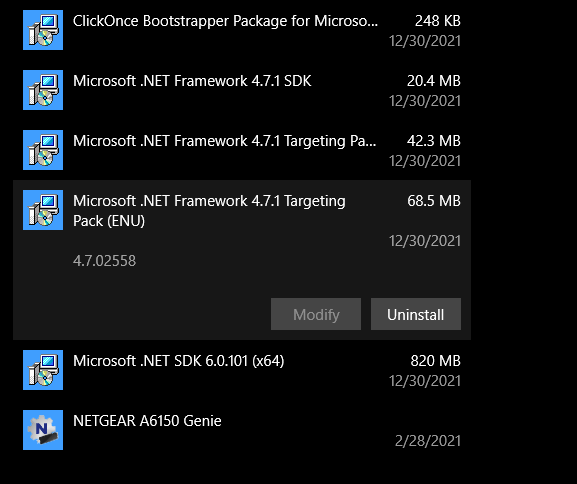
The c# extension does not work. Please note that I absolutely do have the developer pack v4.7.1. installed and have tried uninstalling it and reinstalling it many times to no avail. Have also tried uninstalling and reinstalling VSCode, Unity, the targetting package. Have also tried restarting my computer. I am on Windows 10 so the Mono install should not make a difference. I have tried setting useGlobalMono to latest, this did not fix the problem. I cannot understand why this is happening and every fix I have found on the internet that looks incredibly similar does not work.