-
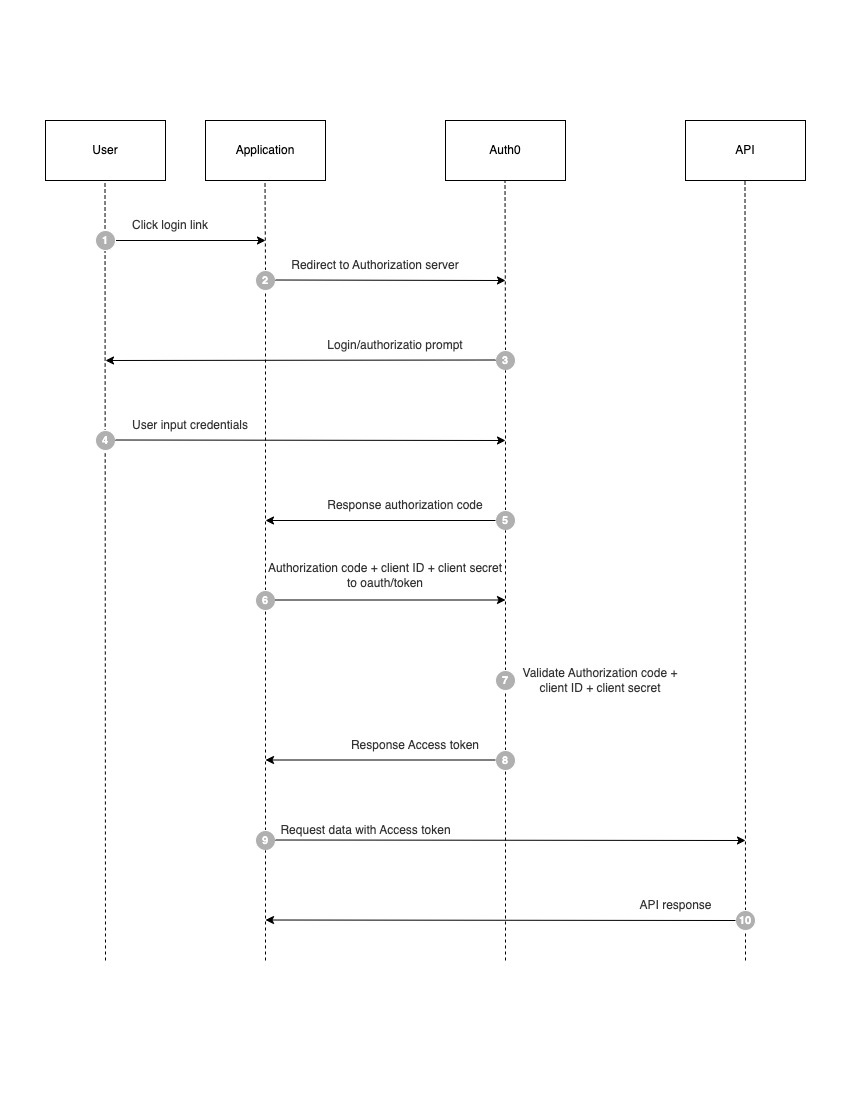
The user accesses to application.
-
Application finds that the user is not logged in and jumps to the
sso-server. -
The SSO authentication server finds that the user is not logged in and directs the user to the login page.
- We check if the URL that has came as query to the
sso-serverhas been registered or not.
const alloweOrigin = {
  "http://localhost:3000": true,
  "http://localhost:3002": true,
};-
User enters username and password to submit login request.
-
The Authentication server verifies the user information and creates a session (Global session) between the user and the Authentication server. And then creates an Authorization token as well.
-
Then the Authentication server takes the authorization token to redirect to the
redirect_utlalong with theAuthorization token.
router.post("/oauth/signin", (req: typeof Request, res: typeof Response) => {
  const username = req.body.username;
  const password = req.body.password;
  const clientId = req.body.client_id;
  const redirectUrl = req.body.redirect_url;

  authModule.checkCredential(
    connection,
    username,
    password,
    (userType: UserType) => {
      // create global session here
      req.session.user = userType.userId;
      (authModule.sessionUser as any)[userType.userId] = userType;
      if (redirectUrl === null) {
        return res.redirect("/");
      }

      // create authorization token
      const code = authModule.generateAuthorizationCode(clientId, redirectUrl);
      authModule.storeClientInCache(redirectUrl, userType.userId, code);

      // redirect to client with an authorization token
      res.redirect(302, redirectUrl + `?authorization_code=${code}`);
    }
  );
});- The
sso-clientgets the token and goes to thesso-serverauthentication to check if the token to find out whether the token valid, exists or expires.
useEffect(() => {
    const authCode = router.query["authorization_code"];
    if (authCode) {
      const requestOptions = {
        method: "POST",
        headers: {
          "Content-Type": "application/json",
          Authorization: "Bearer l1Q7zkOL59cRqWBkQ12ZiGVW2DBL",
        },
        body: JSON.stringify({
          grant_type: "authorization_code",
          authorization_code: authCode,
          client_id: "CLIENT_ID",
          client_secret: "CLIENT_SECRET",
          redirect_url: "http://localhost:3000/callback",
        }),
      };
      fetch("http://localhost:3001/oauth/token", requestOptions).then(
        (res: Response) => {
          if (res.status === 200) {
            // store access token in cookie
            // res.headers.append('Set-Cookie', res.)
            const data = res.json().then((j) => {
              console.log(j);
            });
          }
        }
      );
    }
  }, [router.query]);
const verifyAuthorizationCode = (
bearerCode: string,
authCode: string,
clientId: string,
redirectUrl: string
) => {
const ssoCode = authCode.replace(/\s/g, "+");
const clientName = (intermediateTokenCache as any)[ssoCode][1];
const globalSessionToken = (intermediateTokenCache as any)[ssoCode][0];
if (bearerCode.replace("Bearer ", "") !== (appTokenDB as any)[clientName]) {
return false;
}
if (authCode === undefined) {
return false;
}
if (!(sessionClient as any)[globalSessionToken].includes(clientName)) {
return false;
}
const authData = JSON.parse(
CryptoJS.AES.decrypt(ssoCode, SECRET_KEY).toString(CryptoJS.enc.Utf8)
);
if (authData) {
const { client_id, redirect_url, exp } = authData;
if (clientId !== client_id || redirect_url !== redirectUrl) {
return false;
}
if (exp < Date.now()) {
return false;
}
return true;
}
return false;
};- Then the
sso_serverreturn a signed JWT with user information (Access token) to thesso-client.
const generateAccessToken = (
  authCode: string,
  clientId: string,
  clientSecret: string
) => {
  const ssoCode: string = authCode.replace(/\s/g, "+");
  const globalSessionToken: string = (intermediateTokenCache as any)[
    ssoCode
  ][0];
  const userInfo: UserType = (sessionUser as any)[globalSessionToken];
  return jwt.sign(
    {
      client_id: clientId,
      client_secret: clientSecret,
      user: userInfo,
    },
    cert,
    {
      algorithm: "RS256",
      expiresIn: "1h",
      issuer: "sso-auth-server",
    }
  );
};sso-clientuse theAccess tokento access to protected resources.