Explorer duplicates "View another namespace" when workspace has multiple folders #120


Description

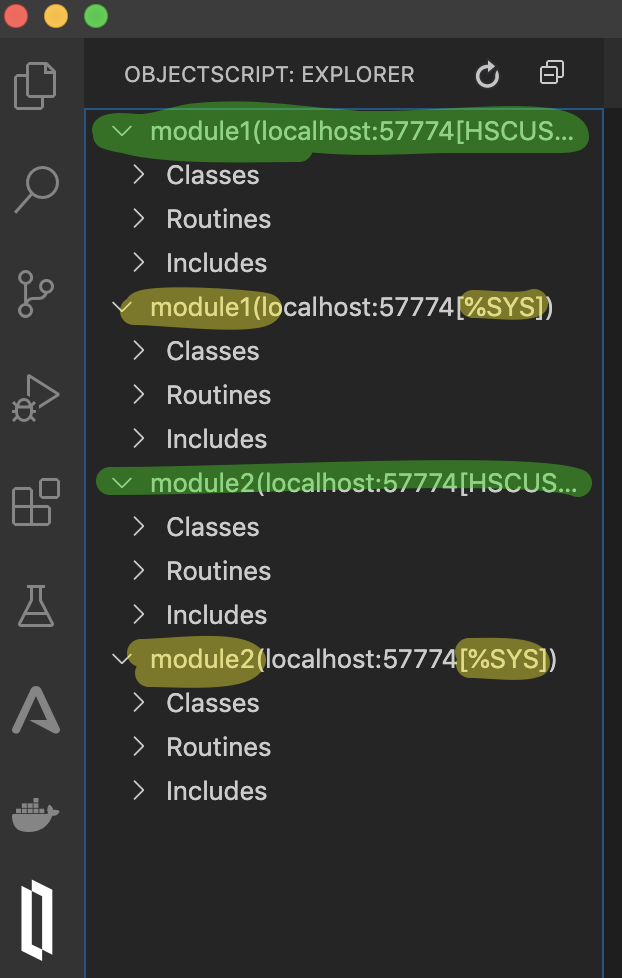
Scenario is developing multiple independent but related modules using different folders in the same VSCode workspace. This will show two folder-specific trees in the explorer (highlighted green) and works as expected. However, if you choose to view another namespace it is added for each folder in the project (highlighted yellow). I would have expected a single extra tree in the explorer that wasn't tied to a folder.
File tree:
.
├── module1
│   ├── .vscode
│   │   └── settings.json
│   ├── cls
│   ├── inc
│   ├── mac
│   └── module.xml
├── module2
│   ├── .vscode
│   │   └── settings.json
│   ├── cls
│   ├── inc
│   ├── mac
│   └── module.xml
└── project.code-workspace
project.code-workspace
{
	"folders": [
		{
			"path": "module1"
		},{
			"path": "module2"
		}
	],
	"settings": {
		"objectscript.conn": {
			"active": false,     // not active!
			"ns": "HSCUSTOM",
			"host": "localhost",
			"port": 57774,
			"username": "SYSTEM",
			"password": "_SYS",
			"https": false
		},
		"objectscript.export.atelier": true,
		"objectscript.export.folder": "."
	}
}
module1/.vscode/settings.json (module2 the same)
{
	"objectscript.conn": {
		"active": true     // activate in each module
	}
}