Skip to content

.CDN_ACCESS_LOGS Folder listing is empty #5350

Closed

Description

@cyberduck

d72cbab created the issue

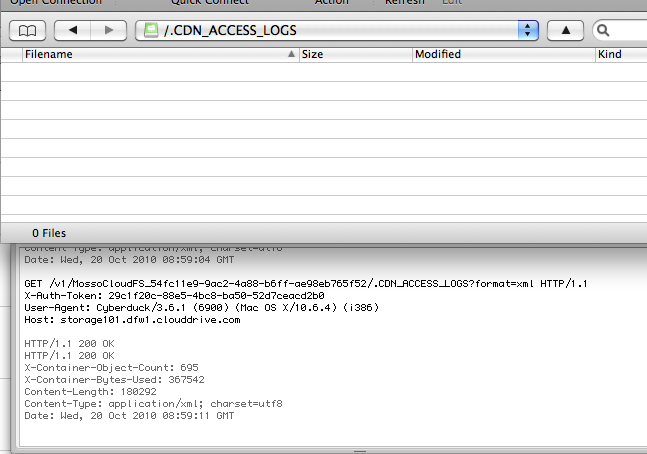
CloudFiles Web interface shows heaps of files in this folder. I have successfully downloaded them using the cloudfiles-python module ... but CyberDuck shows this folder as being empty, despite the HTTP transcript saying there are 695 objects in the folder.
Screenshots attached.

FWIW .. here is some ropey python code that downloads the contents of CDN_ACCESS_LOGS ..

#mainline
ofolder = ".CDN_ACCESS_LOGS"
try:
    conn = cloudfiles.get_connection(username, apikey)
    container = conn.get_container(ofolder)
    lst = container.list_objects()
    for x in lst:
        obj = container.get_object(x)
        bn = os.path.split(x)
        savename = './cdnlogs/'+bn[1]
        if os.path.exists(savename):
            continue
        obj.save_to_filename(savename)
        print bn[1]+'\n'
except cloudfiles.errors.ResponseError, err:
    print ifile, ofolder, err

Attachments

Activity

  1. cyberduck commented on Oct 20, 2010

    @cyberduck
    ContributorAuthor

    @dkocher commented

    I cannot replicate the issue here using version 3.7. Can you verify this is still not working for you with 3.7?

  2. cyberduck commented on Oct 20, 2010

    @cyberduck
    ContributorAuthor

    d72cbab commented

    Just downloaded 3.7
    Afraid it still shows blank listing.
    Screenshot attached.

    Thanks,
    Dave

  3. cyberduck commented on Oct 20, 2010

    @cyberduck
    ContributorAuthor

    @dkocher commented

    The only thing is that the Content-Length returned is suspiciously short. I doubt it can contain a XML listing of the advertised 697 objects.

  4. cyberduck commented on Nov 19, 2010

    @cyberduck
    ContributorAuthor

    @dkocher commented

    Can you please contact Rackspace support and provide them the transcript from the log drawer in Cyberduck.

  5. cyberduck commented on Dec 2, 2010

    @cyberduck
    ContributorAuthor

    http://openid-provider.appspot.com/shawncmaddock commented

    I've been having the identical issue. (Other containers work correctly, .CDN_ACCESS_LOGS shows contents in the web interface but not Cyberduck, small content length...) I contacted Rackspace, and included my Cyberduck log. Here is their response:

    The problem with CyberDuck and other third-party applications such as FireUploader when it comes to the CDN log container is that they each have their own unique implementations of folder structures within Cloud Files. CDN access logs are stored in the format "containername/yyyy/mm/dd/hh/uniqueid.log.0.gz". The slashes in the object name are interpreted as subdirectories by CyberDuck, but since the corresponding "folder objects" are not there (in this case, it would require objects named containername, containername/yyyy, containername/yyyy/mm, etc.), it cannot read the objects in the container properly.

    The only options for fixing this problem is if Cyberduck either:

    A. automatically adds the corresponding folder objects inside .CDN_ACCESS_LOGS for you
    B. updates their code to ignore the slashes in the .CDN_ACCESS_LOGS container entirely

    Option A is a bad idea in general because it would make it quite difficult to find the log you're looking for and it would conflict with every other implementation. FireUploader requires a slightly different MIME type and metadata in their folder objects, for example. Option B is far more sensible.

    Unfortunately, there's nothing that we can do on our end to accommodate the idiosyncrasies of all the third-party folder implementations.

    Seeing as the specs for Cloud Files do not allow for nested containers, couldn't the "exception" be applied to all Cloud Files containers, and treat the / as a "normal" character? OS X doesn't have a problem with it as it uses colons...

  6. cyberduck commented on Dec 2, 2010

    @cyberduck
    ContributorAuthor

    @dkocher commented

    The same issue is also discussed in #5471.

  7. cyberduck commented on Dec 2, 2010

    @cyberduck
    ContributorAuthor

    @dkocher commented

    I disagree that Rackspace does not have a resolution to their problem. Their own statement in the latest developer guide states:

    Pseudo hierarchical folders/directories. To take advantage of this feature, the directory marker Objects must also be created to represent the appropriate directories. The following additional Objects need to be created. A good convention would be to create these as zero or one byte files with a Content-Type of application/directory.

    Therefore I expect them to store the files using the marker objects they propose themselves. Eat your own dog food.

  8. cyberduck commented on Dec 6, 2010

    @cyberduck
    ContributorAuthor

    2d18520 commented

    This is Rackspace's response to your last comment:

    We've run into this issue with other third-party products as well, and as I mentioned before the issue lies with the fact that everyone has a different standard for the directory objects. If we were to automatically add them, the container would immediately become incomprehensible both to users of our control panel and to all of the other third-party programs that utilize Cloud Files. That's why we suggest that the objects be implemented by the third-party applications themselves; that way the changes will only affect users of that particular program and their implementation will not interfere with others.

    I can forward you their admin's email address if you're willing to hash it out with them, otherwise it looks like I'll be writing my own solution similar to the OP for downloading the access logs.

  9. cyberduck commented on Dec 6, 2010

    @cyberduck
    ContributorAuthor

    @dkocher commented

    I was in contact with engineering at Rackspace as well. They are now supporting an alternate way to enumerate containers using a delimiter that we can possibly implement which should resolve the issue.

  10. cyberduck commented on Dec 17, 2010

    @cyberduck
    ContributorAuthor

    @dkocher commented

    In 5fb15b1.

  11. cyberduck commented on Dec 22, 2010

    @cyberduck
    ContributorAuthor

    @dkocher commented

    Please test this using the latest snapshot build available.

  12. cyberduck commented on Dec 30, 2010

    @cyberduck
    ContributorAuthor

    2d18520 commented

    Just tried with build 8162, the access log folder is still empty. :-(

    Cyberduck log for connecting, accessing root, then accessing .CDN_ACCESS_LOGS:

    GET /v1.0 HTTP/1.1
    x-auth-user: ************
    x-auth-key: ********************************
    Host: auth.api.rackspacecloud.com
    Connection: Keep-Alive
    User-Agent: Cyberduck/4.0b9 (Mac OS X/10.6.5) (i386)
    HTTP/1.1 204 No Content
    Date: Thu, 30 Dec 2010 15:18:26 GMT
    Server: Apache/2.2.3 (Mosso Engineering)
    X-Storage-Url: https://storage101.dfw1.clouddrive.com/v1/MossoCloudFS_********************************
    X-Storage-Token: ********************************
    X-CDN-Management-Url: https://cdn.clouddrive.com/v1/MossoCloudFS_********************************
    X-Auth-Token: ********************************
    X-Server-Management-Url: https://servers.api.rackspacecloud.com/v1.0/************
    Content-Length: 0
    Connection: close
    Content-Type: application/octet-stream
    
    GET /v1/MossoCloudFS_********************************?format=xml HTTP/1.1
    X-Auth-Token: ********************************
    Host: storage101.dfw1.clouddrive.com
    Connection: Keep-Alive
    User-Agent: Cyberduck/4.0b9 (Mac OS X/10.6.5) (i386)
    HTTP/1.1 200 OK
    X-Account-Object-Count: 11878
    X-Account-Bytes-Used: 142646861026
    X-Account-Container-Count: 3
    Content-Length: 396
    Content-Type: application/xml; charset=utf8
    Date: Thu, 30 Dec 2010 15:18:27 GMT
    Connection: keep-alive
    
    GET /v1/MossoCloudFS_********************************/.CDN_ACCESS_LOGS?format=xml&path=&delimiter=%2F HTTP/1.1
    X-Auth-Token: ********************************
    Host: storage101.dfw1.clouddrive.com
    Connection: Keep-Alive
    User-Agent: Cyberduck/4.0b9 (Mac OS X/10.6.5) (i386)
    HTTP/1.1 200 OK
    X-Container-Object-Count: 1267
    X-Container-Bytes-Used: 1270906
    Content-Length: 86
    Content-Type: application/xml; charset=utf8
    Date: Thu, 30 Dec 2010 15:18:30 GMT
    Connection: keep-alive
    
  13. cyberduck commented on Jan 3, 2011

    @cyberduck
    ContributorAuthor

    @dkocher commented

    The previous fix was faulty as it still used the path parameter. In 2806cfd.

  14. cyberduck commented on Jan 6, 2011

    @cyberduck
    ContributorAuthor

    2d18520 commented

    Woot. Just confirmed this is fixed in 8197. Thanks for your work on this!!!

  15. locked as resolved and limited conversation to collaborators on Nov 26, 2021
  16. added theissue type on Sep 1, 2025
Sign up for free to join this conversation on GitHub. Already have an account? Sign in to comment

Metadata

Metadata

Assignees

Labels

cloudfilesRackspace CloudFiles

Type

Projects

No projects

    Milestone

    Relationships

    None yet

    Development

    No branches or pull requests

    Issue actions