Repository navigation
[JENKINS-69489] plugin manager restart looks interactive but is not #18266
Description

not all Jenkins instances support restartability,
Notable windows with `java -jar jenkins.war`
In these cases if you upgrade a plugin it will not be available until after you restart and the plugin manage has a checkbox to "restart when complete".
Previously on windows this checkbox and text was visually disabled when the controller could not be restarted.
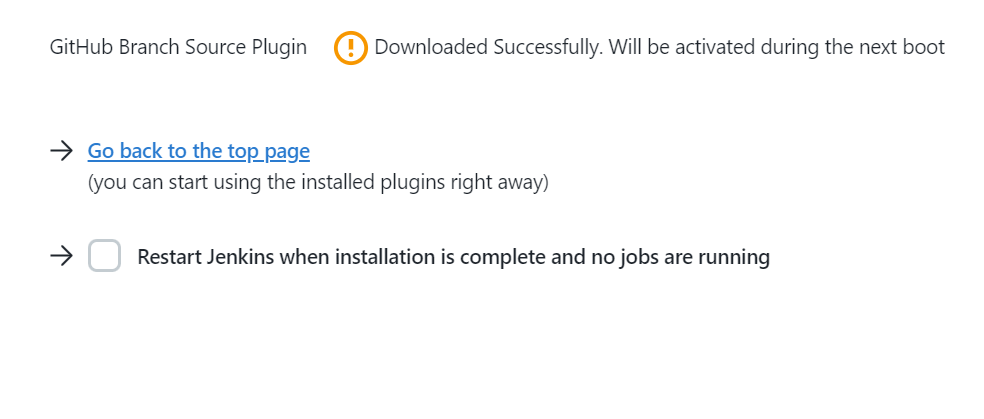
in 2.361.1 rc the checkbox is interactable (you can click on it and it pulses and it is reactive to hover in exactly the same way as an enabled checkbox ) and the text is bold - leading to confusion.
Steps to Reproduce
(on Windows - other OSes may be restartable)
Start Jenkins 2.361.1 rc (java -jar jenkins.war) and do not install any plugins.
download https://updates.jenkins.io/download/plugins/cloudbees-folder/6.714.v79e858ef76a_2/cloudbees-folder.hpi and install it using the plugin managers advance option
restart Jenkins
go to the plugin manager and check for plugin updates
select the folder plugin update and choose install.
in the resulting page check the behaviour of the checkbox and text for automatic restarting
expected behaviour
either :
* the checkbox is not interactable, and the text is greyed out to make it look disabled
* the checkbox and the text are not displayed
actual behaviour
the checkbox is interactable (hover and click, however a click does not persist state change) and the text is bold making it apear as though this should work
Originally reported by  teilo, imported from: plugin manager restart looks interactive but is not
- assignee:
 notmyfault
- status: Closed
- priority: Minor
- component(s): core
- label(s): 2.387.3-fixed, regression, ux
- resolution: Fixed
- resolved: 2023-03-20T09:41:16+00:00
- votes: 0
- watchers: 3
- imported: 2025-11-24
Raw content of original issue
not all Jenkins instances support restartability,
Notable windows with `java -jar jenkins.war`
In these cases if you upgrade a plugin it will not be available until after you restart and the plugin manage has a checkbox to "restart when complete".
Previously on windows this checkbox and text was visually disabled when the controller could not be restarted.
in 2.361.1 rc the checkbox is interactable (you can click on it and it pulses and it is reactive to hover in exactly the same way as an enabled checkbox ) and the text is bold - leading to confusion.
Steps to Reproduce
(on Windows - other OSes may be restartable)
Start Jenkins 2.361.1 rc (java -jar jenkins.war) and do not install any plugins.
download https://updates.jenkins.io/download/plugins/cloudbees-folder/6.714.v79e858ef76a_2/cloudbees-folder.hpi and install it using the plugin managers advance option
restart Jenkins
go to the plugin manager and check for plugin updates
select the folder plugin update and choose install.
in the resulting page check the behaviour of the checkbox and text for automatic restarting
expected behaviour
either :
* the checkbox is not interactable, and the text is greyed out to make it look disabled
* the checkbox and the text are not displayed
actual behaviour
the checkbox is interactable (hover and click, however a click does not persist state change) and the text is bold making it apear as though this should work
- environment:
Jenkins 2.361.1 RC


Activity
jenkins-infra-bot commentedon Aug 31, 2022
Remote link associated with this issue:
jenkins-infra-bot commentedon Sep 4, 2022
basil:
Raw content of original comment:
Regression as of what release?
jenkins-infra-bot commentedon Sep 5, 2022
Raw content of original comment:
it is known good with 2.346.2 (there is no checkbox)
jenkins-infra-bot commentedon Sep 5, 2022
basil:
Raw content of original comment:
What was the last passing weekly, and what was the first failing weekly?
jenkins-infra-bot commentedon Sep 5, 2022
Raw content of original comment:
that is a good question for someone other than me to investigate.
jenkins-infra-bot commentedon Sep 5, 2022
basil:
Raw content of original comment:
If you are unwilling to triage the ticket, then put the ux-untriaged label on it.
jenkins-infra-bot commentedon Sep 5, 2022
Raw content of original comment:
done.

is there somewhere I can find what labels I am expected to use as a reporter somewhere?  I checked the documentation but it did not mention any.
jenkins-infra-bot commentedon Sep 5, 2022
basil:
Raw content of original comment:
The use of this label came about in https://groups.google.com/g/jenkinsci-ux/c/AFe-kcqoEok/m/8gKtkeoEAQAJ wherein we discussed the increasing triage burden associated with UX tickets. At the time, I was spending the majority of my week doing nothing other than triaging UX tickets, which I felt was unsustainable for me as an individual. The label came about as a way of delineating that help is wanted in order to make it easier for volunteers to share the burden of this triage work. Ideally, members of the User Experience SIG would dedicate some amount of time to regularly triaging tickets with this label in addition to the valuable work they do on new feature development. I do not believe this process was ever documented, since it was expected that the volume of UX bugs would eventually slow down. That does not appear to have been the case, with more UX bugs on the regression dashboard than ever.