You signed in with another tab or window. Reload to refresh your session.You signed out in another tab or window. Reload to refresh your session.You switched accounts on another tab or window. Reload to refresh your session.Dismiss alert
Hmm.. seems related to JoinMarket-Org/joinmarket-clientserver#1195 and can be fixed by deleting the lock file. This file must be deleted in cases where there was a system or program crash.
/unlock will not remove the .lock file from a previously running process. Ensure no other process is running, remove .lock file and try again. If you still get the same I´d check filesystem permissions.
If you need any help, feel free to post in the Telegram group.
The ticket will not be closed immediately, as it would be nice if users don't need to do this manually after a system issue. What can be done about these situations?
e.g. it can definitely be ensured that no lock files exist at startup.. but this only partly solves the problem.
Hmm.. seems related to JoinMarket-Org/joinmarket-clientserver#1195 and can be fixed by deleting the lock file. This file must be deleted in cases where there was a system or program crash.
/unlock will not remove the .lock file from a previously running process. Ensure no other process is running, remove .lock file and try again. If you still get the same I´d check filesystem permissions.
Can reproduce the problem on unclean shutdowns. On umbrel a workaround is to remove the lock file of the wallet, e.g. wallet named "my_wallet".
(Make sure you have written down your wallet seed before executing any command)
Closing the ticket as this is addressed in all integrations using the v0.0.9 image via joinmarket-webui-docker/#39. Please reopen should this happen again.
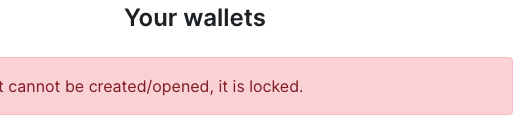
I am having same issue, except I'm running mynode. The power was cut & now i'm getting the error "jmdat cannot be created/opened, it is locked".
I've tried the above command and get the following error "No such container: jam_jam_1"
As far as I am aware, mynode does not use docker, so would you try if the directory /home/joinmarket/.joinmarket exists on your file system?
If yes, then try
Note: Please replace $wallet_name with your wallet name, e.g. if it is named "wallet", then use rm /home/joinmarket/.joinmarket/wallets/.wallet.jmdat.lock. You might need sudo or switch to user joinmarket (sudo su - joinmarket)
Is there a manual way to just access the folder & delete it - I've looked into the wallet folder, however the lock file doesn't appear to be there.
Which wallet folder did you look into? /home/joinmarket/.joinmarket/wallets?
Failing to delete the lock, can I just sweep funds after the fidelity bond runs out?
You can always restore the wallet with your seed in other software, such as Sparrow. However, the Fidelity Bond is specific to JM and needs to be spent/unlock from a JM wallet.
Would greatly appreciate any help
Hope this solves your problems or leads you in the right direction. Do not hesitate to report back if you still have questions or need help.
Apologies in advance, only a noob.
Nothing of the sort is necessary. JM is not very user-friendly (yet).
I just tried switching to user joinmarket & executing rm command. The lock file doesn't actually exist at /home/joinmarket/.joinmarket/wallets. When I go to Jam UI, the wallet is still inactive - "wallet.jmdat cannot be created/opened, it is locked".
OK so I need to find a way to unlock funds within JM, there's no other way to exit the fidelity bond - like force close a lightning channel?
Ha, it uses docker after all. Try docker ps | grep jam to get the name of the container. And try the original procedure again.
I just tried switching to user joinmarket & executing rm command. The lock file doesn't actually exist at /home/joinmarket/.joinmarket/wallets. When I go to Jam UI, the wallet is still inactive - "wallet.jmdat cannot be created/opened, it is locked".
Should be mapped to the local directory /mnt/hdd/mynode/jam/data. However, try your original approach first.
Edit: Okay, it is using the ui-only docker container. I'd suggest asking in the mynode support group. Sorry for the misguided attempt : (
OK so I need to find a way to unlock funds within JM, there's no other way to exit the fidelity bond - like force close a lightning channel?
Yes, there is no other way at the moment. Other wallets will simply "not see" the fidelity bond UTXO.
I'm having the same issue as John, currently attempting to delete the .lock file but can't find it.
I can see this directory...
(jmvenv) joinmarket@myNode:/joinmarket-clientserver/scripts $ /home/joinmarket/.joinmarket/wallets
bash: /home/joinmarket/.joinmarket/wallets: Is a directory
But I can't remove the file.
(jmvenv) joinmarket@myNode:~/joinmarket-clientserver/scripts $ rm Jam_Wallet.jmdat.lock
rm: cannot remove 'Jam_Wallet.jmdat.lock': No such file or directory
I'm having the same issue as John, currently attempting to delete the .lock file but can't find it. I can see this directory... (jmvenv) joinmarket@myNode:/joinmarket-clientserver/scripts $ /home/joinmarket/.joinmarket/wallets bash: /home/joinmarket/.joinmarket/wallets: Is a directory But I can't remove the file. (jmvenv) joinmarket@myNode:~/joinmarket-clientserver/scripts $ rm Jam_Wallet.jmdat.lock rm: cannot remove 'Jam_Wallet.jmdat.lock': No such file or directory
I do not have a running mynode instance, but based on your post, it seems you have not executed the command in the right directory.
Important: Make sure you have written down your wallet seed before executing any command!
Also, make sure JM is not running when following the steps.
Use cd (change directory) to navigate into /home/joinmarket/.joinmarket/wallets and pwd (print working directory) to verify:
joinmarket@myNode:~/joinmarket-clientserver/scripts $ cd /home/joinmarket/.joinmarket/wallets
joinmarket@myNode:~/.joinmarket/wallets $ pwd
/home/joinmarket/.joinmarket/wallets
Then use ls -al (list directory contents) to show the contents of the directory, e.g.:


Activity
yshwanth commentedon Mar 12, 2022
Same error when unlocking on Umbrel
theborakompanioni commentedon Mar 14, 2022
Hmm.. seems related to JoinMarket-Org/joinmarket-clientserver#1195 and can be fixed by deleting the lock file. This file must be deleted in cases where there was a system or program crash.
If you need any help, feel free to post in the Telegram group.
edit: "lock file" - not "log file".
theborakompanioni commentedon Mar 14, 2022
The ticket will not be closed immediately, as it would be nice if users don't need to do this manually after a system issue. What can be done about these situations?
e.g. it can definitely be ensured that no lock files exist at startup.. but this only partly solves the problem.
[-]unable to unlock wallet[/-][+]Unable to unlock wallet[/+]theborakompanioni commentedon Mar 16, 2022
Can reproduce the problem on unclean shutdowns. On umbrel a workaround is to remove the lock file of the wallet, e.g. wallet named "my_wallet".
(Make sure you have written down your wallet seed before executing any command)
docker exec -t jam_jam_1 rm /root/.joinmarket/wallets/.my_wallet.jmdat.lockmerlinoa commentedon Mar 16, 2022
Awesome thanks! I can confirm that running the above docker command resolved the issue for me.
theborakompanioni commentedon Apr 14, 2022
The next server release includes a fix that might be related to this issue: JoinMarket-Org/joinmarket-clientserver#1213
theborakompanioni commentedon Jul 21, 2022
Closing the ticket as this is addressed in all integrations using the
v0.0.9image via joinmarket-webui-docker/#39. Please reopen should this happen again.johnd1984 commentedon May 10, 2023
Hello,
I am having same issue, except I'm running mynode. The power was cut & now i'm getting the error "jmdat cannot be created/opened, it is locked".
I've tried the above command and get the following error "No such container: jam_jam_1"
I've tried switching user permission from admin to bitcoin using "sudo su - bitcoin" - same error
Is there a manual way to just access the folder & delete it - I've looked into the wallet folder, however the lock file doesn't appear to be there.
Failing to delete the lock, can I just sweep funds after the fidelity bond runs out?
Would greatly appreciate any help
Apologies in advance, only a noob.
theborakompanioni commentedon May 10, 2023
As far as I am aware, mynode does not use
docker, so would you try if the directory/home/joinmarket/.joinmarketexists on your file system?If yes, then try
Note: Please replace
$wallet_namewith your wallet name, e.g. if it is named "wallet", then userm /home/joinmarket/.joinmarket/wallets/.wallet.jmdat.lock. You might needsudoor switch to userjoinmarket(sudo su - joinmarket)Which wallet folder did you look into?
/home/joinmarket/.joinmarket/wallets?You can always restore the wallet with your seed in other software, such as Sparrow. However, the Fidelity Bond is specific to JM and needs to be spent/unlock from a JM wallet.
Hope this solves your problems or leads you in the right direction. Do not hesitate to report back if you still have questions or need help.
johnd1984 commentedon May 11, 2023
Thanks for speedy reply,
OK that makes with docker & mynode.
I just tried switching to user joinmarket & executing rm command. The lock file doesn't actually exist at /home/joinmarket/.joinmarket/wallets. When I go to Jam UI, the wallet is still inactive - "wallet.jmdat cannot be created/opened, it is locked".
OK so I need to find a way to unlock funds within JM, there's no other way to exit the fidelity bond - like force close a lightning channel?
theborakompanioni commentedon May 11, 2023
Ha, it uses docker after all. Trydocker ps | grep jamto get the name of the container. And try the original procedure again.Should be mapped to the local directory/mnt/hdd/mynode/jam/data. However, try your original approach first.Edit: Okay, it is using the
ui-onlydocker container. I'd suggest asking in the mynode support group. Sorry for the misguided attempt : (Yes, there is no other way at the moment. Other wallets will simply "not see" the fidelity bond UTXO.
johnd1984 commentedon May 11, 2023
Thanks for your help 👍
I've posted the question in mynode telegram group
I couldn't find the lock file in "/mnt/hdd/mynode/jam/data" directory either
johnd1984 commentedon May 11, 2023
is it possible to import wallet to another mynode jam, then spend funds? worst case senario
theborakompanioni commentedon May 11, 2023
Next version should be able to import wallets by seed. So yes, it should be possible "soon"™.
johnd1984 commentedon May 11, 2023
ok thanks :)
JeffBorchers commentedon Sep 4, 2023
I'm having the same issue as John, currently attempting to delete the .lock file but can't find it.
I can see this directory...
(jmvenv) joinmarket@myNode:/joinmarket-clientserver/scripts $ /home/joinmarket/.joinmarket/wallets
bash: /home/joinmarket/.joinmarket/wallets: Is a directory
But I can't remove the file.
(jmvenv) joinmarket@myNode:~/joinmarket-clientserver/scripts $ rm Jam_Wallet.jmdat.lock
rm: cannot remove 'Jam_Wallet.jmdat.lock': No such file or directory
theborakompanioni commentedon Sep 7, 2023
Hey @JeffBorchers!
I do not have a running mynode instance, but based on your post, it seems you have not executed the command in the right directory.
Important: Make sure you have written down your wallet seed before executing any command!
Also, make sure JM is not running when following the steps.
cd(change directory) to navigate into/home/joinmarket/.joinmarket/walletsandpwd(print working directory) to verify:ls -al(list directory contents) to show the contents of the directory, e.g.:joinmarket@myNode:~/.joinmarket/wallets $ ls -al -rw-------. 1 joinmarket joinmarket 0 Mar 21 02:18 Jam_Wallet.jmdat -rw-------. 1 joinmarket joinmarket 0 Apr 14 02:20 .Jam_Wallet.jmdat.lock.) and ending with.jmdat.lock, usermto delete the file (and only this file!):joinmarket@myNode:~/.joinmarket/wallets $ rm .Jam_Wallet.jmdat.lockAfter that start JM and Jam and try to unlock the wallet.
Hope this is helpful - let us know if it worked and you can access the wallet via the UI again.
oskgie commentedon Aug 31, 2024
thanks for the diligent advice so far regarding this issue. my raspi denies the very last "rm" order for the lock-file.
first it asks: "remove write-protected regular file... ?"
after confirming it denies with the message: "permission denied"
any idea how to solve this?
theborakompanioni commentedon Sep 2, 2024
Depends on your setup. Try removing it with the user that owns the file (find out with
ls -l .<wallet_name>.jmdat.lock) or usesudo.As said above: Make sure you have written down your wallet seed before executing any command! Also, make sure JM is not running.