A command-line tool to automatically organize files in a directory by their types.
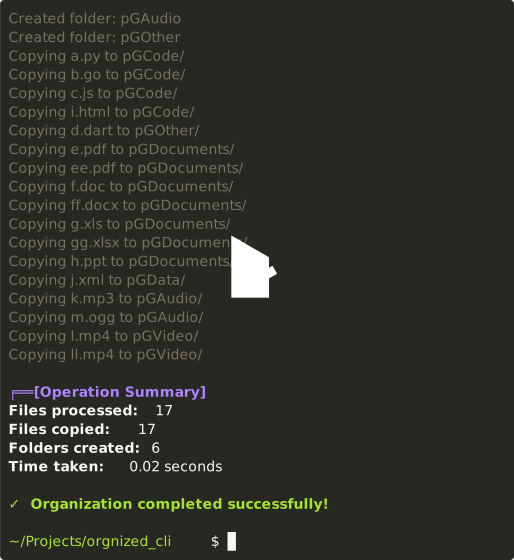
- Automatically categorizes files by extension (documents, images, videos, etc.)
- Creates organized folder structure with configurable prefix
- Supports both copy (default) and move (--delete) modes
- Multiple conflict resolution strategies (rename, skip, overwrite)
- Dry-run mode to preview changes
- Detailed statistics and error reporting
- User confirmation before making changes
- Handles edge cases (permissions, existing folders, etc.)
- Ensure you have Python 3.6+ installed
- Clone this repository or download the script:
git clone https://github.com/karvanpy/orgnized-cli.git
cd orgnized-cli
- (Optional) Make the script executable:
chmod +x orgnized-cli.py
You can install using pip or pipx -> pip install orgnized-cli or execute directly without installation via uvx orgnized-cli
Basic syntax:
./orgnized-cli.py [DIRECTORY] [OPTIONS]
- Organize files (copy mode - keeps originals):
./orgnized-cli.py ~/Downloads
- Organize files by moving them (deletes originals):
./orgnized-cli.py ~/Downloads --delete
- Preview what would happen (dry-run mode):
./orgnized-cli.py ~/Downloads --dry-run --verbose
- Custom folder prefix and conflict handling:
./orgnized-cli.py ~/Downloads --prefix "sorted_" --conflict skip
| Option | Description |
|---|---|
| --delete | Move files instead of copying (deletes originals) |
| --dry-run | Preview changes without actually making them |
| --verbose | Show detailed output of operations |
| --prefix TEXT | Prefix for organized folders (default: "orgz") |
| --conflict | How to handle conflicts: "rename" (default), "skip", or "overwrite" |
The tool organizes these file categories by default:
- Images: .jpg, .jpeg, .png, .gif, .bmp, .tiff, .webp, .svg, .heic, .raw
- Documents: .pdf, .doc, .docx, .txt, .rtf, .odt, .xls, .xlsx, .ppt, .pptx, .md
- Audio: .mp3, .wav, .flac, .aac, .ogg, .m4a, .wma, .opus
- Video: .mp4, .avi, .mkv, .mov, .wmv, .flv, .webm, .m4v, .3gp
- Archives: .zip, .rar, .7z, .tar, .gz, .bz2, .xz, .iso
- Code: .py, .js, .html, .css, .java, .cpp, .h, .php, .rb, .sh, .pl
- Data: .csv, .json, .xml, .yaml, .yml, .sql, .db
- Executables: .exe, .msi, .dmg, .pkg, .deb, .rpm, .apk
- Fonts: .ttf, .otf, .woff, .woff2, .eot
Files with unknown extensions go to "Other" category.
- You specify a directory to organize
- The tool analyzes files and shows what changes it will make
- You confirm the operation
- The tool:
- Creates category folders (if they don't exist)
- Copies or moves files to appropriate folders
- Handles naming conflicts based on your preference
- Preserves file metadata when copying
- Provides a summary of actions taken
Contributions are welcome! Here's how:
- Fork the repository
- Create a feature branch ("git checkout -b feature/your-feature")
- Commit your changes ("git commit -am 'Add some feature'")
- Push to the branch ("git push origin feature/your-feature")
- Open a Pull Request
MIT License. See LICENSE file for details.
If you find this tool useful, consider starring the repository! For issues or feature requests, please open an issue on GitHub.