
Geolocate a photo by the length of a shadow, entirely in your browser.
ShadowFinder Web is a browser-based port of Bellingcat's ShadowFinder. From an object, its shadow, and the date and time, it maps every place on Earth where that shadow could fall. No setup, accounts, Jupyter or Colab. Drop an image, mark three points, pick a time, hit calculate. No uploads. No server. Everything runs locally in your browser.
Try it live → kluter.github.io/ShadowFinder-Web

This project would not exist without the original ShadowFinder, created by Galen Reich at Bellingcat, with contributors Jordan Gillard, Thomas Ellmenreich and Boris Nezlobin. They did the hard part. ShadowFinder Web is a faithful re-implementation of their algorithm in JS.
If you use this tool in research, cite the original project.
The original is brilliant, but getting a result takes work:
A Google sign-in for Colab, measuring shadow pixels in a separate tool, and pasting numbers into code cells. ShadowFinder Web removes those steps and wraps the method in a clean, guided interface.
| Aspect | Original notebook | ShadowFinder Web |
|---|---|---|
| Measuring | a separate image tool, then paste numbers | click base, top and shadow tip on the image |
| Running it | edit and run code cells | a guided five-step interface |
| Date and time | type it in | type it in, or autofill from EXIF if present |
| Bad geometry | no warning | live shadow-angle warning (experimental) |
| Result | a static PNG |
an interactive map (Dark, OpenStreetMap, Satellite) |
| To start | Colab and a Google sign-in | open a web page |
Shadow length is only accurate when the camera is side-on to the shadow (it runs left to right across the frame, about 90 degrees to the object). Point it toward or away from the camera and perspective distorts the shadow's apparent length, skewing the height-to-shadow-length ratio the tool depends on, so the band lands in the wrong place. The tool measures this angle and warns you.
The tool grades the object-to-shadow angle like this:
| Angle, object to shadow | Verdict |
|---|---|
88° to 98° |
🟢 good, reliable |
85° to 87°, or 99° to 109° |
🟡 borderline, usable |
< 85° or > 109 |
🔴 likely wrong |
These thresholds are experimental, set by feel rather than rigorous testing. Contributions to refine them are welcome.
- Drop a photo on the left panel (or click Browse).
- Mark three points: the base of the object, its top, then the shadow tip.
- Set the date and time (or click Use this
date & timefromEXIF). Pick UTC or Local. - Calculate. The bright band shows every location where that shadow could occur.
The band is every place the shadow could fall, a search space, not a pin.
- Brightest is the best match, fading out toward the 20% edge.
- Expect a long curved band (often two), not a dot; a tighter band means better input.
- It only rules places out. Combine it with terrain, climate, and other clues to narrow down.
- Sun positions come from SunCalc, the JS equivalent of the original's
suncalcpackage. - The world is sampled on a
0.5 degree grid(latitude -60 to 85). Each point's sun altitude gives the expected shadow ratioheight / tan(altitude), compared to yours. - Points within a 20% band are drawn, brightest where the match is exact, the same band the original produces.
- Local mode uses Bellingcat's
timezone_grid.jsonto convert your local time to UTC at every point before computing the sun.
Checked against the Original: height 10, shadow 8, 2024-02-29 12:00 UTC reproduces the ring from its README.
The one deliberate difference is the projection: the original is a static equirectangular plot, while ShadowFinder Web uses an interactive Web Mercator map you can zoom into. Same band, same data, just curved more toward the poles. A flat layout would mean dropping Leaflet's tiles, which are Web Mercator only.
For the full method and worked examples, see Bellingcat's article.
Three cases with known answers:
| Test | Date and time | Expected |
|---|---|---|
Manual Input: Height 10, Shadow 8 |
2024-02-29 12:00:00 UTC |
The ring from the original's README |
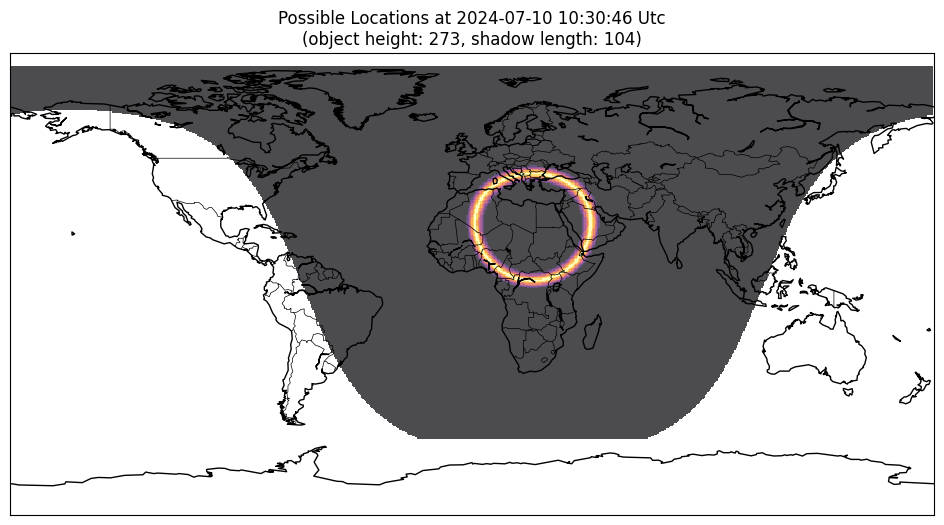
| A Sunny Seaside Image | 2024-07-10 10:30:46 UTC |
Bellingcat's Result Map |
| A still from this Rainbolt Video | 2024-05-03 11:17:41 Local |
The result revealed in the video |

Mind the Rainbolt date format: the video writes it 05 03 2024, month-first, so that is 3 May, not 5 March. Enter the wrong one and the band lands in the wrong place.
| Rainbolt's test photo | Rainbolt's result |
|---|---|
 |
 |
A static site, no build step. Serve the folder with anything:
# any static server works, for example
npx serve .
# or VS Code's Live Server extensionYour photo never leaves your browser. It is drawn into a canvas and its EXIF is read in memory, no upload, no server. Confirm it yourself: open DevTools (F12) → Network, load an image, and no request carries it. Any EXIF text is escaped before it is shown, so a crafted file cannot inject anything.
The only outbound requests are map tiles (CARTO, OpenStreetMap, Esri) and the Leaflet library. The only thing stored is your chosen map layer, in localStorage (sf-tileset), no image data, no coordinates.
// Every network request ShadowFinder Web makes:
// GET unpkg.com/leaflet@1.9.4/...   (the map library, once)
// GET .../tile/{z}/{x}/{y}          (map tiles)
// GET timezone_grid.json            (local file, Local mode only)
// No image, no coordinates, nothing else.ShadowFinder Web is plain HTML, CSS, and JavaScript with no build step. Its logic lives in js/script.js, unminified, so what you read is what runs.
| Library | Loaded from | Touches your data? |
|---|---|---|
| Leaflet | CDN (unpkg) | No, renders map tiles only |
| SunCalc | bundled in js/ |
Locally only, no network |
| exifr | bundled in js/ |
Locally only, no network |
Only Leaflet comes from a CDN; swap it for a local copy to run fully offline.
It was built with AI assistance, disclosed on purpose because the risks of opaque, AI-generated OSINT tools are real. The fix is not to hide it, but to keep the code readable so anyone can verify it.
- Map tiles reveal the area you view. Tile requests encode the map coordinates, so a tile server can infer where you are looking. Use a VPN if that matters.
- One CDN dependency. Leaflet loads from unpkg. A compromised CDN could in theory serve malicious code, but this is highly unlikely; self-host Leaflet to rule it out entirely.
- Browser and OS trust. If your browser or system is compromised, no web app can protect you.
You may also like  TracePoint, my other browser geolocation tool. It finds where a photo was taken by intersecting lines of sight.