
Turn a folder (or zip) of transparent PNG frames into a WebM, MOV, GIF or MP4, with the transparency intact.



Exported an animation from Blender, After Effects, a canvas or an AI tool as a PNG sequence and need it on a website, in a video editor or in a chat? One command:
aether-renderer-core -i frames/ -o animation.webm
web2vid.com · Docs & CLI · Project page · Download · GUI app · Changelog
- 🫧 Transparent output in WebM (VP9), MOV (ProRes 4444) and GIF; MP4 for when you don't need alpha
- 📦 Frames from a folder or a ZIP (macOS
__MACOSX/._files are skipped) - 🚰 Or a PNG stream on stdin (
-i -), e.g. piped from aether-renderer-capture: no temp files - 🔢 Frames in natural order:
frame_2.pngcomes beforeframe_10.png, with or without zero padding - 🌗 Fade in / fade out that fades to transparent (or to your background color), not to black
- 🎨 Background color (
--background '#1e1e1e') to flatten transparency onto a solid color, for any format - 📊 Real progress: a frame counter with
--verbose, JSON lines with--progress json, and a callback for library users - 🎛️ Options on the command line, in a JSON or TOML config, or both (the command line wins)
- 🖼️ Preview a single frame without rendering
- 💻 macOS, Linux and Windows, with prebuilt binaries
- 🦀 Also a Rust library: the Aether Renderer GUI is built on it
| Format | Transparency | Best for |
|---|---|---|
webm (default) |
✅ | Websites (Chrome, Firefox, Edge), small files |
mov |
✅ full quality | Video editors: Premiere, DaVinci Resolve, Final Cut, After Effects |
gif |
✅ on/off per pixel | Chat, email, README files, anywhere video isn't allowed |
mp4 |
❌ | Everything else, social media, maximum compatibility |
The format is taken from the output file name (-o loop.gif renders a GIF), or set it with --format.
MP4 can't store transparency, so transparent areas become black. To match the page
or video the clip will sit on, give it that color: --background '#1e1e1e'. The
same flag works for every format and makes the output opaque; fades then go to that color.
Safari does not play transparent WebM. For transparent video on Safari, use a GIF, or serve a HEVC-with-alpha version next to the WebM (on the roadmap).
You need ffmpeg on your PATH:
brew install ffmpeg            # macOS
sudo apt install ffmpeg        # Ubuntu / Debian
winget install Gyan.FFmpeg     # Windows
Then either download a binary from Releases
(macOS Apple Silicon and Intel, Linux, Windows), or install with Cargo. The macOS binaries are signed
and notarized by Apple and the Windows .exe is signed (from v0.7.0), so they run without security warnings:
cargo install aether-renderer-core# folder of PNGs -> transparent WebM at 30 fps
aether-renderer-core -i frames/ -o out.webm
# from a zip, as a GIF at 24 fps
aether-renderer-core -i frames.zip -o out.gif --fps 24
# for a video editor, with a soft 1 second fade in and out
aether-renderer-core -i frames/ -o out.mov --fade-in 1 --fade-out 1
# higher quality WebM (lower crf = better, default 30)
aether-renderer-core -i frames/ -o out.webm --crf 20
# only some files, or a numbered sequence
aether-renderer-core -i renders/ -o scene1.webm --file-pattern 'scene1_*.png'
aether-renderer-core -i renders/ -o out.webm --file-pattern 'frame_%04d.png'
# check a frame first: saves the middle frame (or frame 12) as out.png
aether-renderer-core -i frames/ -o out.webm --preview
aether-renderer-core -i frames/ -o out.webm --preview 12
# PNG files back to back on stdin, straight from another program
aether-renderer-capture -i anim.html --stdout -d 4 | aether-renderer-core -i - -o out.webm --frames 120| Option | Default | Description |
|---|---|---|
-i, --input |
required | Folder or .zip with the frames, or - for a PNG stream on stdin |
--frames |
With -i -: how many frames the stream has. Optional; gives a real progress percentage and is needed for --fade-out |
|
-o, --output |
output.<format> |
Output file |
--format |
from the output extension, else webm |
webm, mov, gif or mp4 |
--fps |
30 |
Frames per second |
--file-pattern |
*.png |
Glob (scene_*.png) or numbered sequence (frame_%04d.png) |
--background |
transparent (black for mp4) | Solid color behind the frames: '#1e1e1e', '#fff', white or transparent |
--fade-in |
0 |
Seconds to fade in from transparent (from the background color if set) |
--fade-out |
0 |
Seconds to fade out at the end |
--crf |
webm 30, mp4 23 |
Constant quality, lower is better (webm 0–63, mp4 0–51) |
--bitrate |
Target bitrate instead, e.g. 2M (if both are set, --crf wins) |
|
--preview [N] |
Save frame N (default: the middle frame) as a PNG instead of rendering |
|
--open |
Open the result when done | |
-c, --config |
JSON or TOML config file, see below | |
-v, --verbose |
Details and a progress bar | |
--progress json |
One JSON object per line on stdout, for GUIs and scripts (see below) | |
--verbose-ffmpeg |
Show ffmpeg's own output |
If ffmpeg fails, the error shows ffmpeg's own explanation, and no half-written file is left behind.
With --progress json, every line on stdout is a JSON object, so a GUI or script
can draw its own progress bar:
{"event":"progress","frame":0,"total_frames":360,"percent":0.0}
{"event":"progress","frame":96,"total_frames":360,"percent":26.67}
{"event":"progress","frame":360,"total_frames":360,"percent":100.0}
{"event":"done","output":"out.webm","frames":360,"warnings":[],"notes":"Video render complete."}
On failure the last line is {"event":"error","message":"..."} and the exit code is 1.
With a stream on stdin and no --frames, total_frames is 0 (unknown) and
percent stays 0 until the end; done still reports the frame count.
Progress comes from ffmpeg about twice a second. GIFs need every frame before they
can be written, so their progress mostly jumps to 100% at the end.
Every option can live in a .json or .toml file; anything you also pass on the
command line overrides the file. Handy for keeping a project's settings next to its
frames:
# render.toml
input = "frames"
output = "loop.webm"
fps = 24
fade_in = 0.5
fade_out = 0.5
crf = 24
background = "#1e1e1e"   # optional
aether-renderer-core --config render.toml
aether-renderer-core --config render.toml --fps 60 -o draft.mov # overrideThe same in JSON: examples/example_config.json. Relative paths are relative to the folder you run the command from.
[dependencies]
aether-renderer-core = "0.7"
use aether_renderer_core::config::PartialConfig;
let cfg = PartialConfig {
input: Some("frames".into()),
output: Some("out.webm".into()),
fps: Some(24),
..Default::default()
}
.into_config()?;
let report = aether_renderer_core::render(cfg)?;
println!("{}", report.summary());For a progress bar, use render_with_progress:
let report = aether_renderer_core::render_with_progress(cfg, |p| {
    println!("{:.0}% ({}/{} frames)", p.percent, p.frame, p.total_frames);
})?;
To render a PNG stream from any reader (no temp files), use render_stream.
The frame count is optional:
let frames = std::process::Command::new("aether-renderer-capture")
    .args(["-i", "anim.html", "--stdout"])
    .stdout(std::process::Stdio::piped())
    .spawn()?
    .stdout
    .unwrap();
aether_renderer_core::render_stream(cfg, frames, Some(60), |p| {
    println!("{}/{} frames", p.frame, p.total_frames);
})?;
RenderConfig::from_file("render.toml") loads a config file, and
aether_renderer_core::preview_frame extracts a single frame.
cargo test                      # ffmpeg tests are skipped when ffmpeg is missing
cargo clippy --all-targets -- -D warnings
cargo fmt
The tests render real transparent, odd-sized frames to every format and check the
result with ffprobe: size, frame rate, codec and alpha. CI runs them on Linux, macOS
and Windows.
A single frame duplicated N times, rendered to WebM:
| Frames | Total time (s) | Avg time/frame (ms) |
|---|---|---|
| 1 | 1.17 | 1173.9 |
| 100 | 1.79 | 17.9 |
| 1000 | 13.13 | 13.1 |
| 10000 | 112.07 | 11.2 |
Measured with 0.4 (VP8). 0.5 uses VP9, which in our tests takes about 20% longer and gives files about 40% smaller at better quality.
Prefer drag and drop? The Aether Renderer GUI is a desktop app built on this crate.
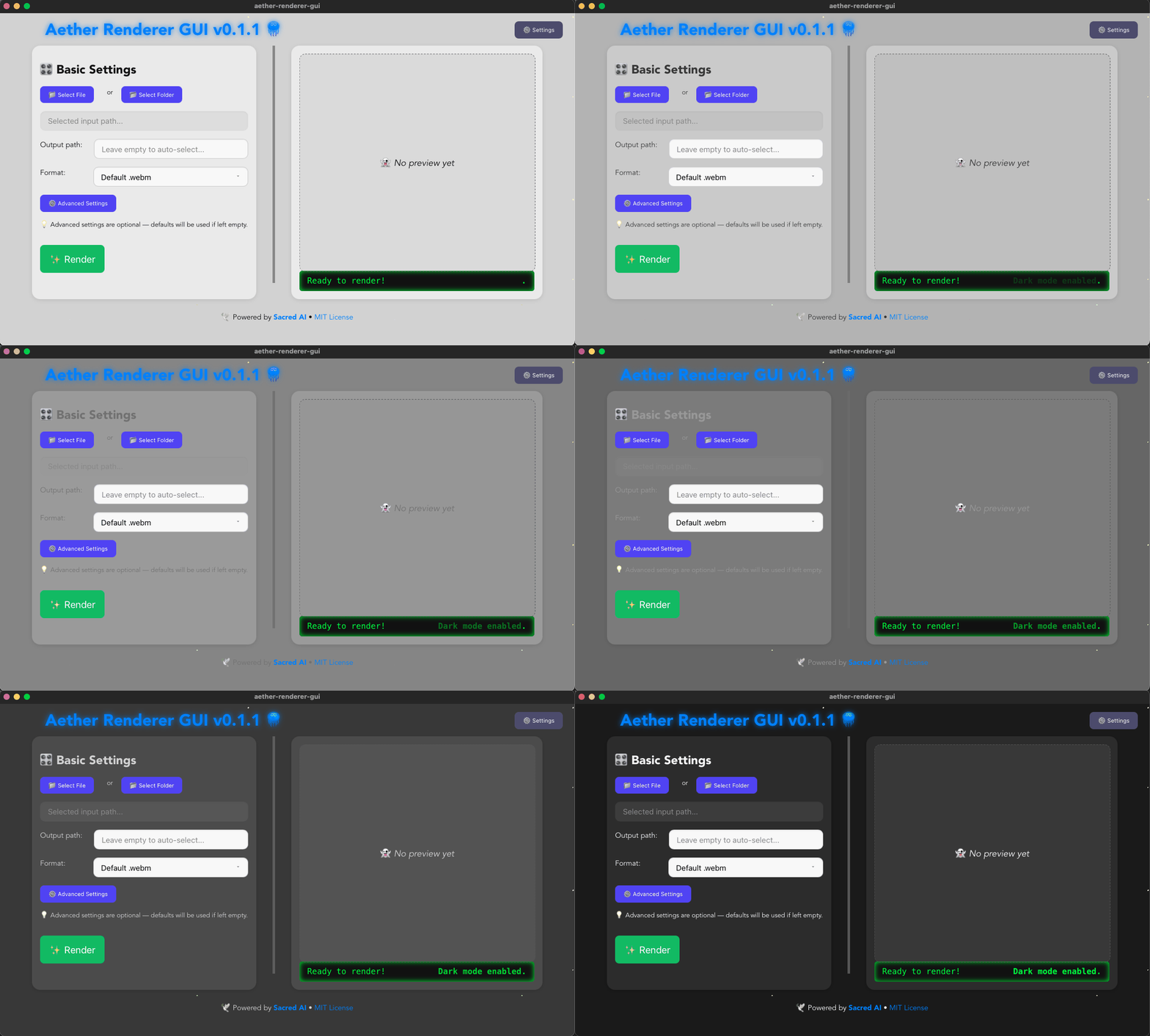
Download the installer from the GUI releases.
Try it with sacred-stars.zip:
aether-renderer-core -i sacred-stars.zip -o stars.webm- WebM with alpha, MP4, GIF
- Bitrate / CRF quality control, fades
- Preview a single frame
- GUI version with Tauri
- ProRes 4444 MOV, TOML config, config + CLI override, Windows-safe input (0.5)
- Background color for any format, real progress bar and
--progress json(0.6) - Safari-ready transparent video (HEVC with alpha) and a
--format webthat writes both - Resize and crop (
--width,--height) - Frames from a PNG stream on stdin (
-i -), for piping from capture, canvas and AI tools (0.7) - Raw RGBA frames on stdin, for programs that produce pixels instead of PNGs
Ideas and bug reports are welcome in issues.
Licensed under either of
- Apache License, Version 2.0 (LICENSE-APACHE or https://www.apache.org/licenses/LICENSE-2.0)
- MIT license (LICENSE-MIT or https://opensource.org/licenses/MIT)
at your option.
Unless you explicitly state otherwise, any contribution intentionally submitted for inclusion in the work by you, as defined in the Apache-2.0 license, shall be dual licensed as above, without any additional terms or conditions.
Made by Mads Paaskesen at Hardcore Websmith and MP-IT.
Need custom rendering pipelines, video automation or a Rust/Node.js backend? Get in touch.