Contract-first backend framework for Bun and Node.
Define your API once — get an HTTP API, MCP tools, AI-agent tools and a typed client.




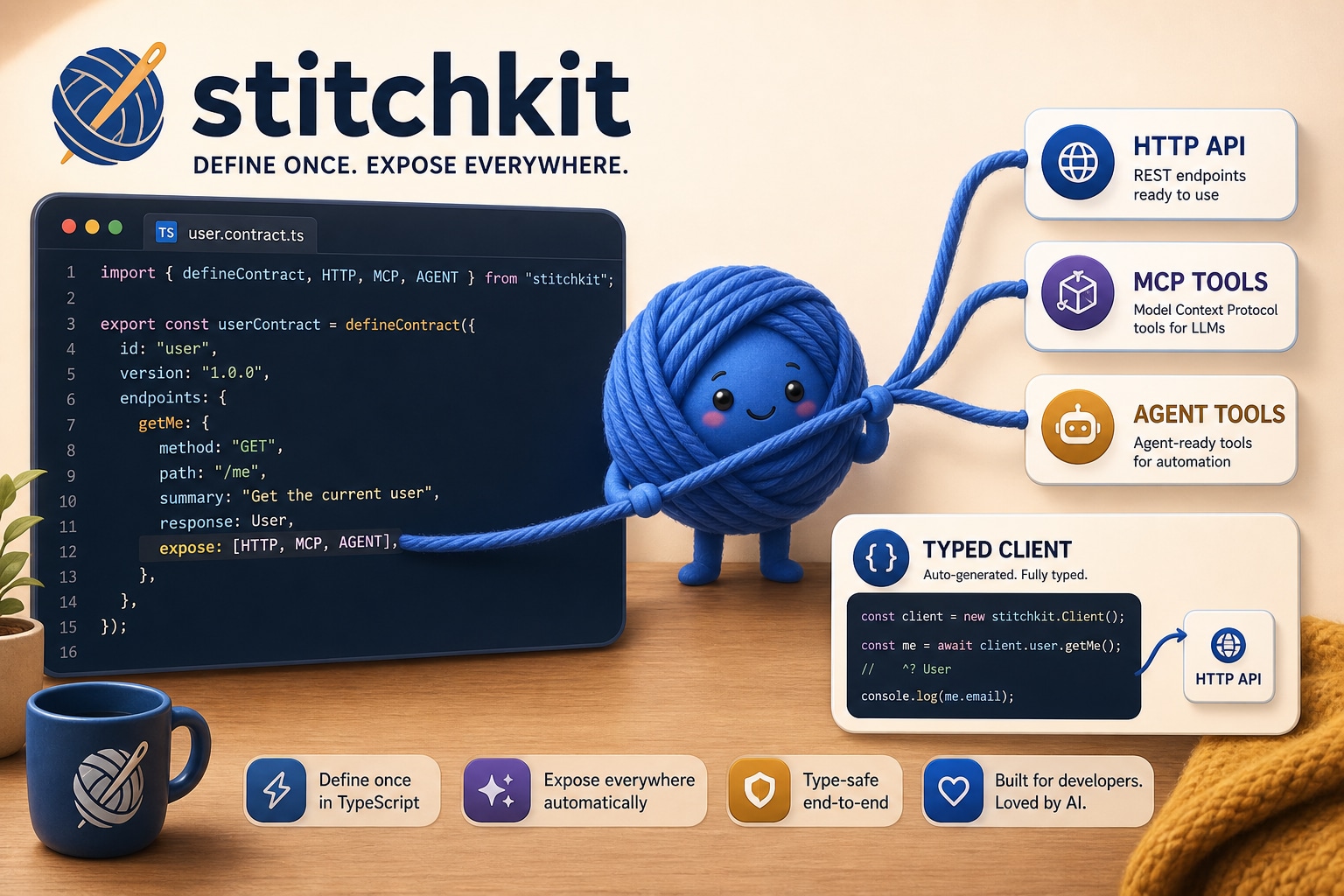
One defineContract() → an HTTP API, MCP tools and AI-agent tools on the server — plus a fully-typed client to call them.
- One contract, four surfaces. Define your API once — get HTTP routes, MCP tools (for Claude/Cursor), AI SDK tools (for agents), and a typed client.
- Zero HTTP framework deps. Built on
Bun.serve()(Bun) orsrvx(Node). No Hono, no Elysia, no Express. - Fullstack type safety. Server handlers, client calls, MCP tools — all typed from the same contract.
- Small. ~4000 lines of source. No magic, no codegen, no build step.
- Thin over what you already use. WebSocket = Socket.IO (
createSocketIOClient/createSocketIOServer). React data layer =react-query-kit(createCursorQuery). stitchkit owns the contract and the transport — not its own competing WebSocket or hook engine.
A modern backend exposes the same operations three ways — an HTTP API for the app, MCP tools for assistants like Claude and Cursor, and tool definitions for AI agents. Written by hand, that is one surface described three times: three places to drift, three places to keep in sync. stitchkit collapses them into a single contract — change it once, every surface and the typed client move together.
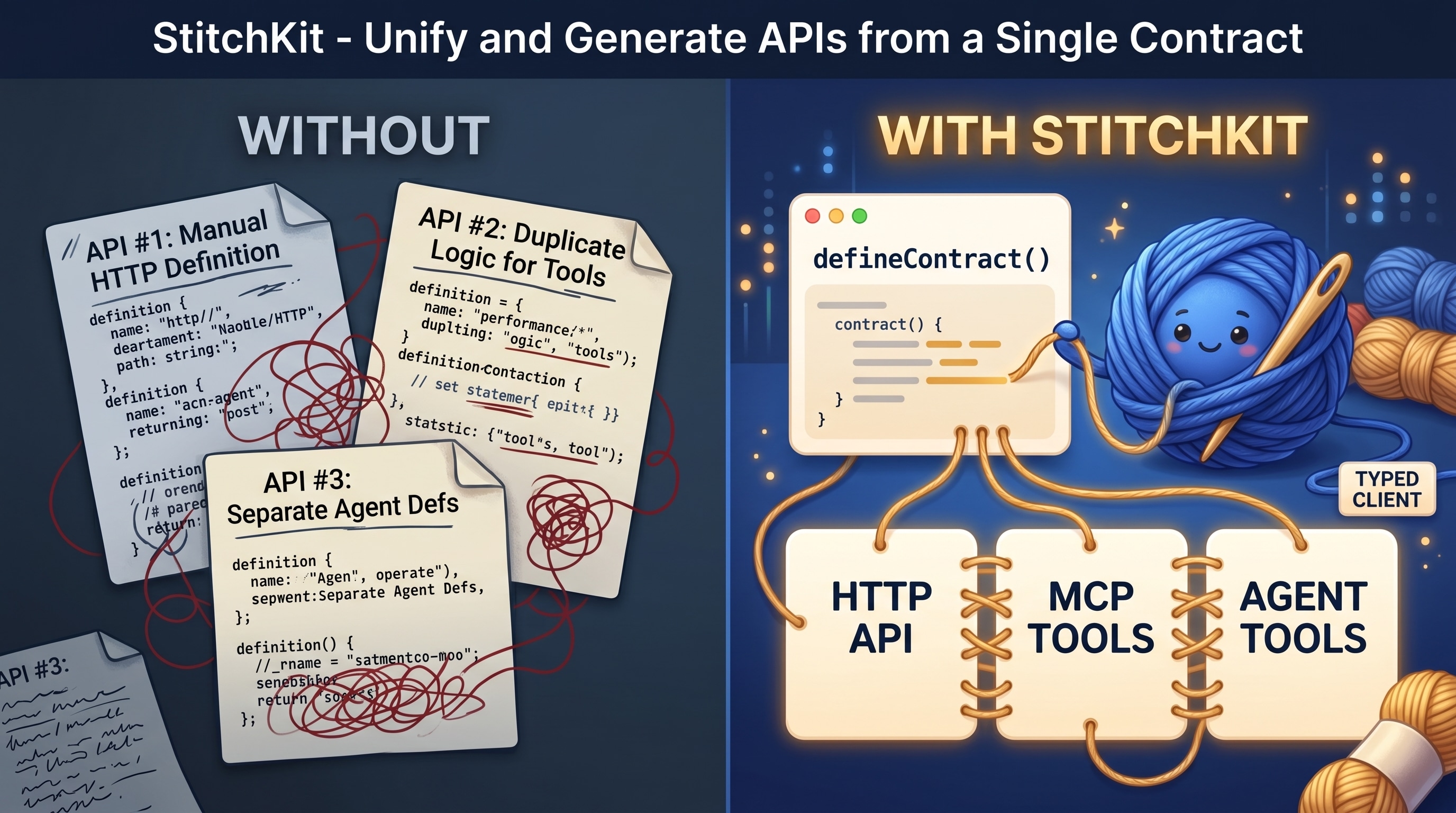
Pre-1.0. The core is stable and covered by tests, but the public API may still
change between minor versions until 1.0. Bun is first-class; Node ≥ 22 is
supported via stitchkit/node.
bun add stitchkit        # Bun
npm install stitchkit    # Node
pnpm add stitchkit # pnpmBrowser code imports browser-safe entrypoints:
import { defineContract, createClient, createHttpClient } from 'stitchkit'
import { createSocketIOClient } from 'stitchkit'
import { createCursorQuery, createCacheBridge } from 'stitchkit/react'
import { parseSSE } from 'stitchkit'
Server code imports server entrypoints:
import { createServer, createHandler, implement } from 'stitchkit/server'
import { createSocketIOServer, createAuthHook } from 'stitchkit/server'
import { createMcpHandler, mountAgent } from 'stitchkit/tools'
The root stitchkit entrypoint is browser-safe. Server and tool code live behind stitchkit/server and stitchkit/tools.
// shared/contracts.ts
import { defineContract } from 'stitchkit'
import { z } from 'zod'

const UserSchema = z.object({ id: z.string(), name: z.string() })
const CreateUserSchema = z.object({ name: z.string() })
const IdSchema = z.object({ id: z.string() })

export const users = defineContract({ prefix: 'users' }, {
  list:   { method: 'GET',    path: '/',    desc: 'List all users',  output: z.array(UserSchema) },
  create: { method: 'POST',   path: '/',    desc: 'Create a user',   input: CreateUserSchema, output: UserSchema },
  get:    { method: 'GET',    path: '/:id', desc: 'Get user by ID',  params: IdSchema, output: UserSchema },
  delete: { method: 'DELETE', path: '/:id', desc: 'Delete a user',   params: IdSchema },
})// server/index.ts
import { implement, createServer } from 'stitchkit/server'
import { users } from '../shared/contracts'
const service = implement(users, {
list: (ctx) => db.users.findMany(),
create: (ctx) => db.users.create({ name: ctx.input.name }),
get: (ctx) => db.users.findById(ctx.params.id),
delete: (ctx) => db.users.delete(ctx.params.id),
})
createServer({ services: [service], port: 3000 })// client/api.ts
import { createClient, createHttpClient } from 'stitchkit'
import { users } from '../shared/contracts'
const http = createHttpClient({ baseUrl: '/api' })
export const api = createClient(users, http)
await api.list() // GET /users → User[]
await api.create({ name: 'Max' }) // POST /users → User
await api.get({ id: '123' }) // GET /users/123 → UserFor many contracts at once, use createClients(contractRegistry, http).
stitchkit does not ship its own hook engine — pair the typed client with
react-query-kit, wrapping
the client methods directly:
import { createMutation, createQuery } from 'react-query-kit'
import { api } from './api'

export const useUsers = createQuery({ queryKey: ['users'], fetcher: () => api.list() })
export const useCreateUser = createMutation({ mutationFn: api.create })
For cursor-paginated lists, createCursorQuery is the canonical helper:
import { createCursorQuery } from 'stitchkit/react'
import { api } from './api'

export const useFeed = createCursorQuery({ queryKey: ['feed'], endpoint: api.feed.list })
It injects cursor from the page param and bakes in getNextPageParam. Page
size is the server's call — the contract's limit default — never the client's.
import { createMcpHandler } from 'stitchkit/tools'

const handleMcp = createMcpHandler({
  serverInfo: { name: 'my-app', version: '1.0.0' },
  auth: (req) => resolveApiKey(req),     // → identity, or null for 401
  services: [service],                   // contract endpoints with expose: ['MCP']
})
// mount `handleMcp` under /mcp — no @modelcontextprotocol/sdk import in your appimport { mountAgent } from 'stitchkit/tools'
import { generateText } from 'ai'
const tools = mountAgent(service, { context: { userId: 'agent-1' } })
const result = await generateText({ model, tools, prompt: 'Create a user named Max' })stitchkit's WebSocket layer is Socket.IO — polling fallback, heartbeat, acks,
a mature client. The wrappers cover the boilerplate.
// Server
import { createServer, createSocketIOServer } from 'stitchkit/server'

const socket = createSocketIOServer<ServerToClientEvents, ClientToServerEvents>({
  cors: { origin: 'https://app.example.com' },
})

socket.io.on('connection', (s) => { /* rooms, handshake auth — your domain logic */ })

createServer({
  services: [service],
  websocket: socket.websocket,    // → Bun.serve
  rawRoutes: [socket.route],      // ready /socket.io/* route
})
// Client
import { createSocketIOClient } from 'stitchkit'
const socket = createSocketIOClient<ServerToClientEvents, ClientToServerEvents>({
url: 'https://api.example.com',
})
socket.connect()
socket.on('notification', (data) => console.log(data)) // typed
socket.emit('join', { room: 'r1' }) // typedSync Socket.IO events into the TanStack Query cache. Transport-agnostic — it
takes any emitter with on(event, handler) => unsubscribe (the
createSocketIOClient result qualifies).
import { createCacheBridge } from 'stitchkit/react'

const bridge = createCacheBridge({
  socket,
  queryClient,
  handlers: {
    notification: (data, ctx) => {
      if (ctx.isFresh(['notes'])) return            // skip echo of own mutation
      ctx.queryClient.setQueryData(['notes'], data)
    },
  },
})
bridge.connect()
// in a mutation: onSuccess: () => bridge.markFresh(['notes'])import { streamSSE } from 'stitchkit/server' // server: AsyncGenerator → SSE Response
import { parseSSE } from 'stitchkit' // client: Response → AsyncGenerator| Feature | API |
|---|---|
| Contract | defineContract() — single source of truth for your API |
| HTTP Server | createServer() / createHandler() — Bun.serve, validation, hooks, raw routes |
| MCP Tools | createMcpHandler() / mountMcp() — MCP tools from contracts |
| Agent Tools | mountAgent() — Vercel AI SDK tools from contracts |
| Typed Client | createClient() / createClients() — typed fetch from contracts |
| Cursor Pagination | createCursorQuery() — react-query-kit infinite query from a contract method |
| WebSocket | createSocketIOClient() / createSocketIOServer() — typed Socket.IO wrappers |
| Cache Bridge | createCacheBridge() — socket events → TanStack Query cache |
| Auth | createAuthHook() / createBearerResolver() — scope-aware auth from contract.scope |
| SSE Streaming | streamSSE() / parseSSE() — async generator ↔ SSE |
| Events | createEventBus<EventMap>() — typed in-process pub/sub |
| Multipart | parseMultipart() — file upload with field validation |
| Rate Limiting | createRateLimiter() — token bucket, per-key |
| Cache | createCache() — in-memory with TTL + cacheHeaders() |
| Errors | AppError, notFound(), badRequest(), unauthorized() |
A modern backend exposes the same operations as an HTTP API, as MCP tools and as AI-agent tools. Most stacks make you describe each surface separately.
| Without stitchkit | With stitchkit | |
|---|---|---|
| Define an operation | once per surface — HTTP, MCP, agent (3×) | once — defineContract() |
| Keep the surfaces in sync | manual; they drift apart | cannot drift — one source |
| Typed client | hand-written, or a codegen step | inferred from the contract |
| Expose a new surface | re-describe every endpoint | flip expose — already typed |
Versus other typed-API tools:
| Capability | stitchkit | tRPC | ts-rest | Hono / Elysia |
|---|---|---|---|---|
| Contract is plain data — no decorators, no codegen | ✅ | ✅ | ❌ | |
| Inferred typed client | ✅ | ✅ | ✅ | |
| Plain HTTP REST routes | ✅ | ✅ | ✅ | |
| MCP tools from the same contract | ✅ | ❌ | ❌ | ❌ |
| AI-agent tools from the same contract | ✅ | ❌ | ❌ | ❌ |
| No HTTP-framework dependency | ✅ | ✅ | ✅ | — it is one |
The line no other tool draws: the same contract becomes MCP tools and AI-agent tools — not just an HTTP API and a client. That is what stitchkit is for.
createServer({
  services: [service],
  hooks: {
    onRequest(req) { },              // logging, rate limiting
    beforeHandle(ctx, endpoint) { }, // auth, scope checks
    afterHandle(ctx, result) { },    // transform, cache headers
    onError(ctx, error) { },         // error formatting
  },
})Contracts carry a scope; createAuthHook enforces it on every transport from
one declarative rules map:
import { createAuthHook, createBearerResolver } from 'stitchkit/server'

const authHook = createAuthHook<User>({
  resolve: (ctx) => resolveSession(ctx),
  rules: {
    public: 'public',
    user: 'authenticated',
    admin: (user) => user.isAdmin,
  },
})

createServer({ services, hooks: { beforeHandle: authHook } })stitchkit ships with one runtime dependency. Everything else is an optional peer — an install pulls in only what the project actually uses.
| Dependency | Kind | Why this one |
|---|---|---|
ky |
bundled, runtime | The HTTP client behind the typed client — ~13 KB, fetch-based, with retry, hooks and timeouts built in. The only thing stitchkit installs for you. |
zod |
peer, required | Schemas are the single source of truth. A peer so your app and stitchkit share one zod instance — z.infer types and instanceof checks break across two copies. |
@modelcontextprotocol/sdk |
peer, optional | Only stitchkit/tools — the MCP server. |
ai |
peer, optional | Only stitchkit/tools — agent tools (Vercel AI SDK). |
@tanstack/react-query + react-query-kit |
peer, optional | Only stitchkit/react — createCursorQuery, createCacheBridge. |
socket.io / @socket.io/bun-engine / socket.io-client |
peer, optional | Only the Socket.IO wrappers. |
Why peers, not bundled. A peer is resolved once, by your app — framework and
app code share a single instance. Bundled copies would double zod, split the
react hook runtime and break instanceof. Optional peers mean an app that
never touches MCP never installs the MCP SDK. → ADR 0011
The framework itself is small — ~4000 lines, no codegen, no build step in your app.
A complete runnable app lives in packages/starter — a
notes CRUD with a contract, a typed client, react-query-kit hooks and a
Socket.IO live-reload.
This README is the quick start. The full guide and API reference are in
docs/:
- Guide — getting started · contracts · HTTP server · typed client · MCP & agents · realtime · auth & errors · testing & deployment
- API reference — every export, by entrypoint.
- Roadmap — where stitchkit is going.
- Architecture decisions — the why behind the design.
Issues and PRs are welcome — see CONTRIBUTING.md. Released changes are in CHANGELOG.md; security issues go through SECURITY.md.
MIT © Max Listov