Repository navigation
Masonry, isotope, packery images overlapping in Safari #671
Description

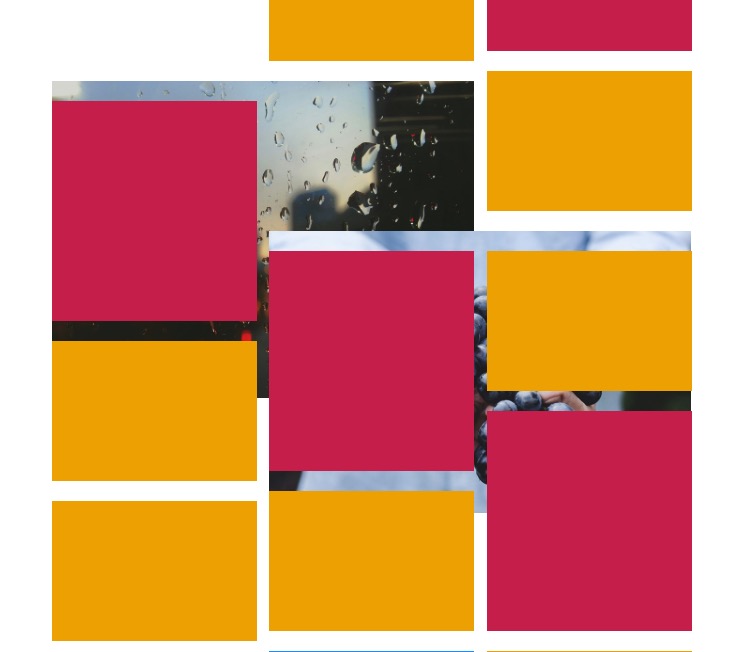
There seems to be an issue with images loading and infinite scroll in Safari. On first load of your infinitescroll masonry demo, images are "behind" the colored blocks. On subsequent loads, the layout is as expected (After images are cached, it does not occur).
I can reproduce it using a new tab in Safari's "private window" setting consistently. Does not seem to occur in Firefox or Chrome.
Mike
Reacted by islem Boussetta, Hugh Downer, jeehag, jared laser, Jim, Andy Feliciotti and Nikhil Bhavsar
Activity
[-]Masonry, isotope, packery issue with images in Safari[/-][+]Masonry, isotope, packery images overlapping in Safari[/+]desandro commentedon Jun 26, 2017
Thanks for reporting this issue! I've seen this a couple times on mobile Safari as well. This is indeed a bug. I'll be investigating and working on a fix for the next release.
TaktakTaktouk commentedon Jul 27, 2017
I have exactly the same issue with Safari (mobile & desktop) you can take a look here http://keepgif.com
jeehag commentedon Jul 29, 2017
I also have a same problem.
I hope this issue to be handled soon.
It's a awesome app! I will also appreciate your effort.
HughbertD commentedon Aug 1, 2017
👍 for same problem! Thanks for all your efforts!
mahsajafari67 commentedon Aug 15, 2017
hi..How to fix this problem?????
hi..How to fix this problem?????
dariodev commentedon Aug 19, 2017
Something like this as a temporary solution?
Layout Packery after image loads - after items have been appended to the container.
riccardomel commentedon Sep 18, 2017
Hi, same issue, any fix suggestion or new release?
cPlayIt commentedon Sep 20, 2017
Like others have mentioned it happens when the images are not cached.. a lot of times they will be scattered and sometimes it happens in a way that poisons any future append.
anyone found a workaround in the mean time?
riccardomel commentedon Sep 20, 2017
Hi, here a simple but working workaround:
NOTE: i use infinite scroll and masonry with vanilla javascript if you use jQuery is the same but check the official docs. In this example i load the next masonry grid using AJAX call
The problem: The issue is generated for an images cache problem in SAFARI only during append event in the infinte scroll plugin.
The solution:
Hope this can be useful, thanks a lot, hope you can fix in the next release.
Riccardo Mel - riccardomel.com
csillery commentedon Sep 20, 2017
@riccardomel Cool man, thanks.
jonXmack commentedon Sep 21, 2017
I found I didn't need to hide/show anything, so my code was quite a bit more simple, does the same thing though.
riccardomel commentedon Sep 21, 2017
Yes is the same, but with ajax-data the masonry.layout method "move" the cards of the masonry for a few second (the masonry block change position). My fix prevent also this issue.
7 remaining items
daGUY commentedon Jan 19, 2018
Sorry to be the bearer of bad news, but I'm still seeing this issue with imagesLoaded 4.1.4 and Infinite Scroll 3.0.3 in Safari, both on macOS High Sierra and iOS 11.
I'm using both plugins in conjunction with Isotope, with Masonry as the layout mode, if that matters:
The best workaround I can come up with is to call
isotope()again after the items are appended to force a re-layout:p-drolima commentedon Feb 15, 2018
hi desandro,
Is there a resolution for this issue? I see you didnt close it yet... and there is report afterwards also saying that is not resolved.
Could you possibly clarify?
Thank you
desandro commentedon Feb 16, 2018
@p-drolima I'd like to this its fixed, as I am unable to reproduce the issue. I'm waiting to see if any other reports come in.
JimmyAppelt commentedon Mar 7, 2018
Having same Safari issues with srcset (also on safari/chrome mobile) image do not load as per issue #732 where I have a suggested fix applied to get images finally loading.
Infinite Scroll 3.0.3 (using infinite-scroll.pkgd.js with included ImageLoaded as per documentation https://infinite-scroll.com/options.html#outlayer) in combination with packery as outlayer makes appending items with images overlapping (fairly unusable this way).
ralphmorris commentedon Mar 19, 2018
@desandro I had this same issue too on Safari with imagesLoaded v4.1.4 and Infinite Scroll v3.0.3. Fixed it with the by adding .imagesLoaded().progress at the beginning but then on append.InfiniteScroll event adding imagesLoaded().always
This works but not sure if its the best approach?
p-drolima commentedon Apr 21, 2018
Hi, not sure if this can help anyone else's use case or not but as I was still struggling to find a solution for this I managed to find it finally.
mheiduk commentedon May 1, 2018
Hi,
same problem here, images on Safari don't get loaded. Latest Safari Version on latest MacOS Version mit Masonry implemented. Have to use another Infinite Load Script because of this.
Best,
Marc
twiddly commentedon Sep 27, 2019
you're a lifesaver, thank you!
Mopra commentedon Jan 29, 2020
This is perfect, even in 2020 :D
mujuw commentedon Feb 10, 2020
Also having trouble with this.
Code is below:
Link: https://wordpress-153471-712046.cloudwaysapps.com/works/collage/
I've been struggling with this for over a month now; getting to the point where I'd pay for someone's help.
VasylTsiutsyk commentedon Feb 19, 2024
https://codepen.io/desandro/pen/GodqdY
here is solution
🛠 check for non-zero naturalWidth
🛠 check for non-zero naturalWidth
🛠 check for non-zero naturalWidth
🛠 check for non-zero naturalWidth