Repository navigation
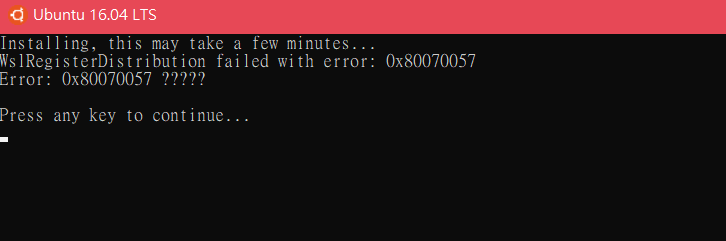
WSL2 - Windows 19041.264 - WslRegisterDistribution fails with error 0x80070057 - Incorrect parameter #5293
Description

-
Microsoft Windows [version 10.0.19041.264]
-
What you're doing and what's happening:
I updated to this version of Windows.
I already have docker on this machine, that detected WSL2 possibility.
I followed https://docs.microsoft.com/fr-fr/windows/wsl/install-win10 to the letter, with an apparent success. -
What's wrong / what should be happening instead:
When installing Debian, then ubuntu I get the same result at the initial lauch

Also docker is having a similar issue when trying to register its distribution :
[Engines ][Error] Start failed with Failed to deploy distro docker-desktop to [...]\AppData\Local\Docker\wsl\distro: exit code: -1
 stdout: Paramètre incorrect.
i tried to uninstall WSL et install it again, I tried to reset, delete and reinstall images, reinstall docker, etc. Always stops here. Also not an issue of legacy console. I tried to stop, start, restart, and tried in between LxssManager.
Thank you for your attention !
Activity
[-]WslRegisterDistribution fails with error 0x80070057 - Incorrect parameter[/-][+]WSL2 - Windows 19041.264 - WslRegisterDistribution fails with error 0x80070057 - Incorrect parameter[/+]devsuitup commentedon Jun 5, 2020
Please, I really need some help people, i re-installed everything (wsl, wsl2, windows components, etc..)
Same result :
benhillis commentedon Jun 5, 2020
devsuitup - Could you please take a trace so I can figure out where the error is coming from?https://github.com/microsoft/WSL/blob/master/CONTRIBUTING.md#8-detailed-logs
devsuitup commentedon Jun 5, 2020
Hi Ben Hillis (@benhillis) , thank you for your attention.
You will find the logs attached to this post, in a zip file -- .etl isn't supported by github
lxcore_logs.zip
Thanks !
benhillis commentedon Jun 5, 2020
devsuitup - Thanks for the logs. It looks like the failure is coming from trying to create our virtual network. Could you please also collect the networking logs detailed here:
https://github.com/microsoft/WSL/blob/master/CONTRIBUTING.md#9-networking-logs
devsuitup commentedon Jun 6, 2020
Ben Hillis (@benhillis) FYI, after your answer I uninstalled NordVPN, Hamachi, FortiClient and restarted the machine -- and got the same issue.
Here is the trace : https://aka.ms/AA8lxay
devsuitup commentedon Jul 25, 2020
Ben Hillis (@benhillis) Any news ?
mwt commentedon Jul 27, 2020
I solved a similar problem for myself (#5660) by uninstalling HyperV under "Turn Windows features on and off". Does this happen to work for you, devsuitup, as well?
mkuder commentedon Aug 31, 2020
I had this problem after installing Ubuntu or Ubuntu 20.04 either from the Store or PowerShell, the latter still complained that no distributions are installed. I had HyperV already disabled and LxssManager was running. What finally fixed it was just restarting the computer and Ubuntu 20.04 ran fine then. Using Windows build 19041.450 (2004 feature update).
dmitridb commentedon Jan 5, 2021
Amusingly, this only was fixed for me after I turned hyper-v on. I figured it was somehow essential to the operation of WSL2, so it's funny hearing that turning it off worked.
kall commentedon Mar 11, 2021
I created a new Virtual Switch in Hyper-V Manager.
Then it works well.
0x80070057 error did not occurred.
tigercosmos commentedon Mar 27, 2021
Same issue. None of the methods above work :(
I have tried the following:
Turn on and off Hyper-V
Enable and disable WSL
Install and uninstall Ubuntu Package
Windows version 20H2
8 remaining items
mtncork commentedon May 4, 2021
I am getting this behavior, "Incorrect parameter" and the shell not created with insider build 21370 for Linux 18.04. Same behavior for WSL1 or WSL2.
From the Event Log in PerfView it looks like there's a failure creating a virtual machine due to an incorrect parameter:
ThreadID="15,496" FormattedMessage="onecore\vm\compute\shared\vmwp\lib\workerprocess.cpp(1315)\vmcompute.exe!00007FF66FD2BDF3: (caller: 00007FF66FC4E45C) Exception(50) tid(3c88) 80070057 The parameter is incorrect. CallContext:[\VirtualMachine_Start] " TraceData="onecore\vm\compute\shared\vmwp\lib\workerprocess.cpp(1315)\vmcompute.exe!00007FF66FD2BDF3: (caller: 00007FF66FC4E45C) Exception(50) tid(3c88) 80070057 The parameter is incorrect. CallContext:[\VirtualMachine_Start] " VmName=" - " VmId=" - " StackFrame="<<<EXCEPTION_DURING_VALUE_LOOKUP InvalidCastException>>>" Module="[{ Name="C:\WINDOWS\system32\vmcompute.exe", BaseAddress="140696412815360", SizeOfImage=4091904, TimeDateStamp=1438749299 },{ Name="C:\WINDOWS\SYSTEM32\ntdll.dll", BaseAddress="140703339642880", SizeOfImage=2109440, TimeDateStamp=1581716554 },{ Name="C:\WINDOWS\System32\KERNEL32.DLL", BaseAddress="140703317295104", SizeOfImage=774144, TimeDateStamp=-257251206 }]"
I was unable to attach wsl.etl.
Default Distribution: Ubuntu-18.04
Default Version: 2
Windows Subsystem for Linux was last updated on 5/4/2021
WSL automatic updates are on.
Kernel version: 5.10.16
Microsoft Windows [Version 10.0.21370.1]
mtncork commentedon May 4, 2021
I fixed this. I was missing a .wslconfig file in my user directory.
gmag11 commentedon May 5, 2021
This worked in my setup, thank you
timmy3780 commentedon Sep 14, 2021
On an Administrative command line:
corneliusroot commentedon Apr 15, 2022
kgambrah commentedon May 27, 2022
Removing the existing install with
wsl --unregister ubuntu-18.04and installing again worked for me.amirhoseinJ commentedon Jun 15, 2022
Anyone having this issue might also want to try cleaning existing ".wslconfig" file which could cause the problem.
unsalkorkmaz commentedon Jun 28, 2022
https://stackoverflow.com/questions/64191759/wslregisterdistribution-failed-with-error-0xffffffff#comment121617854_64217462
jfrgagnon commentedon Nov 21, 2022
I had that issue on Ubuntu and Ubuntu 20.04 after installing the WSL2-Linux-Kernel . I don't know why it broke my WSL2 installation, but I realized that it was the kernel setting in the ./.wslconfig file that was creating this bug...
Skipping this setting with "#" in front of the line resolve the issue for me...
taksqth commentedon Jul 13, 2023
I have the same problem, tried a couple different options but no luck.
as-thanhdao commentedon Jul 14, 2023
the latest update of Windows is suck, tried to rollback then it works now.
tek-aevl commentedon Jul 16, 2023
^This
aristizabal95 commentedon Jul 28, 2023
Indeed, it appears the windows update
Windows 11 Insider Preview 25905.1000 (rs_prerelease)was the problem. Today I installedWindows 11 Insider Preview 25915.1000 (rs_prerelease)and the issue is gone now.microsoft-github-policy-service commentedon Aug 1, 2024
This issue has been automatically closed since it has not had any activity for the past year. If you're still experiencing this issue please re-file this as a new issue or feature request.
Thank you!