Repository navigation
intellisense doesn't work in jupyter notebooks on a remote server when an anaconda env is chosen for running the kernel #4226

Description

Type: Bug
- I connect to Ubuntu Server and open jupyter notebook.
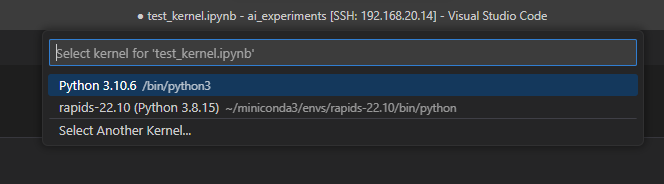
- From the drop down for selecing the kernel if I select 'Python 3.10.6 /bin/python3' intellisense works (even the advanced functionality, like column names for pandas).
- If I select an anaconda env '<env_name> (Python 3.8.15) ~/miniconda3/envs/<env_name>/bin/python' intellisense doesn't work.
This is a huge issue for people working in data science/ml since anaconda (or its flavors) is what most of us use.
Here is a screenshot of selecting the kernel:
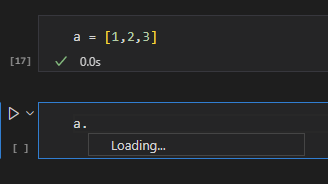
Nothing triggers completions, even ctrl+space
VS Code version: Code 1.77.0 (7f329fe6c66b0f86ae1574c2911b681ad5a45d63, 2023-03-29T10:02:16.981Z)
OS version: Windows_NT x64 10.0.22621
Modes:
Sandboxed: No
Remote OS version: Linux x64 5.15.0-69-generic
System Info
| Item | Value |
|---|---|
| CPUs | 11th Gen Intel(R) Core(TM) i7-11800H @ 2.30GHz (16 x 2304) |
| GPU Status | 2d_canvas: enabled canvas_oop_rasterization: disabled_off direct_rendering_display_compositor: disabled_off_ok gpu_compositing: enabled multiple_raster_threads: enabled_on opengl: enabled_on rasterization: enabled raw_draw: disabled_off_ok skia_renderer: enabled_on video_decode: enabled video_encode: enabled vulkan: disabled_off webgl: enabled webgl2: enabled webgpu: disabled_off |
| Load (avg) | undefined |
| Memory (System) | 31.73GB (10.33GB free) |
| Process Argv | --crash-reporter-id 343d629c-3582-46e1-84af-07d42196c000 |
| Screen Reader | no |
| VM | 0% |
| Item | Value |
|---|---|
| Remote | SSH: 192.168.20.14 |
| OS | Linux x64 5.15.0-69-generic |
| CPUs | AMD Ryzen 9 3900X 12-Core Processor (24 x 2200) |
| Memory (System) | 62.69GB (60.12GB free) |
| VM | 0% |
Extensions (15)
| Extension | Author (truncated) | Version |
|---|---|---|
| remotehub | Git | 0.54.0 |
| jupyter-keymap | ms- | 1.1.0 |
| remote-ssh | ms- | 0.98.0 |
| remote-ssh-edit | ms- | 0.84.0 |
| azure-repos | ms- | 0.30.0 |
| remote-explorer | ms- | 0.2.0 |
| remote-repositories | ms- | 0.32.0 |
| copilot | Git | 1.79.10634 |
| python | ms- | 2023.6.0 |
| vscode-pylance | ms- | 2023.3.40 |
| jupyter | ms- | 2023.3.1000892223 |
| jupyter-keymap | ms- | 1.1.0 |
| jupyter-renderers | ms- | 1.0.15 |
| vscode-jupyter-cell-tags | ms- | 0.1.8 |
| vscode-jupyter-slideshow | ms- | 0.1.5 |
A/B Experiments
vsliv368:30146709
vsreu685:30147344
python383:30185418
vspor879:30202332
vspor708:30202333
vspor363:30204092
vslsvsres303:30308271
vserr242:30382549
pythontb:30283811
vsjup518:30340749
pythonptprofiler:30281270
vsdfh931:30280409
vshan820:30294714
vstes263cf:30335440
vscorecescf:30445987
pythondataviewer:30285071
vscod805:30301674
binariesv615:30325510
bridge0708:30335490
bridge0723:30353136
cmake_vspar411:30581797
vsaa593:30376534
pythonvs932:30410667
cppdebug:30492333
vsclangdf:30486550
c4g48928:30535728
dsvsc012:30540252
pynewext54:30695312
azure-dev_surveyone:30548225
nodejswelcome1cf:30587006
282f8724:30602487
pyind779:30671433
f6dab269:30613381
vscrp:30673768
pythonsymbol12:30671437
vsccsb:30677849
azdwalk:30687957
pythonms35:30701012
Activity
Auxority commentedon Apr 4, 2023
I have the same issue
DonJayamanne commentedon Apr 4, 2023
Thanks for filing this issue and sorry you are running into this issue.
Please could you enable logging as follows:
Jupyter->LoggingverboseJupyteroutput panel.radekosmulski commentedon Apr 5, 2023
This is quite interesting, because turns out it sometimes works with Anaconda envs!
This is for system python where intelisense has always worked for me so far:
I then switched to using an Anaconda env and... to my surprise it worked! (I reloaded the window though using command palette, not sure if that played a role).
But to reproduce the error I created a new file and picked the kernel only when I wanted to run the code. Then the issue came up again. There is an issue that comes up in the logs:
And interestingly, if I reload the window (
Developer: Reload window) the issue goes away!debonte commentedon Apr 11, 2023
Rich Chiodo (@rchiodo)
rchiodo commentedon Apr 11, 2023
Can you try this with the latest version? 2023.4.11 had some fixes in it. This might have been this bug here:
#4166
2023.4.11 should be the latest 'prerelease' version of Pylance.
Auxority commentedon Apr 15, 2023
works for me 👍