- VSCode Version: all VSCode versions including Insider
- OS Version: macOs 10.14.4 but I suppose its the same on every platform
Steps to Reproduce:
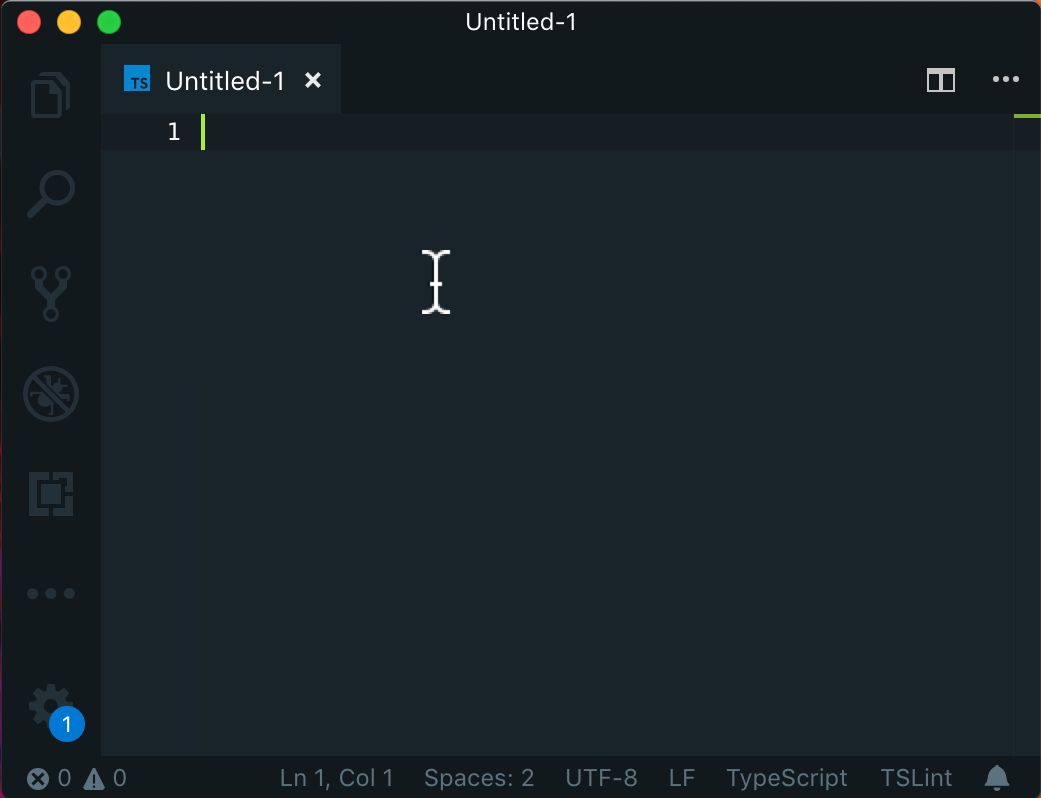
Ok, lets start with first screen shot. Notice where I have left my mouse cursor:
Lets start typing:
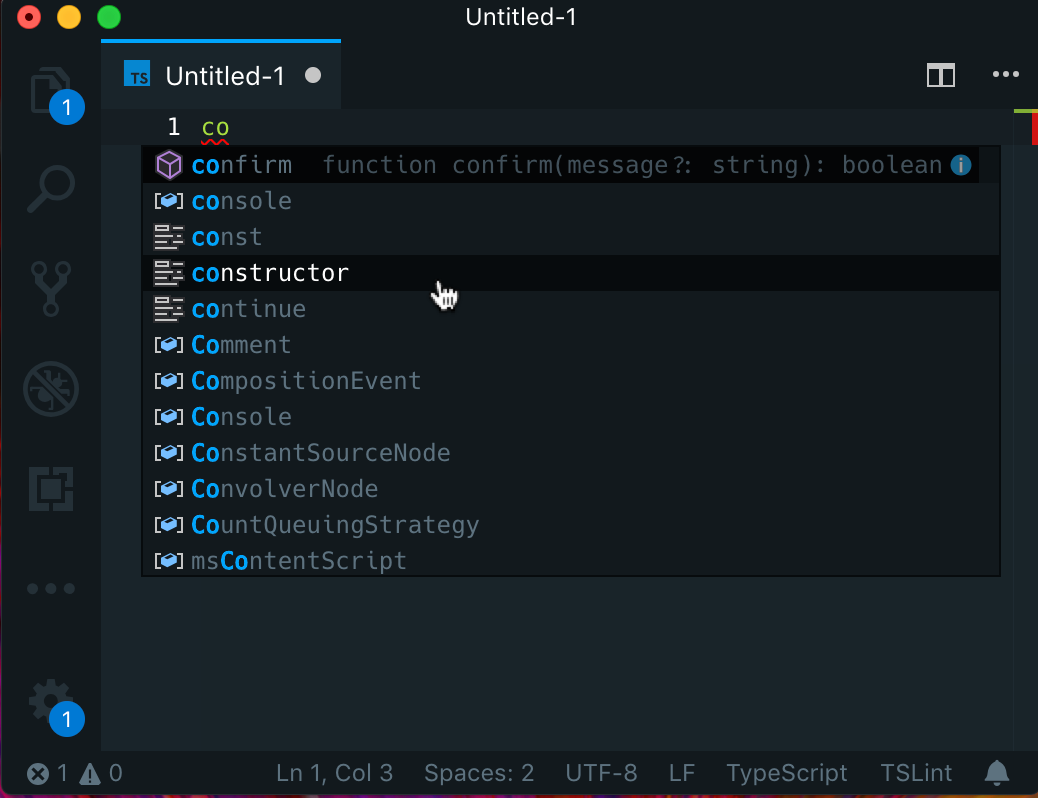
Notice what is being highlighted and where.
There are two hightlighted lines.
- First one (with
confirm) is what will be used if I press tab for autocompletion. Also it will be a starting point for keyboard up and down arrow buttons to navigate manually through the list.
- Second highlighted line (with
constructor) is where I have left my mouse cursor earlier, before I started typing.
Additionally (and this is pretty important and annoying) ONLY mouse cursor have ability to use list.focusForeground theme setting in Suggest Widget (thats why contructor or more precisly nstructor is white). We end up in situation where item that is NOT going to be used for autocomplete has higher VISUAL priority.
(We only have editorSuggestWidget.selectedBackground to visually mark an Suggest Item that will be used for autocompletion. There is no editorSuggestWidget.selectedForeground to make it pop more.)
How (in my opinion) it should work:
- Mouse cursor should NOT hightlight Suggest Widget items only becouse it was left in that spot. It should highlight an item only if we move the mouse cursor.
- If mouse cursor is moved it should take the visual priority, unhightlight first line (with
confirm in screenshots above), and highlight only the item under the cursor, although this might lead to some confusion, for example: what if we hover Suggest Item with mouse and press tab... So this is something to consider.
- This is very important: along with
editorSuggestWidget.selectedBackground there should be editorSuggestWidget.selectedForeground setting to achieve higher visual priority for keyboard-related actions (like pressing tab button to autocomplete, or up/down arrow buttons to pick other suggestion) on selected Suggest Item
Does this issue occur when all extensions are disabled?: Yes


Steps to Reproduce:

Ok, lets start with first screen shot. Notice where I have left my mouse cursor:
Lets start typing:

Notice what is being highlighted and where.
There are two hightlighted lines.
confirm) is what will be used if I presstabfor autocompletion. Also it will be a starting point for keyboardupanddownarrow buttons to navigate manually through the list.constructor) is where I have left my mouse cursor earlier, before I started typing.Additionally (and this is pretty important and annoying) ONLY mouse cursor have ability to use
list.focusForegroundtheme setting in Suggest Widget (thats whycontructoror more precislynstructoris white). We end up in situation where item that is NOT going to be used for autocomplete has higher VISUAL priority.(We only have
editorSuggestWidget.selectedBackgroundto visually mark an Suggest Item that will be used for autocompletion. There is noeditorSuggestWidget.selectedForegroundto make it pop more.)How (in my opinion) it should work:
confirmin screenshots above), and highlight only the item under the cursor, although this might lead to some confusion, for example: what if we hover Suggest Item with mouse and presstab... So this is something to consider.editorSuggestWidget.selectedBackgroundthere should beeditorSuggestWidget.selectedForegroundsetting to achieve higher visual priority for keyboard-related actions (like pressingtabbutton to autocomplete, orup/downarrow buttons to pick other suggestion) on selected Suggest ItemDoes this issue occur when all extensions are disabled?: Yes