Repository navigation
Setting up your project
Download and install OpenJDK 8 (Hotspot)
Ensure that the JAVA_HOME environment is set up (more info here).
Note: Android only supports a subset of Java 8+ features (see here)
Download the Command Line Only Tools.
Create the ANDROID_HOME directory.
Windows: %USERPROFILE%\Documents\Tools\android-sdk
Mac/Linux: ~/Tools/android-sdk
Add the ANDROID_HOME environment variable similar to how JAVA_HOME was set up above.
Copy the Command Line Tools to the ANDROID_HOME/cmdline-tools directory. Your directories should look like:
Windows: %USERPROFILE%\Documents\Tools\android-sdk\cmdline-tools\tools\bin
Mac/Linux: ~/Tools/android-sdk/cmdline-tools/tools/bin
Add the cmdline-tools/tools/bin to your PATH.
Next, set up your keystore.
Windows
mkdir %USERPROFILE%\.android
keytool -genkey -v -keystore %USERPROFILE%\.android\debug.keystore -storepass android -alias androiddebugkey -keypass android -keyalg RSA -keysize 2048 -validity 10000
Mac/Linux
mkdir ~/.android
keytool -genkey -v -keystore ~/.android/debug.keystore -storepass android -alias androiddebugkey -keypass android -keyalg RSA -keysize 2048 -validity 10000
mini2Dx uses Gradle as its build system. However, setting up a gradle project from scratch can be tricky. So mini2Dx uses a modified version of the LibGDX project generator to generate a basic project template for you.
First, download the project generator for your platform.
- mini2Dx Project Generator - Windows
- mini2Dx Project Generator - Mac OS X
- mini2Dx Project Generator - Linux
Unzip the tool and run the app. The following window will appear.
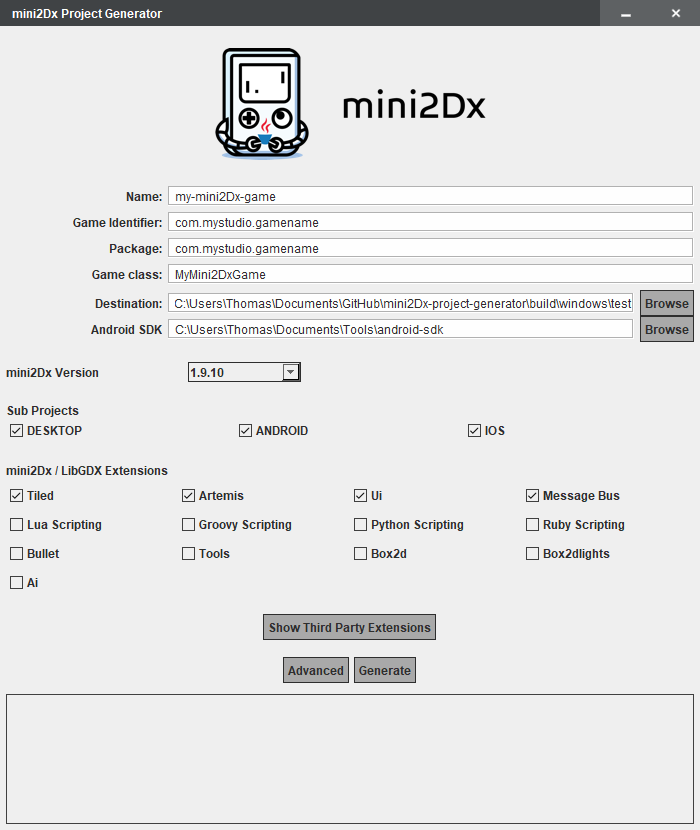
Name              <- The name of your game, e.g. 'Space Invaders'
Game Identifier   <- A unique identifier for your game. This is used by mini2Dx when publishing your game
                    (to the App Stores, Steam, etc.) and for determining where player data is stored.
                    This is usually a reverse domain name; e.g. com.taito.spaceinvaders
Package           <- The Java package your game classes will be coded in, e.g. com.taito.spaceinvaders
Game Class        <- The name of your mini2Dx game class, e.g. SpaceInvadersGame
Destination       <- The folder to generate your project in
Android SDK       <- If making an Android game, this should be the path to your Android SDK folder
Sub-projects      <- Which platforms you want to deploy your game to
LibGDX Extensions <- The LibGDX extensions you would like to use
Warning: If you want to add platforms later, you'll have to do it manually
Fill out the form and click 'Generate' to generate your project. You are now ready to import the project into your IDE.
The project layout is the same as a LibGDX project.
settings.gradle            <- modules definitions
build.gradle               <- main Gradle build file, defines dependencies and plugins
gradlew                    <- script that will run Gradle on Unix systems
gradlew.bat                <- script that will run Gradle on Windows
gradle                     <- local gradle wrapper
local.properties           <- Intellij only file, defines android sdk location

core/
    build.gradle           <- Gradle build file for core project
    src/main/java          <- Source folder for all your game's code
    assets/                <- contains for your graphics, audio, etc.  Shared with other projects.

desktop/
    build.gradle           <- Gradle build file for desktop project
    src/                   <- Source folder for your desktop project, contains Desktop launcher class

android/
    build.gradle           <- Gradle build file for android project
    AndroidManifest.xml    <- Android specific config
    res/                   <- contains icons for your app and other resources
    src/                   <- Source folder for your Android project, contains Android launcher class

ios/
    build.gradle           <- Gradle build file for the ios project
    src/                   <- Source folder for your iOS project, contains iOS launcher class