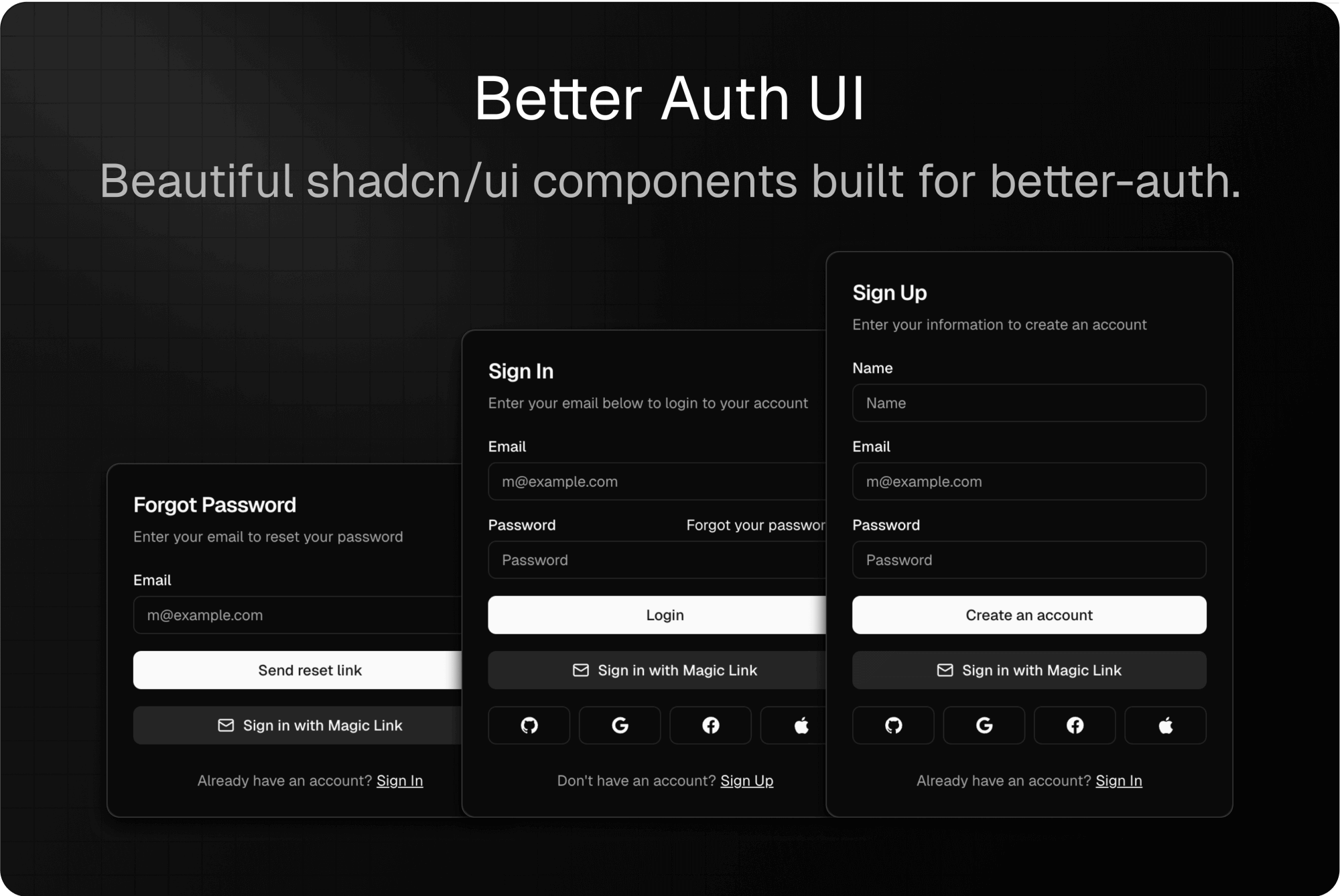
Pre-built, customizable authentication UI components for Better Auth in Svelte 5.
This is a complete Svelte 5 port of the Better Auth UI React library with full feature parity. The API is nearly identical to the original React library, making it easy to follow the official documentation. All credits for the original design and architecture go to daveycodez.
Important: This library is in early stage development. While we have achieved full feature parity with the React version and all components have been ported, the library has not been battle-tested in production environments yet. Issues may arise. Use at your own risk until we reach v1.0 stable.
This Svelte port was primarily built to support my own projects including stacksee.com and textatlas.com. While it currently maintains full feature parity with the original React library, this port may evolve independently over time. I may add new features, make different architectural decisions, or implement functionality specifically tailored to my project needs that diverge from the original library.
If you're looking for a library that strictly mirrors the React version, please be aware that this port's API and features may change to better serve the needs of my projects and the Svelte ecosystem.
- Easy – Plug & play authentication components
- Customizable – Fully styled with TailwindCSS and shadcn-svelte, easy to extend
- Robust – Built with Svelte 5 runes and modern best practices
- ✨ Full Feature Parity - Complete port of all React components and functionality
- 🚀 Svelte 5 Runes - Built with the latest Svelte 5 reactive primitives
- 🔐 Better Auth Integration - Native integration with Better Auth's Svelte client
- 🛣️ Path Helpers - Server & client-side path utilities (unique to Svelte port)
- 🎨 Tailwind CSS - Fully styled with Tailwind CSS v4
- 📦 shadcn-svelte Components - Built on top of high-quality UI components
- ✅ Form Validation - Zod 4 schema validation out of the box
- 🌐 Localization Ready - Easy to customize all text strings
- 📱 Fully Responsive - Mobile-first design
Ensure you have Better Auth and shadcn set up in your project first.
Them install the package:
pnpm add better-auth-ui-svelte

## bun add better-auth-ui-svelte
## npm install better-auth-ui-svelte
## yarn add better-auth-ui-svelteMake sure you have these installed in your project:
svelte^5.0.0better-auth^1.3.0bits-ui^2.0.0@lucide/svelte^0.400.0tailwindcss^4.0.0zod^4.0.0svelte-sonner^0.4.0
For TailwindCSS v4, add the following @import to your global CSS file:
/* app.css or global.css */
@import 'better-auth-ui-svelte/css';
For TailwindCSS v3 (Deprecated), add the following to your Tailwind config:
content: ['./node_modules/better-auth-ui-svelte/dist/**/*.{js,svelte}'];Follow these steps to integrate Better Auth UI into your SvelteKit project:
Create your Better Auth client instance (e.g., in src/lib/auth-client.ts):
import { createAuthClient } from 'better-auth/svelte';

export const authClient = createAuthClient({
	baseURL: 'http://localhost:5173',
	// Add any plugins you need
	plugins: [
		// organizationClient(),
		// twoFactorClient(),
		// etc.
	]
});The <AuthUIProvider /> wraps your application with authentication context. Set it up in your root layout:
<!-- src/routes/+layout.svelte -->
<script lang="ts">
	import { AuthUIProvider } from 'better-auth-ui-svelte';
	import { Toaster } from 'svelte-sonner';
	import { authClient } from '$lib/auth-client';
	import { goto, invalidateAll } from '$app/navigation';
</script>

<Toaster />

<AuthUIProvider {authClient}>
	{@render children()}
</AuthUIProvider>
The <AuthUIProvider /> can be customized with additional settings:
<AuthUIProvider
	{authClient}
	navigate={goto}
	onSessionChange={async () => await invalidateAll()}
	social={{
		providers: ['github', 'google', 'facebook']
	}}
	magicLink
	passkey
	multiSession
	twoFactor={['otp', 'totp']}
>
	<slot />
</AuthUIProvider>Create a dynamic route to handle all authentication views. Create the file src/routes/auth/[path]/+page.svelte:
<script lang="ts">
	import { AuthView, authViewPaths } from 'better-auth-ui-svelte';
	import type { PageProps } from './$types.js';

	let { data, params }: PageProps = $props();
</script>

<main class="container flex grow items-center justify-center p-4">
	<AuthView path={params.path} />
</main>
This single dynamic route handles all authentication views:
/auth/sign-in– Sign in via email/password and social providers/auth/sign-up– New account registration/auth/magic-link– Email login without a password/auth/forgot-password– Request password reset email/auth/reset-password– Set new password after receiving reset link/auth/two-factor– Two-factor authentication/auth/recover-account– Recover account via backup code/auth/email-otp– Email OTP verification/auth/sign-out– Log the user out/auth/callback– OAuth callback handler/auth/accept-invitation– Accept organization invitation
You can use individual authentication forms directly in your pages:
<script lang="ts">
	import { SignInForm, SignUpForm } from 'better-auth-ui-svelte';
</script>

<SignInForm
	redirectTo="/dashboard"
	onSuccess={() => {
		console.log('Signed in!');
	}}
/>Use <SignedIn /> and <SignedOut /> to conditionally render content:
<script lang="ts">
	import { SignedIn, SignedOut } from 'better-auth-ui-svelte';
</script>

<SignedOut>
	<a href="/auth/sign-in">Sign In</a>
</SignedOut>

<SignedIn>
	<a href="/dashboard">Dashboard</a>
</SignedIn>Display a user button with avatar and dropdown menu:
<script lang="ts">
	import { UserButton } from 'better-auth-ui-svelte';
</script>

<UserButton align="end" /><AuthView />- Dynamic authentication view handler (sign in, sign up, forgot password, etc.)<AuthUIProvider />- Context provider for auth configuration<AuthLoading />- Loading state component
<SignInForm />- Email/password sign in<SignUpForm />- User registration<ForgotPasswordForm />- Password reset request<ResetPasswordForm />- Set new password<MagicLinkForm />- Magic link authentication<TwoFactorForm />- Two-factor authentication<RecoverAccountForm />- Account recovery<EmailOtpForm />- Email OTP verification
<UserButton />- User dropdown menu with avatar<UserAvatar />- User avatar with fallback to initials<SignedIn />- Renders children only when authenticated<SignedOut />- Renders children only when not authenticated
<AccountSettingsCards />- Complete account settings UI<AccountsCard />- Manage connected accounts<UpdateAvatarCard />- Avatar upload and management<UpdateNameCard />- Update user name<UpdateUsernameCard />- Update username<UpdateFieldCard />- Generic field update card<DeleteAccountCard />- Account deletion with confirmation
<SecuritySettingsCards />- Complete security settings UI<ChangeEmailCard />- Email change with verification<ChangePasswordCard />- Password change with validation<SessionsCard />- Active sessions management<PasskeysCard />- Passkey authentication management<TwoFactorCard />- Two-factor authentication setup<ApiKeysCard />- API key management
<OrganizationSwitcher />- Switch between organizations<CreateOrganizationDialog />- Create new organization<OrganizationView />- Organization details view<OrganizationSettingsCards />- Organization settings<OrganizationMembersCard />- Member management<OrganizationInvitationsCard />- Invitation management<UserInvitationsCard />- User's received invitations
<AuthCallback />- OAuth callback handler<SignOut />- Sign out component<RedirectToSignIn />- Redirect unauthenticated users to sign in<RedirectToSignUp />- Redirect users to sign up<PasswordInput />- Password input with visibility toggle<FormError />- Form error display component
Customize all text strings by passing a localization prop to <AuthUIProvider />:
<script lang="ts">
	import { AuthUIProvider, authLocalization } from 'better-auth-ui-svelte';
	import { authClient } from '$lib/auth-client';

	const customLocalization = {
		...authLocalization,
		SIGN_IN: 'Log In',
		SIGN_UP: 'Create Account',
		EMAIL: 'Email Address',
		PASSWORD: 'Your Password'
	};
</script>

<AuthUIProvider {authClient} localization={customLocalization}>
	<slot />
</AuthUIProvider>All components accept a className prop for custom styling:
<SignInForm className="max-w-md mx-auto" />For granular styling control, use the classNames prop:
<AuthView
	path="sign-in"
	classNames={{
		base: 'border-2 border-primary',
		header: 'bg-primary/10',
		title: 'text-xl font-bold',
		footerLink: 'text-primary hover:underline'
	}}
/>The <AuthUIProvider /> accepts the following configuration options:
interface AuthUIProviderProps {
	// Required
	authClient: ReturnType<typeof createAuthClient>;

	// Navigation (SvelteKit)
	navigate?: (href: string) => void;

	// Session management
	onSessionChange?: () => void | Promise<void>;

	// Social authentication
	social?: {
		providers?: ('google' | 'github' | 'facebook' | 'apple' | 'discord' | 'twitter')[];
	};

	// Additional auth methods
	magicLink?: boolean | {
		resendCooldown?: number;
		redirectToSentPage?: boolean;
	};
	emailVerification?: boolean | {
		resendCooldown?: number;
		redirectToVerifyPage?: boolean;
	};
	passkey?: boolean;

	// Two-factor authentication
	twoFactor?: ('otp' | 'totp')[];

	// Multi-session support
	multiSession?: boolean;

	// Localization
	localization?: Partial<AuthLocalization>;

	// Avatar handling
	avatar?: {
		upload?: (file: File) => Promise<string>;
		delete?: (url: string) => Promise<void>;
	};

	// Settings page configuration
	settings?: {
		url?: string;
	};

	// Organization configuration
	organization?: {
		pathMode?: 'id' | 'slug';
		basePath?: string;
		slug?: string;
	};
}Note: This feature is unique to the Svelte port and not available in the original React version of Better Auth UI. Added by Chris Jayden to ease server-side implementation in SvelteKit.
Better Auth UI for Svelte includes utility functions to generate authentication paths that work both client-side and server-side. This makes it easy to maintain consistent paths across your application and handle redirects in hooks, load functions, and components.
- Server-Side Compatible - Works in
hooks.server.ts,+page.server.ts, and+layout.server.ts - Type-Safe - TypeScript ensures you use valid path names
- Single Source of Truth - Change paths once, updates everywhere
- No Hardcoding - Never hardcode
/auth/sign-inpaths again
import { getAuthPath, getAuthUrl } from 'better-auth-ui-svelte';

// Get auth paths (default: '/auth')
getAuthPath('SIGN_IN'); // '/auth/sign-in'
getAuthPath('SIGN_UP'); // '/auth/sign-up'
getAuthPath('FORGOT_PASSWORD'); // '/auth/forgot-password'

// Get full URLs (useful for emails, redirects)
getAuthUrl('RESET_PASSWORD', {
	baseURL: 'https://example.com'
}); // 'https://example.com/auth/reset-password'

// Account and organization paths
getAccountPath('SETTINGS'); // '/account/settings'
getOrganizationPath('MEMBERS'); // '/organization/members'Use path helpers in your server hooks for authentication redirects:
// src/hooks.server.ts
import { redirect } from '@sveltejs/kit';
import { getAuthPath } from 'better-auth-ui-svelte';

export async function handle({ event, resolve }) {
	const session = await getSession(event);

	// Redirect unauthenticated users to sign-in
	if (!session && event.url.pathname.startsWith('/app')) {
		throw redirect(303, getAuthPath('SIGN_IN'));
	}

	// Redirect authenticated users away from auth pages
	if (session && event.url.pathname === getAuthPath('SIGN_IN')) {
		throw redirect(303, '/app');
	}

	return resolve(event);
}Create a shared config file to keep paths consistent across your app:
// src/lib/config/auth-config.ts
import type { PathConfig } from 'better-auth-ui-svelte';

export const authPathConfig: PathConfig = {
	basePath: '/auth',
	// Optionally customize individual paths
	viewPaths: {
		SIGN_IN: 'login', // /auth/login instead of /auth/sign-in
		SIGN_UP: 'register' // /auth/register instead of /auth/sign-up
	}
};
Then use it everywhere:
<!-- src/routes/+layout.svelte -->
<script lang="ts">
  import { AuthUIProvider } from 'better-auth-ui-svelte';
  import { authPathConfig } from '$lib/config/auth-config';

  // Provider will use your custom paths
  <AuthUIProvider
    {authClient}
    basePath={authPathConfig.basePath}
    viewPaths={authPathConfig.viewPaths}
  />
</script>
// src/hooks.server.ts
import { getAuthPath } from 'better-auth-ui-svelte';
import { authPathConfig } from '$lib/config/auth-config';
// Use same config for server-side redirects
throw redirect(303, getAuthPath('SIGN_IN', authPathConfig));// Auth paths
getAuthPath(view, config?) // Get auth path
getAuthUrl(view, config?) // Get full URL with baseURL
getAllAuthPaths(config?) // Get all auth paths as object
// Account paths
getAccountPath(view, config?)
getAccountUrl(view, config?)
getAllAccountPaths(config?)
// Organization paths
getOrganizationPath(view, config?)
getOrganizationUrl(view, config?)
getAllOrganizationPaths(config?)The library exports the following utilities:
// Component exports
export { AuthView, AuthUIProvider, SignInForm, SignUpForm, UserButton, UserAvatar, ... };

// Path constants
export { authViewPaths, accountViewPaths, organizationViewPaths };

// Path helpers (unique to Svelte port)
export {
  getAuthPath,
  getAuthUrl,
  getAccountPath,
  getAccountUrl,
  getOrganizationPath,
  getOrganizationUrl,
  getAllAuthPaths,
  getAllAccountPaths,
  getAllOrganizationPaths
};

// Utilities
export { createForm, getViewByPath };

// Context helpers
export { getAuthUIConfig, getAuthClient, getLocalization };

// Localization
export { authLocalization };

// Types
export type {
  AuthUIConfig,
  User,
  Session,
  AuthLocalization,
  PathConfig,
  AccountPathConfig,
  OrganizationPathConfig
};- Node.js 18+ and pnpm
- Docker (for Mailpit and PostgreSQL)
-
Install dependencies
pnpm install
-
Configure environment variables
Copy
.env.exampleto.envand update the values:cp .env.example .env
-
Start Mailpit for email testing
Mailpit provides a local SMTP server and web UI for testing emails:
docker compose up -d
Access the Mailpit web UI at http://localhost:8025 to view emails sent during development (magic links, OTP codes, etc.)
-
Start development server
pnpm dev
# Build library
pnpm run build

# Lint and format
pnpm run lint
pnpm run format

# Stop Mailpit
docker compose downAll authentication emails (magic links, OTP codes) are sent through Mailpit in development:
- SMTP Server: localhost:1025
- Web UI: http://localhost:8025
- Emails are captured locally and never sent to real addresses
- Click on emails in the UI to view and test links
Better Auth UI for Svelte is built with:
- Svelte 5 Runes (
$state,$derived,$effect) for reactive state - Better Auth Svelte Client for authentication state and methods
- Svelte Context for configuration and dependency injection
- Zod 4 for schema validation
- Bits UI via shadcn-svelte for accessible UI primitives
- Tailwind CSS v4 for styling
This Svelte port maintains full feature parity with the React version. The API is nearly identical, with these framework-specific differences:
- Path Helpers: Unique to this Svelte port - utility functions for generating auth paths that work client and server-side (see Path Helpers)
- Navigation: Instead of Next.js router, use SvelteKit's
gotofunction - Session Management: Use
invalidateAll()instead ofrouter.refresh() - Dynamic Routes: Use SvelteKit's
[path]syntax instead of Next.js[path] - Reactivity: Built with Svelte 5 runes instead of React hooks
- Link Component: SvelteKit doesn't need a custom Link component
- Form Handling: Uses TanStack Svelte Form instead of React Hook Form (same API)
Contributions are welcome! Please feel free to submit a Pull Request.
MIT
- Original React version by daveycodez
- Complete Svelte 5 port with full feature parity by Chris Jayden multiplehats
- Built with Better Auth
- UI components from shadcn-svelte
- Better Auth - Framework agnostic authentication library
- Better Auth UI (React) - Original React version
- Better Auth UI Docs - Official documentation (React-based, but API is nearly identical)
- shadcn-svelte - Beautifully designed Svelte components