
An experiment in AI and art to create dynamic comic strips.
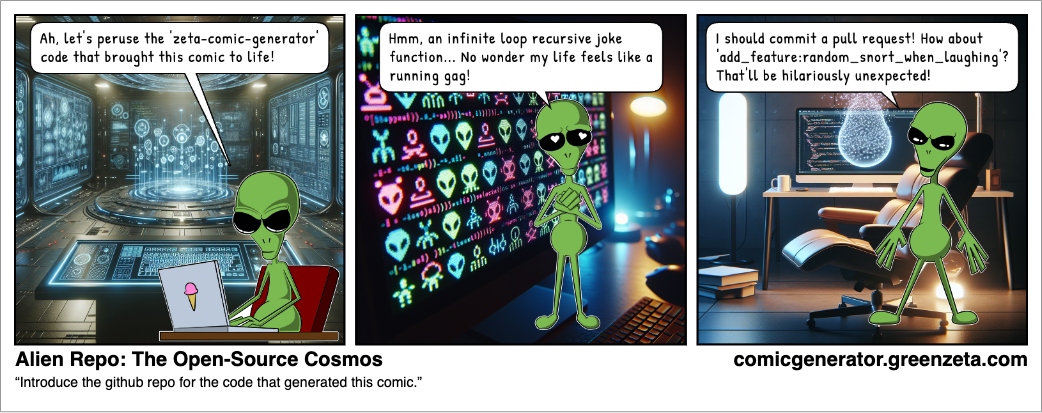

Write a sentence or two describing a premise for the comic strip. GPT, and variaous other AI models, take the premise and write a three panel comic strip describing: dialog, background scenery, and character action. The text description of the background scenery is sent to an image generator to produce background images. The character action is selected from a list of pre-drawn character art featuring Alpha Zeta, the alien mascot of GreenZeta.com. All of these assets are merged together into a comic strip!
For a more detailed description, check out Zeta Comics: Blending AI & Art in Digital Stories.
Create and browse Zeta comics from an AI assistant by adding a remote MCP (Model Context Protocol) server with the URL https://comicgenerator.greenzeta.com/mcp. Use a client that supports Streamable HTTP and MCP Apps to generate and view comic strips inline. The endpoint is public and requires no authentication.
Once connected, ask things like “Generate a comic about Alpha Zeta learning to cook,” “Show me the latest comic,” or “List the series, then show me part 1 of one.” After generating a comic, ask the assistant to save it to receive a permanent link. Generation uses the website's daily allowance; browsing and viewing existing comics do not.
| Tool | What it does |
|---|---|
generate_comic |
Creates and displays a three-panel comic from a short premise (up to 210 characters). Supports an optional workflow: openai (default), xai, or google. The assistant checks availability first with prepare_comic_generation. |
view_comic |
Displays a saved comic using its permalink, the 32-character identifier from its detail-page URL. |
get_latest_comic |
Finds the newest public gallery comic and returns its title, summary when available, permalink, and link. Takes no arguments. |
get_random_comic |
Finds a random public gallery comic and returns the same details as get_latest_comic. Takes no arguments; repeated calls may return the same comic. |
get_series |
Lists available series with descriptions, published comic counts, permalinks, and links. Takes no arguments. |
get_series_comic |
Finds a comic within a series using its series permalink and a zero-based index (part 1 is 0), ordered oldest first. |
prepare_comic_generation |
Checks the daily generation allowance for a premise and optional workflow before generation starts. |
save_comic |
Saves a completed generated comic when you explicitly ask to save it, returning a permanent link. The assistant supplies the draft identifier automatically. |
To display a comic found by the latest, random, or series lookup tools, the assistant passes the returned comic permalink to view_comic. See the MCP server documentation for implementation and deployment details.
The code in this rep is meant to be an example of interacting with various public AI APIs, as well as rendering a comic strip with JavaScript. It is provided for review purposes only and does not include instructions for setting up the required PHP/MySQL server.
Feel free to dig in and adapt any of this to your own project. The Alpha Zeta character art located in the assets/character_art directory is (c) Matthew Wilber. Feel free to use the images without modification. Attribution is appriciated but not required.
The ComicRenderer, DialogBalloon and CharacterAction classes are designed to be used independently of this project. The CharacterAction class is designed to work with the character art included in the assets/character_art folder of this project. If you create your own character art, you will need to update the dialog balloon coordinates in CharacterActions to the appropriate locations in your images.
To use in your own project, simply copy the scripts/modules/ComicRenderer folder into your project and import the ComicRenderer from ComicRenderer.js.
import { ComicRenderer } from "./ComicRenderer/ComicRenderer.js";
To use the ComicRenderer, instantiate the class and pass it a DOM element.
const comicRenderer = new ComicRenderer(document.getElementById("#comic-strip"));
Then pass a valid JSON script object to the comicRenderer.LoadScript() method.
let script = {
    "title": "A Simulated Comic",
    "panels": [
        {
            "scene": "Panel 1 Scene.",
            "dialog": [
                {
                    "character": "alpha",
                    "text": "I'm saying something."
                }
            ],
            "panelEl": {},
            "background": "A simulated background.",
            "images": [
                {
                    "url": "https://comicgenerator.greenzeta.com/backgrounds/6648d7d1475af.png",
                    "type": "background"
                },
                {
                    "url": "https://comicgenerator.greenzeta.com/assets/character_art/standing.png",
                    "type": "character",
                    "character": "alpha",
                    "action": "standing"
                }
            ],
            "action": "standing"
        },
        {
            "scene": "Panel 2 Scene.",
            "dialog": [
                {
                    "character": "alpha",
                    "text": "I'm saying something else."
                }
            ],
            "panelEl": {},
            "background": "A simulated background.",
            "images": [
                {
                    "url": "https://comicgenerator.greenzeta.com/backgrounds/6648d7d213f01.png",
                    "type": "background"
                },
                {
                    "url": "https://comicgenerator.greenzeta.com/assets/character_art/typing.png",
                    "type": "character",
                    "character": "alpha",
                    "action": "typing"
                }
            ],
            "action": "typing",
            "altAction": "hopeful"
        },
        {
            "scene": "Panel 3 Scene.",
            "dialog": [
                {
                    "character": "alpha",
                    "text": "I'm saying a punch line."
                }
            ],
            "panelEl": {},
            "background": "A simulated background.",
            "images": [
                {
                    "url": "https://comicgenerator.greenzeta.com/backgrounds/6648d7d361767.png",
                    "type": "background"
                },
                {
                    "url": "https://comicgenerator.greenzeta.com/assets/character_art/joyous.png",
                    "type": "character",
                    "character": "alpha",
                    "action": "joyous"
                }
            ],
            "action": "joyous"
        }
    ],
    "prompt": ""
};
comicRenderer.LoadScript(script);