Elixir Tips and Tricks from the Experience of Development. Each part consists of 10 Unique Tips and Tricks with clear explanation with live examples and outputs. These tips will speed up your development and saves your time in typing code as well.
You can read specific parts with following links... Part 1 Part 2 Part 3 Part 4
This is just the other way of writing Multiple OR conditions. This is not the recommended approach because in regular approach when the condition evaluates to true , it stops executing the remaining conditions which saves time of evaluation unlike this approach which evaluates all conditions first in list. This is just bad but good for discoveries.
# Regular Approach
find = fn(x) when x>10 or x<5 or x==7 -> x end

# Our Hack
hell = fn(x) when true in [x>10,x<5,x==7] -> x end Prints information about the data type of any given term. Try that in iex and see the magic.
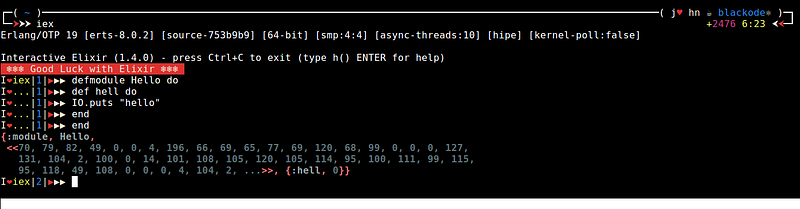
iex> i(1..5)Copy the content into a file and save the file as .iex.exs in your ~ home directory and see the magic.
You can also download the file HERE
# IEx.configure colors: [enabled: true]
# IEx.configure colors: [ eval_result: [ :cyan, :bright ] ]
IO.puts IO.ANSI.red_background() <> IO.ANSI.white() <> " ❄❄❄ Good Luck with Elixir ❄❄❄ " <> IO.ANSI.reset
Application.put_env(:elixir, :ansi_enabled, true)
IEx.configure(
 colors: [
   eval_result: [:green, :bright] ,
   eval_error: [[:red,:bright,"Bug Bug ..!!"]],
   eval_info: [:yellow, :bright ],
 ],
 default_prompt: [
   "\e[G",    # ANSI CHA, move cursor to column 1
    :white,
    "I",
    :red,
    "❤" ,       # plain string
    :green,
    "%prefix",:white,"|",
     :blue,
     "%counter",
     :white,
     "|",
    :red,
    "▶" ,         # plain string
    :white,
    "▶▶"  ,       # plain string
      # ❤ ❤-»" ,  # plain string
    :reset
  ] |> IO.ANSI.format |> IO.chardata_to_string

)
Each x sigil call respective sigil_x definition
Defining Custom Sigils
defmodule MySigils do
  #returns the downcasing string if option l is given then returns the list of downcase letters
  def sigil_l(string,[]), do: String.Casing.downcase(string)
  def sigil_l(string,[?l]), do: String.Casing.downcase(string) |> String.graphemes

  #returns the upcasing string if option l is given then returns the list of downcase letters
  def sigil_u(string,[]), do: String.Casing.upcase(string)
  def sigil_u(string,[?l]), do: String.Casing.upcase(string) |> String.graphemes
endLoad the module into iex
iex> import MySigils
iex> ~l/HELLO/
"hello"
iex> ~l/HELLO/l
["h", "e", "l", "l", "o"]
iex> ~u/hello/
"HELLO"
iex> ~u/hello/l
["H", "E", "L", "L", "O"]defmodule BugError do
defexception message: "BUG BUG .." # message is the default
endUsage
$ iex bug_error.ex
iex> raise BugError
** (BugError) BUG BUG ..
iex> raise BugError, message: "I am Bug.." #here passing the message dynamic
** (BugError) I am Bug..
The get_in function can be used to retrieve a nested value in nested maps using a list of keys.
nested_map = %{ name: %{ first_name: "blackode"} }     #Example of Nested Map
first_name = get_in(nested_map, [:name, :first_name])  # Retrieving the Key

# Returns nil for missing value
nil = get_in(nested, [:name, :last_name])              # returns nil when key is not present
Read docs: Kernel.get_in/2
The special form with is used to chain a sequence of matches in order and finally return the result of do: if all the clauses match. However, if one of the clauses does not match, its result of the miss matched expression is immediately returned.
iex> with 1 <- 1+0,
          2 <- 1+1,
          do: IO.puts "all matched"
"all matched"iex> with 1 <- 1+0,
2 <- 3+1,
do: IO.puts "all matched"
4
## since 2 <- 3+1 is not matched so the result of 3+1 is returned.Writing Protocols**A Protocol is a way to dispatch to a particular implementation of a function based on the type of the parameter.
The macros defprotocol and defimpl are used to define Protocols and Protocol implementations respectively for different types in the following example.
defprotocol Triple do
  def triple(input)
end

defimpl Triple, for: Integer do
  def triple(int) do
    int * 3
  end
end

defimpl Triple, for: List do
  def triple(list) do
    list ++ list ++ list
  end
end Load the code into iex and execute
iex> Triple.triple(3)
9
Triple.triple([1, 2])
[1, 2, 1, 2,1,2]There is no ternary operator like true ? "yes" : "no" . So, the following is suggested.
"no" = if 1 == 0, do: "yes", else: "no"When using pipelines, sometimes we break the pipeline for or operation.
For example:
result = :input
|> do_something
|> do_another_thing
# Bad
result = (result || :default_output)
|> do_something_else
Indeed, || is only a shortcut for Kernel.|| . We can use Kernel.|| in the pipeline instead to avoid breaking the pipeline.
The code above will be:
result = :input
|> do_something
|> do_another_thing
|> Kernel.||(:default_output)  #<-- This line
|> do_something_else
This above tip is from qhwa
Code grouping stands for something great. It shows you how your code is grouped when you write multiple lines of code in single line with out using braces. It will be more clear with the following example.
one 1 |> two()If you want to see how this line of code is grouped into, you can check in the following format..
quote(do: one 1 |> two()) |> Macro.to_string |> IO.puts
one(1 |> two())
So, by using the quote and Macro.to_string you can see how our code is grouped.
This tip came out in discussion with the creator of Ecto MichalMuskala in the Elixir forum.
These replaces the nested complicated conditions. These are my best friends in the situations dealing with more complex comparisons. Trust me you gonna love this.
The || operator always returns the first expression which is true. Elixir doesn’t care about the remaining expressions, and won’t evaluate them after a match has been found.
false || nil || :blackode || :elixir || :joseHere if you observe the first expression is false next nil is also false in elixir next :blackode which evaluates to true and its value is returned immediately with out evaluating the :elixir and :jose . Similarly if all the statements evaluates to false the last expression is returned.
iex> true && :true && :elixir && 5
5
iex> nil && 100
nil
iex> salary = is_login && is_admin && is_staff && 100_000
This && returns the second expression if the first expression is true or else it returns the first expression with out evaluating the second expression. In the above examples the last one is the situation where we encounter to use the && operator.
I have self experience with this . When I am novice in elixir, I just compared "5" > 4 unknowingly by an accident and to my surprise it returned with true.
In Elixir every term can compare with every other term. So one has to be careful in comparisons.

iex> x = "I am x "
"I am x "
iex> x > 34
true
iex> x > [1,2,3]
true
iex>▶ [1,2,3] < 1234567890
false
Order of Comparison
number < atom < reference < fun < port < pid < tuple < map < list < bitstring (binary)
When I see this first time, I said to my self “**Elixir is Crazy” . **This tip really saves time and it resembles your smartness. In Elixir every operator is a macro. So, we can use them as lambda functions.
iex> Enum.reduce([1,2,3], 0, &+/2)
6
iex> Enum.reduce([1,2,3], 0, &*/2)
0
iex> Enum.reduce([1,2,3], 3, &*/2)
18
iex> Enum.reduce([1,2,3], 3, &-/2)
-1
iex> Enum.reduce([1,2,3], 3, &//2)
0.5This is my recent discovery. I always encounter a situation like converting "$34.56" which is a string and I suppose do arithmetic operations. I usually do something like this before binary pattern matching..

iex> value = "$34.56"              |>
iex ...        String.split("$")   |>
iex ...         tl                 |>
iex ...         List.first         |>
iex ...         String.to_float
34.56This tip made my day easy. I recently used this is in one of my projects.
iex> "$" <> value = "$34.56"
"$34.56"
iex> String.to_float value
34.56At beginning stage, I used to press ^c ^c twice and restart shell as iex -S mix whenever I make changes to the project files. If you are doing this now, stop it right now. You can just recompile the project.
$ iex -S mix
iex> recompile()
Warning: The changes in the config/config.ex are not reflected. You have to restart the shell again.
Logger is one of my favorite modules. This come in default and starts along with your application. You have to just require this module. When I am new to Elixir, I always used to write the console outputs as IO.puts "This is value of data" for code debugging but, those lines get mixed up with other lines of information and It became hard to trace those lines.
This Logger module solved my problem. It has many features but, I use three definitions very often warn info and error Each definition prints the information with different **colors **which is more easy to find the statement at a glance.
The best side of this module is it prints along with the time, means it also prints the time while executing your statement. So, you can know the direction of flow of execution.
Before using the Logger module one has to do require Logger so all macros will be loaded inside your working module.

iex> require Logger
Logger
iex> Logger.info "This is the info"
15:04:33.102 [info]  This is the info
:ok
iex> Logger.warn "This is warning"
15:04:56.712 [warn]  This is warning
:ok
iex> Logger.error "This is error"
15:05:19.570 [error] This is error
:ok
This tip is from Anwesh Reddy
We can check the all the applications which are started along with our application. Sometimes we have to check whether a particular application is started or not. So, it helps you in those situations.. If you are a beginner, you don’t feel of using this much. But I am pretty sure of this tip will become handy when you work with multiple applications.
iex> Application.started_applications
[{:logger, 'logger', '1.4.0'}, {:iex, 'iex', '1.4.0'},
 {:elixir, 'elixir', '1.4.0'}, {:compiler, 'ERTS  CXC 138 10', '7.0.1'},
{:stdlib, 'ERTS CXC 138 10', '3.0.1'}, {:kernel, 'ERTS CXC 138 10', '5.0.1'}]Before I let you to use this tip, I just want to remind you that :atoms are not garbage collected. Atom keys are great! If you have a fixed number of them defined statically in your code, you are in no danger.What you should not do is convert user supplied input into atoms without sanitizing them first because it can lead to out of memory. You should also be cautious if you create dynamic atoms in your code.
But , you can use the . to retrieve the data from the keys as map.key unlike the usual notation like map["key"] . That really saves the typing. But, I don’t encourage this because, as a programmer we should really care about memory.
iex> map = %{name: "blackode", blog: "medium"}
%{blog: "medium", name: "blackode"}
iex> map.name
"blackode"
iex> map.blog
"medium"
Be sure that when you try to retrieve a key with . form which is not present in the map, it will raise an **key error **instead of returning the nilunlike the map["key"] which returns nil if key is not present in map
iex> map["age"]
nil
iex> map.age
Bug Bug ..!!** (KeyError) key :age not found in: %{blog: "medium", name: "blackode"}
Bug Bug ..!!
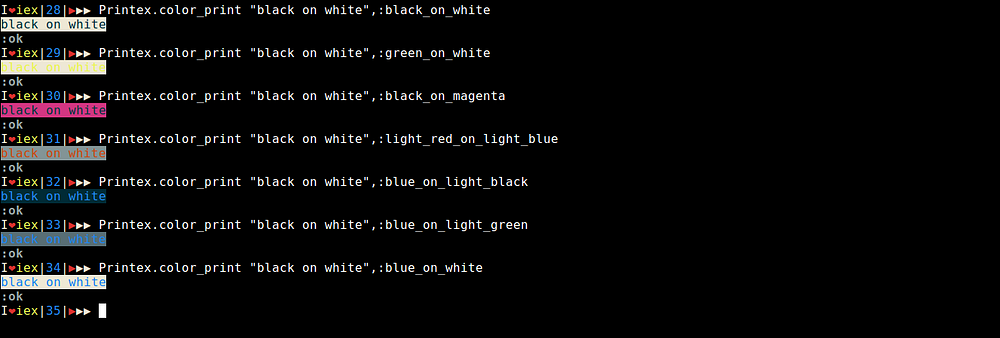
Elixir >=1.4.0 has ANSI color printing option to console. You can have great fun with colors.
You can also provide background colors.
iex> import IO.ANSI
iex> IO.puts red <> "red"<>green<>" green" <> yellow <> " yellow" <>   reset <> " normal"
red green yellow normal
The red prints in red color, green in green color, yellow in yellow color and normal in white. Have fun with colors…
For more details on color printing check Printex module which I created for fun in Elixir.
We cannot make use of the functions as guard clauses in elixir. It means, when cannot accept functions that returns Boolean values as conditions. Consider the following lines of code…
defmodule Hello do
  def hello(name,age) when is_kid(age) do
    IO.puts "Hello Kid #{name}"
  end
  def hello(name,age) when is_adult(age) do
    IO.puts "Hello Mister #{name}"
  end
  def is_kid age do
    age < 12
  end
  def is_adult age do
    age > 18
  end
end
Here we defined a module Hello and a function hello that takes two parameters of name and age. So, based on age I am trying IO.putsaccordingly. If you do so you will get an error saying….
** (CompileError) hello.ex:2: cannot invoke local is_kid/1 inside guard
    hello.ex:2: (module)
This is because when cannot accept functions as guards. We need to convert them to macros
Lets do that…
defmodule MyGuards do

  defmacro is_kid age do
    quote do: unquote(age) < 12
  end

  defmacro is_adult age do
    quote do: unquote(age) > 18
  end

end
# order of module matters here.....
defmodule Hello do

  import MyGuards

  def hello(name,age) when is_kid(age) do
    IO.puts "Hello Kid #{name}"
  end

  def hello(name,age) when is_adult(age) do
    IO.puts "Hello Mister #{name}"

   def hello(name,age) do
    IO.puts "Hello Youth #{name}"
  end

end
In the above lines of code, we wrapped all our guards inside a module MyGuards and make sure the module is top of the module Hello so, the macros first gets compiled. Now compile and execute you will see the following output..
iex> Hello.hello "blackode",21
Hello Mister blackode
:ok
iex> Hello.hello "blackode",11
Hello Kid blackode
:okUsing =~ operator we can find whether the right sub-string present in left string or not..
iex> "blackode" =~ "kode"
true
iex> "blackode" =~ "medium"
false
iex> "blackode" =~ ""
trueSometimes, we have to make sure that certain module is loaded before making a call to the function. We are supposed to ensure the module is loaded.
Code.ensure_loaded? <Module>
iex> Code.ensure_loaded? :kernel
true
iex> Code.ensure_loaded :kernel
{:module, :kernel}
Similarly we are having ensure_compile to check whether the module is compiled or not…
Elixir provides a special syntax which is usually used for module names. What is called a module name is an uppercase* ASCII letter* followed by any number of lowercase* or uppercase ASCII letters*, numbers, or underscores.
This identifier is equivalent to an atom prefixed by Elixir.. So in the defmodule Blackode example Blackode is equivalent to :"Elixir.Blackode"
When we use String.to_atom "Blackode" it converts it into :Blackode But actually we need something like “**Blackode” **to **Blackode. **To do that we need to use Module.concat
iex(2)> String.to_atom "Blackode"
:Blackode
iex(3)> Module.concat Elixir,"Blackode"
Blackode
In Command line applications whatever you pass they convert it into binary. So, again you suppose to do some casting operations …
We all know that = does the pattern match for left and right side. We cannot do [a,b,c]=[1,2,3,4] this raise a MatchError
iex(11)> [a,b,c]=[1,2,3,4]
** (MatchError) no match of right hand side value: [1, 2, 3, 4]
We can use destructure/2 to do the job.
iex(1)> destructure [a,b,c],[1,2,3,4]
[1, 2, 3]
iex(2)> {a,b,c}
{1, 2, 3}
If the left side is having more entries than in right side, it assigns the nilvalue for remaining entries..
iex> destructure([a, b, c], [1])
iex> {a, b, c}
{1, nil, nil}We can decorate our output with inspect and label option. The string of label is added at the beginning of the data we are inspecting.
iex(1)> IO.inspect [1,2,3],label: "the list "
the list : [1, 2, 3]
[1, 2, 3]
If you closely observe this it again returns the inspected data. So, we can use them as intermediate results in |> pipe operations like following……
[1, 2, 3]
|> IO.inspect(label: "before change")
|> Enum.map(&(&1 * 2))
|> IO.inspect(label: "after change")
|> length
You will see the following output
before change: [1, 2, 3]
after change: [2, 4, 6]
3We can pass the anonymous functions in two ways. One is directly using &like following..
[1,2,3,4,5]
|> length
|> (&(&1*&1)).()
This is the most weirdest approach. How ever, we can use the reference of the anonymous function by giving its name.
square = & &1 * &1
[1,2,3,4,5]
|> length
|> square.()
The above style is much better than previous . You can also use fn to define anonymous functions.
We can use ? operator to retrieve character integer codepoints.
iex> ?a
97
iex> ?#
35
The following two tips are mostly useful for beginners…
We can perform the subtraction over lists for removing the elements in list.
iex> [1,2,3,4.5]--[1,2]
[3, 4.5]
iex> [1,2,3,4.5,1]--[1]
[2, 3, 4.5, 1]
iex> [1,2,3,4.5,1]--[1,1]
[2, 3, 4.5]
iex> [1,2,3,4.5]--[6]
[1, 2, 3, 4.5]
We can also perform same operations on char lists too..
iex(12)> 'blackode'--'ode'
'black'
iex(13)> 'blackode'--'z'
'blackode'
If the element to subtract is not present in the list then it simply returns the list.
When you are working with iex environment , you can see a number increment every time you evaluate an expression in the shell like iex(2)>``iex(3)>
Those numbers helps us to reuse the result with v/1 function which has been loaded by default..
iex(1)> list = [1,2,3,4,5]
[1, 2, 3, 4, 5]
iex(2)> double_lsit = Enum.map(list, &(&1*2))
[2, 4, 6, 8, 10]
iex(3)> v 1
[1, 2, 3, 4, 5]
iex(4)> v(1) ++ v(2)
[1, 2, 3, 4, 5, 2, 4, 6, 8, 10]mix do deps.get,compileYou can run multiple tasks by separating them with coma ,
How ever you can also create aliases in your mix project in a file called mix.exs .
The project definition looks like the following way when you create one using a mix tool.
def project do
    [app: :proect_name,
     version: "0.1.0",
     elixir: "~> 1.4-rc",
     build_embedded: Mix.env == :prod,
     start_permanent: Mix.env == :prod,
     deps: deps()]
  end
You are also allowed to add some extra fields…
Here you have to add the aliases field.
[
 aliases: aliases()
]
Don’t forget to add , at the end when you add this in the middle of list .
The aliases() should return the key-value list.
defp aliases do
      [
        "ecto.setup": ["ecto.create", "ecto.migrate", "ecto.seed"]
      ]
end
So, whenever you run the mix ecto.setup the three tasks ecto.create, ecto.migrate and ecto.seed will run one after the other.
You can also add them directly as following unlike I did with private function.
def project do
    [app: :project_name,
     version: "0.1.0",
     aliases: ["ecto.setup": ["ecto.create", "ecto.migrate",   "ecto.seed"]]
.....
endElixir stores the documentation inside the bytecode in a memory. You access the documentation with the help of Code.get_docs/2 function . This means, the documentation accessed when it is required but not when it is loaded in the virtual machine like iex
Suppose you defined a module in memory like ones you defined in IEx, cannot have their documentation accessed as they do not have their bytecode written to disk.
Let us check this…
Create a module with name test.ex with the following code. You can copy and paste it.
defmodule Test do
  @moduledoc """
  This is the test module docs
  """
  @doc """
  This is the documentation of hello function
  """
  def hello do
    IO.puts "hello"
  end
end
Now stay in the directory where your file exists and run the command
$ iex test.exNow you can access the function definitions but not the documentation.
iex> Test.hello
hello
:ok
That means the code is compiled but documentation is not stored in the memory. So, you cannot access the docs. Lets check that…
iex> Code.get_docs Hello,:moduledoc
nil
You will see the output as nil when you are trying to access the docs of the module you have created so far. This is because, the bytecode is not available in disk.
In simple way beam file is not present. Lets do that...
Press Ctrl+C twice so you will come out of the shell and this time you run the command as
$ elixirc test.exAfter running the command, you will see a file with name Elixir.Test.beam . Now the bytecode for the module Test is available in memory. Now you can access the documentation as follows...
$ iex
iex> Code.get_docs Test,:moduledoc
{3, "This is the test module docs\n"}
The output is tuple with two elements. The first element is the line number of the documentation it starts and second element is the actual documentation in the binary form.
You can read more about this function here
When you go with mix test it will run all the tests defined and gives you the time of testing. However, you can see more verbose output like which test you are running with the --trace option like following…
mix test --traceIt will list out the all tests with names you defined as test "test_string" here test_string is the name of the test.
defmacro gen_function(fun_name) do
  quote do
    def unquote(:"#{fun_name}")() do
      # your code...
    end
  end
end
To be simple the name of the function should be an atom instead of binary.
System.cmd(command,args,options \\[])Executes the given command with args.
- command is expected to be an executable available in PATH unless an absolute path is given.
- args must be a list of binaries which the executable will receive as its arguments as is. This means that:
iex> System.cmd "echo", ["hello"]
{"hello\n", 0}iex> System.cmd "echo", ["hello"],into: []
{["hello\n"], 0}Get help from iex with h System.cmd
Checkout the documentation about System for more information and
also check Erlang os Module.
You know that when the list contains all the numbers as ASCII values, it will list out those values instead of the original numbers. Lets check that…
iex> IO.inspect [97,98]
'ab'
'ab'
The code point of a is 97 and b is 98 hence it is listing out them as char_list. However you can tell the IO.inspect to list them as list itself with option char_lists: :as_list .
iex> IO.inspect [97,98],charlists: :as_lists
[97, 98]
'ab'Openiex and type h Inspect.Opts, you will see that Elixir does this kind of thing with other values as well, specifically structs and binaries.
defmacro __ENV__()This macro gives the current environment information. You can get the information like current filename line function and others…
iex(4)> __ENV__.file
"iex"

iex(5)> __ENV__.line
5You can create the pid manually in Elixir with pid function. This comes with two flavors.
Creates the pid from the string.
iex> pid("0.21.32")
#PID<0.21.32>Creates a PID with 3 non negative integers passed as arguments to the function.
iex> pid(0, 21, 32)
#PID<0.21.32>Suppose you are writing a library and you want to test one of your functions for the type pid, then you can create one and test over it.
You cannot create the pid like assigning pid = #PID<0.21.32> because** #** is considered as comment here.
iex(6)> pid = #PID<0.21.32>
...(6)>
When you do like above, iex shell just wait for more input as #PID<0.21.32> is treated as comment.
Now you enter another data to complete the expression. The entered value is the value of the pid. Lets check that…
iex(6)> pid = #PID<0.21.32>      # here expression is not complete
...(6)> 23    # here we are giving the value 23
23            # expression is complete
iex(7)> pid
23 The String.replace function will replace the given the pattern with replacing pattern. By default, it replaces all the occurrences of the pattern.
Lets check that…
iex(1)> str = "hello@hi.com, blackode@medium.com"
"hello@hi.com, blackode@medium.com"

iex(2)> String.replace str,"@","#"
"hello#hi.com, blackode#medium.com
The
String.replace str,"@","#"is same as
String.replace str,"@","#",global: true
But, if you want to replace only the first occurrence of the pattern, you need to pass the option global: false . So, it replaces only the first occurrence of @ . Lets check that…
iex(3)> String.replace str,"@","#",global: false
"hello#hi.com, blackode@medium.com"
Here only first @ is replaced with #.
You can check the memory usage with :erlang.memory
iex(1)> :erlang.memory
[total: 16221568, processes: 4366128, processes_used: 4364992, system: 11855440,
 atom: 264529, atom_used: 250685, binary: 151192, code: 5845369, ets: 331768]
However, you can pass option like :erlang.memory :atom to get the memory usage of atoms.
iex(2)> :erlang.memory :atom
264529