
An open-source, self-hosted platform for building and operating business applications.
Model data. Design forms. Automate processes. Manage access. Extend your system - without starting from scratch.
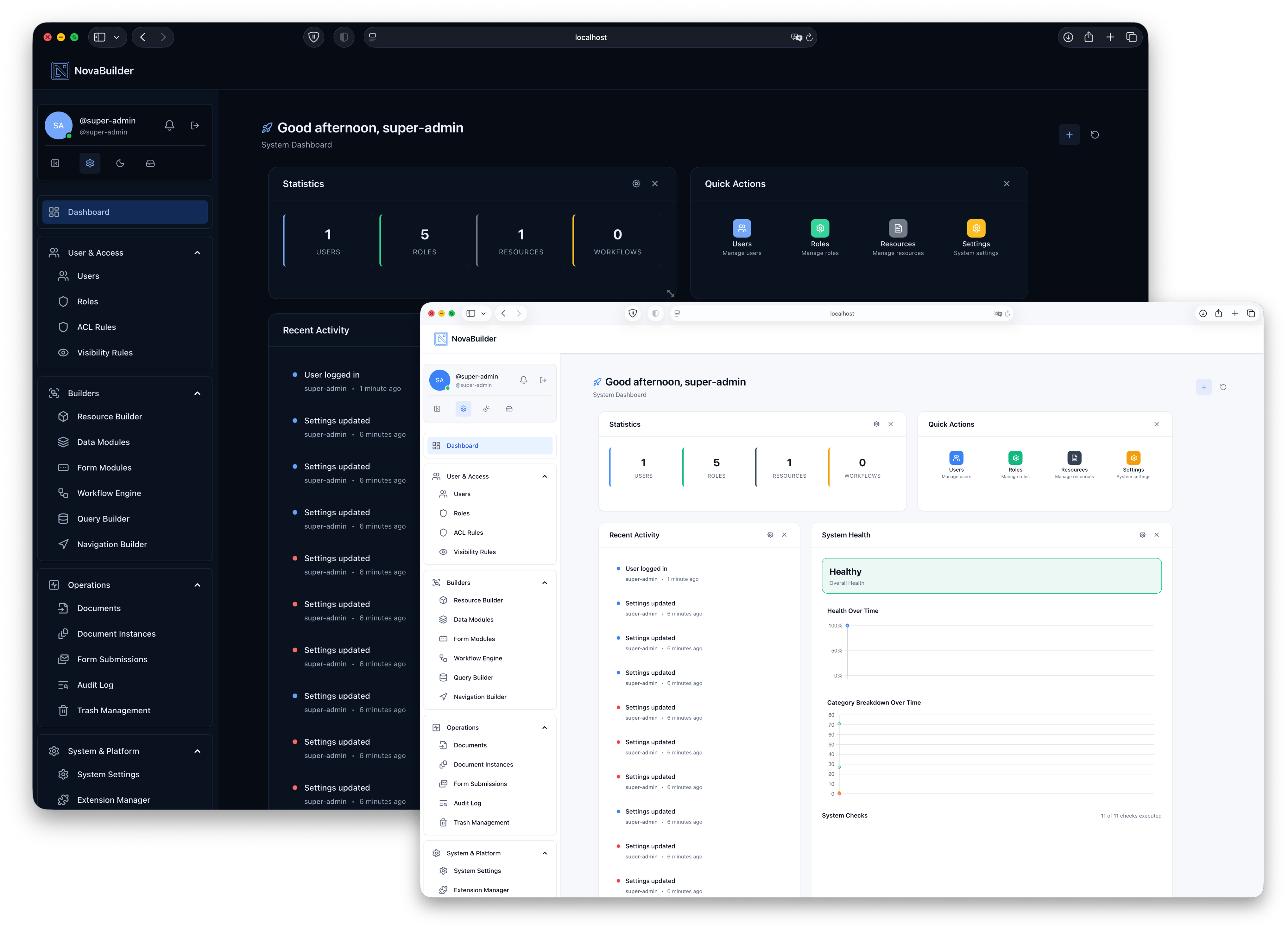
Project status: NovaBuilder is under active development. Review release notes and test upgrades before deploying business-critical workloads. APIs, interfaces and internal structures may change.
A business application is more than a collection of screens. As it grows, it needs consistent data structures, access rules, processes, documents and maintainable integrations.
NovaBuilder brings these concerns together in one modular application platform. Instead of stitching together unrelated tools, you can build around a shared foundation and evolve the system as requirements change.
Designed for: internal operations platforms, administrative systems, multi-user business applications, process-driven services and extensible domain-specific solutions.
Not intended as: a marketing website builder or a standalone drag-and-drop page generator.
| Building block | Purpose |
|---|---|
| Data Modules | Define structured business data, relationships, validation and access rules. |
| Form Builder | Build data-entry experiences with conditional behaviour. |
| Workflow Engine | Connect events, conditions and actions into repeatable processes. |
| Document & PDF tools | Create document-driven processes and generated outputs. |
| Roles & permissions | Control who can access and act on application resources. |
| Multi-tenant architecture | Support tenant-aware applications and access boundaries. |
| Resource Page Builder | Assemble application pages using registered widgets and components. |
| Extensions & Outcome Packs | Package additional functionality and reusable system building blocks. |
| Template Library | Load reusable templates from local files. |
Capabilities and their maturity may vary by release; consult the changelog before relying on a specific feature in production.
                       NovaBuilder application
┌─────────────────────────────────────────────────────────────┐
│                    Pages and user interface                 │
├──────────────────┬──────────────────┬───────────────────────┤
│   Data Modules   │      Forms       │       Workflows       │
├──────────────────┴──────────────────┴───────────────────────┤
│           Documents · Templates · Integrations             │
├─────────────────────────────────────────────────────────────┤
│          Authentication · Roles · Permissions              │
├─────────────────────────────────────────────────────────────┤
│              Core services and extension APIs              │
└─────────────────────────────────────────────────────────────┘
                  Self-hosted infrastructure
Conceptual overview, not an exhaustive runtime architecture diagram.
NovaBuilder is built on a modern PHP and JavaScript stack:
- Backend: PHP 8.2+, Laravel 12, Laravel Sanctum, Spatie Laravel Permission.
- Frontend: Vue 3, Inertia.js 2, Tailwind CSS 4 and Vite 7.
- Visual tooling: Vue Flow, Gridstack and Chart.js.
- Supporting libraries: DOMPDF, PhpSpreadsheet, QR code generation and additional integrations.
The precise dependency versions are defined in composer.json and package.json.
For deployment, start with a prepared release package, rather than assuming a source checkout contains prebuilt assets or installer files.
- Obtain a release package from NovaBuilder releases.
- Upload the release to a PHP-compatible web host with a MySQL/MariaDB database.
- Ensure
storage/andbootstrap/cache/are writable by the application. - Configure the web server and document root according to the release's installation instructions.
- Open
/installer/install.phpand follow the guided setup, where provided by the release package.
The installer guides you through environment checks, database configuration and administrator setup. See INSTALL.md for the deployment procedure.
Security: Use HTTPS, protect
.env, configure backups and never expose private application directories as public web content. Production readiness depends on your deployment, configuration and operational controls.
Prerequisites: PHP 8.2+, Composer, Node.js 20.x, npm 10+, and a configured database. Check required PHP extensions and service dependencies for the target release.
git clone https://github.com/novabuilder-org/novabuilder-core.git
cd novabuilder-core

composer install
npm ci
cp .env.example .env
php artisan key:generate
Configure the database and other required settings in .env, then run:
php artisan migrate
npm run build
For local development:
composer devcomposer dev starts the Laravel development server, queue listener, log viewer and Vite development server. A configured database and other services may still be required for individual features.
Source vs. release: The source repository and packaged distributions may differ. In particular, do not assume that an installer path or precompiled assets are present in a raw clone.
NovaBuilder separates the application foundation from additional functionality. Its extension infrastructure supports packages that can contribute application capabilities without requiring routine edits to core files.
Recent releases introduced Outcome Pack support, a unified package installation pipeline and verification/regeneration tools for generated outputs. The Template Library also supports file-based templates. See CHANGELOG.md for the relevant release details and migration notes.
Extension developers should use documented public interfaces and review the project's license, including its extension exception, before distributing packages.
app/                 Application code, including NovaBuilder components
bootstrap/           Application bootstrap and cache
config/              Application configuration
database/            Migrations, factories and seeders
extensions/          Extension packages
public/              Public web assets and entry points
resources/           Frontend source and application resources
routes/              Application route definitions
storage/             Runtime storage
lang/                Localisation resources
generated/php/        Generated PHP outputs
.github/             Repository automation and community configuration
This is a high-level map; explore the source tree for the current internal module boundaries.
NovaBuilder uses a centralised release model. This repository contains the core source; release packages and authoritative release context are published through the broader NovaBuilder organisation.
- Review
CHANGELOG.mdbefore upgrading. - Read migration notes, particularly when updating templates, extensions or generated outputs.
- Back up the database and files, and test upgrades in a staging environment.
- Keep
composer.lockandpackage-lock.jsoncommitted for reproducible dependency resolution.
NovaBuilder provides authentication and permission-related building blocks, but no framework can guarantee the security of an application or its deployment. Review your access policies, tenant boundaries, custom extensions, hosting configuration and update procedures.
Found a vulnerability? Do not open a public issue. Follow SECURITY.md and report it privately to security@novabuilder.com.
Contributions focused on maintainability, security, documentation, testing and useful extensions are welcome.
Before proposing changes, review the existing code, open issues and project discussions. For substantial changes, discuss the design and scope before implementation.
NovaBuilder Core is licensed under GNU AGPLv3 with an Extension & Plugin Exception, as described in LICENSE.md. The exception sets out conditions under which separately distributed extensions may use other licenses. Read the full terms before redistributing the Core, operating modified network services or publishing commercial extensions.
NovaBuilder — Build systems that last.