Cross Origin Resource Sharing (CORS)
By supporting CORS functionality, a RCouch instance can accept direct connections to protected DBs and instances, without the browser functionality being blocked due to the same origin constraint. CORS is http://caniuse.com/cors today on over 90% of browsers.
- dev list http://markmail.org/message/wzdge2nb3xkaqzlk from @benoitc
- JIRA https://issues.apache.org/jira/browse/COUCHDB-431
- Origin source: http://wiki.apache.org/couchdb/CORS
- Simple requests for a couchdb instance
- Preflight requests for a couchdb instance
- Configuration for a specific CouchDB vhost
- All origins are excluded by default
To enable CORS support, you need to set the option enable_cors = true in the [httpd] section of local.ini, and [cors] section with origins = *. Note that by default, no origins are accepted, you must either use a wildcard or whitelist.
[httpd]
enable_cors = true

[cors]
origins = *
[cors]
; List of origins, separated by a comma (protocol, host, port)
; refer to http://tools.ietf.org/html/rfc6454 for specification
origins = http://home.muse.net.nz:8000, https://localhost, http://www.number10.gov.uk:80
[cors]
; List of accepted methods, comma-separated
; refer to http://tools.ietf.org/html/rfc2616, rfc2817, rfc5789
methods = GET, POST, PUT, DELETE
[cors]
; List of accepted headers separated by a comma
headers = TODO
TODO
To set the options for a vhost, you will need to create a section with the vhost name prefixed by "cors:" . Ex for the vhost example.com:
; Configuration for a vhost
;[cors:example.com]
; credentials = false
; List of origins separated by a comma
;origins =
; List of accepted headers separated by a comma
; headers =
; List of accepted methods
; methods =
== Credentials ==
TODO
The following snippet was lifted from http://www.html5rocks.com/en/tutorials/cors|html5rocks CORS tutorial:
<!DOCTYPE html>
<html lang="en">
  <head>
    <title>Testing CORS</title>
    <meta http-equiv="Content-Type" content="text/html;charset=utf-8">
    <script src="https://ajax.googleapis.com/ajax/libs/jquery/1.8.2/jquery.min.js"></script>
    <meta author="http://www.html5rocks.com/en/tutorials/cors/#toc-adding-cors-support-to-the-server">
    <meta license="Apache 2.0">
    <script>

      // Create the XHR object.
      function createCORSRequest(method, url) {
        var xhr = new XMLHttpRequest();
        if ("withCredentials" in xhr) {
          // XHR for Chrome/Firefox/Opera/Safari.
          xhr.open(method, url, true);
        } else if (typeof XDomainRequest != "undefined") {
          // XDomainRequest for IE.
          xhr = new XDomainRequest();
          xhr.open(method, url);
        } else {
          // CORS not supported.
          xhr = null;
        }
        return xhr;
      }

      // Make the actual CORS request.
      function makeCorsRequest(uri) {
        console.log("got uri: " + uri);
        var xhr = createCORSRequest('GET', uri);
        if (!xhr) {
          alert('CORS not supported');
          return;
        }

        // Response handlers.
        xhr.onload = function() {
          console.log('Response from CORS request to ' + uri + ': ' + xhr.responseText);
        };

        xhr.onerror = function() {
          console.log('Woops, there was an error making the request to ' + uri + '.');
        };

        xhr.send();
      }

      $(document).ready(function() {
        makeCorsRequest('http://my.couchdb.org:5984/');
        });
  </script>
  </head>
  <body>
  </body>
</html>
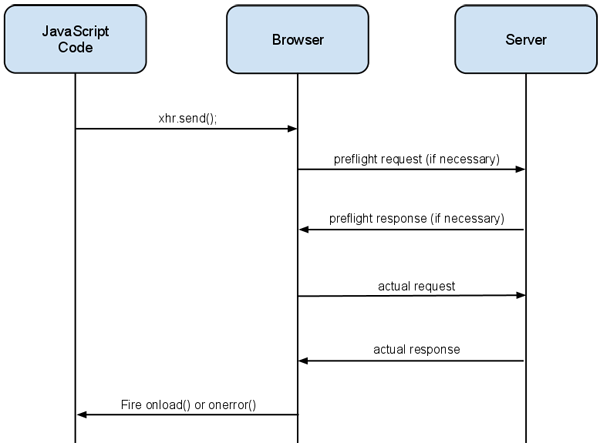
This image is from the excellent http://www.html5rocks.com/en/tutorials/cors/ CORS tutorial.
- http://www.w3.org/TR/cors/ CORS standard
- http://tools.ietf.org/html/rfc6454 Definition of Origin
- https://developer.mozilla.org/en-US/docs/Same-origin_policy_for_file:_URIs
- http://hacks.mozilla.org/2009/07/cross-site-xmlhttprequest-with-cors/
- https://developer.mozilla.org/En/HTTP_access_control
- https://developer.mozilla.org/En/Server-Side_Access_Control
- https://developer.mozilla.org/en-US/docs/Same_origin_policy_for_JavaScript
- http://caniuse.com/cors covers browser support
- http://www.html5rocks.com/en/tutorials/cors/ has a nice example
- http://www.kendoui.com/blogs/teamblog/posts/11-10-03/using_cors_with_all_modern_browsers.aspx
Note that at least IE >= 8 does not support pre-flight.