Your new startup is focusing on building a portfolio management system that supports not only traditional assets like gold, silver, stocks, etc, but crypto-assets as well! The problem is, there are so many coins out there! It's a good thing you understand how HD wallets work, since you'll need to build out a system that can create them.
You're in a race to get to the market. There aren't as many tools available in Python for this sort of thing, yet.
Thankfully, you've found a command line tool, hd-wallet-derive that supports not only BIP32, BIP39, and BIP44, but
also supports non-standard derivation paths for the most popular wallets out there today! However, you need to integrate
the script into your backend with your dear old friend, Python.
Once you've integrated this "universal" wallet, you can begin to manage billions of addresses across 300+ coins, giving you a serious edge against the competition.
In this assignment, however, you will only need to get two coins working: Ethereum and Bitcoin Testnet. Ethereum keys are the same format on any network, so they should work with your custom networks or testnets.
-
PHP must be installed on your operating system (any version, 5 or 7). Don't worry, you will not need to know any PHP.
-
You will need to clone the
hd-wallet-derivetool. -
bitPython Bitcoin library. -
web3.pyPython Ethereum library.
-
Create a project directory called
walletandcdinto it. -
Clone the
hd-wallet-derivetool into this folder and install it using the instructions on itsREADME.md. -
Create a symlink called
derivefor thehd-wallet-derive/hd-wallet-derive.phpscript into the top-level project directory, like so:ln -s hd-wallet-derive/hd-wallet-derive.php deriveThis will clean up the command needed to run the script in our code, as we can call
./deriveinstead of./hd-wallet-derive/hd-wallet-derive.php. -
Test that you can run the
./derivescript properly, using one of the examples on the repo'sREADME.md -
Create a file called
wallet.py—this will be your universal wallet script. You can use this starter code as a starting point.
Your directory tree should look something like this:

-
In a separate file,
constants.py, set the following constants:BTC = 'btc'ETH = 'eth'BTCTEST = 'btc-test'
-
In
wallet.py, import all constants:from constants import * -
Use these anytime you reference these strings, both in function calls, and in setting object keys.
-
Generate a new 12-word mnemonic using
hd-wallet-deriveor by using this tool. -
Set this mnemonic as an environment variable, and include the one you generated as a fallback, using:
mnemonic = os.getenv('MNEMONIC', 'insert mnemonic here')
-
Use the
subprocesslibrary to call the./derivescript from Python. Make sure to properly wait for the process. -
The following flags must be passed into the shell command as variables:
- Mnemonic (
--mnemonic) must be set from an environment variable, or default to a test mnemonic - Coin (
--coin) - Numderive (
--numderive) to set number of child keys generated
- Mnemonic (
-
Set the
--format=jsonflag, then parse the output into a JSON object usingjson.loads(output) -
You should wrap all of this into one function, called
derive_wallets -
Create an object called
coinsthat derivesETHandBTCTESTwallets with this function. When done properly, the final object should look something like this (there are only three children each in this image):

You should now be able to select child accounts (and thus, private keys) by calling coins[COINTYPE][INDEX]['privkey'].
Now, we need to use bit and web3.py to leverage the keys we've got in the coins object.
You will need to create three more functions:
-
priv_key_to_account-- this will convert theprivkeystring in a child key to an account object thatbitorweb3.pycan use to transact. This function needs the following parameters:coin-- the coin type (defined inconstants.py).priv_key-- theprivkeystring will be passed through here.
You will need to check the coin, then return one of the following functions based on the library:
- For
ETH, returnAccount.privateKeyToAccount(priv_key)- This function returns an account object from the private key string. You can read more about this object here.
- For
BTCTEST, returnPrivateKeyTestnet(priv_key)- This is a function from the
bitlibarary that converts the private key string into a WIF (Wallet Import Format) object. WIF is a special format bitcoin uses to designate the types of keys it generates. - You can read more about this function here.
- This is a function from the
-
create_tx-- this will create the raw, unsigned transaction that contains all metadata needed to transact. This function needs the following parameters:coin-- the coin type (defined inconstants.py).account-- the account object frompriv_key_to_account.to-- the recipient address.amount-- the amount of the coin to send.
You will need to check the coin, then return one of the following functions based on the library:
- For
ETH, return an object containingto,from,value,gas,gasPrice,nonce, andchainID. Make sure to calculate all of these values properly usingweb3.py! - For
BTCTEST, returnPrivateKeyTestnet.prepare_transaction(account.address, [(to, amount, BTC)])
-
send_tx-- this will callcreate_tx, sign the transaction, then send it to the designated network. This function needs the following parameters:coin-- the coin type (defined inconstants.py).account-- the account object frompriv_key_to_account.to-- the recipient address.amount-- the amount of the coin to send.
You may notice these are the exact same parameters as
create_tx.send_txwill callcreate_tx, so it needs all of this information available.You will need to check the coin, then create a
raw_txobject by callingcreate_tx. Then, you will need to sign theraw_txusingbitorweb3.py(hint: the account objects have a sign transaction function within).Once you've signed the transaction, you will need to send it to the designated blockchain network.
- For
ETH, returnw3.eth.sendRawTransaction(signed.rawTransaction) - For
BTCTEST, returnNetworkAPI.broadcast_tx_testnet(signed)
Now, you should be able to fund these wallets using testnet faucets. Open up a new terminal window inside of wallet,
then run python. Within the Python shell, run from wallet import * — you can now access the functions interactively.
You'll need to set the account with priv_key_to_account and use send_tx to send transactions.
-
Fund a
BTCTESTaddress using this testnet faucet. -
Use a block explorer to watch transactions on the address.
-
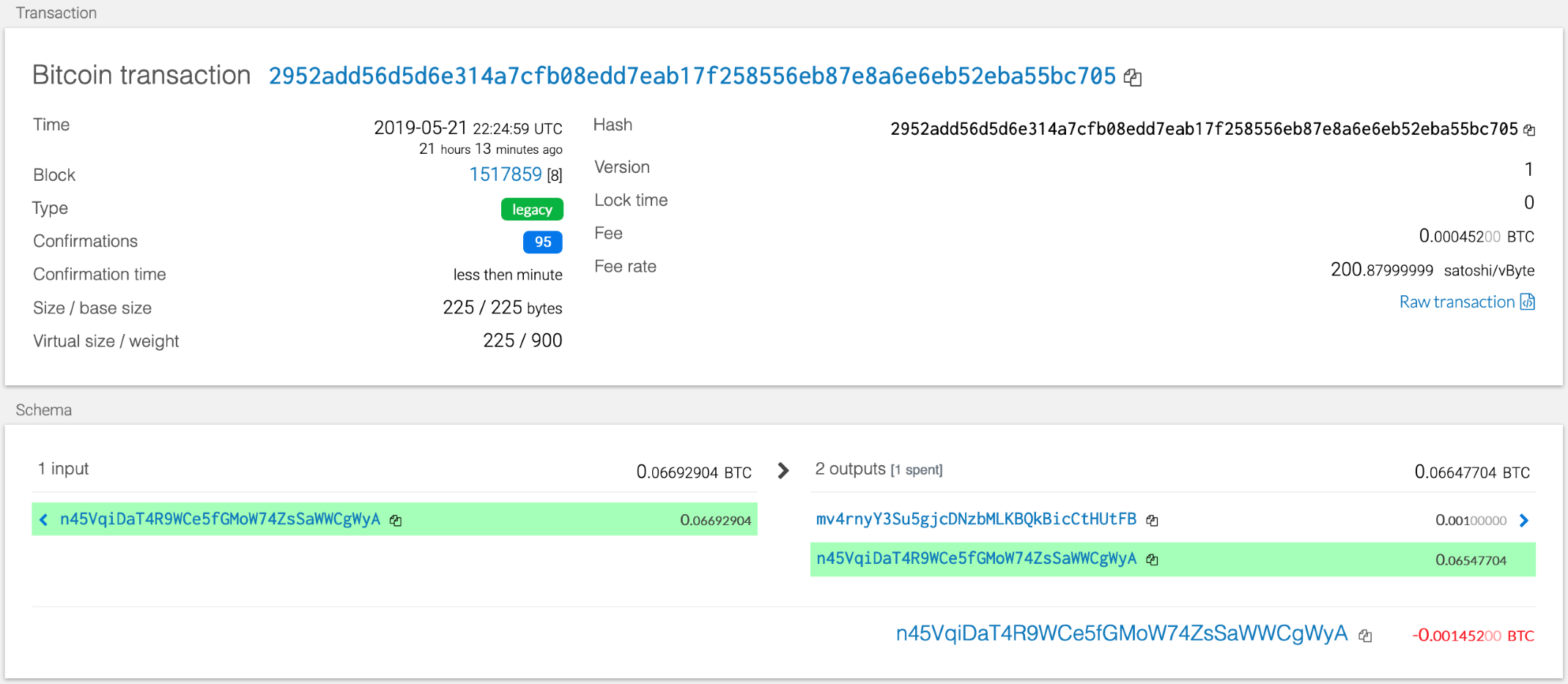
Send a transaction to another testnet address (either one of your own, or the faucet's).
-
Screenshot the confirmation of the transaction, like so:
-
Add one of the
ETHaddresses to the pre-allocated accounts in yournetworkname.json. -
Delete the
gethfolder in each node, then re-initialize usinggeth --datadir nodeX init networkname.json. This will create a new chain, and will pre-fund the new account. -
Add the following middleware to
web3.pyto support the PoA algorithm:
from web3.middleware import geth_poa_middleware

w3.middleware_onion.inject(geth_poa_middleware, layer=0)
-
Due to a bug in
web3.py, you will need to send a transaction or two with MyCrypto first, since thew3.eth.generateGasPrice()function does not work with an empty chain. You can use one of theETHaddressprivkey, or one of thenodekeystore files. -
Send a transaction from the pre-funded address within the wallet to another, then copy the
txidinto MyCrypto's TX Status, and screenshot the successful transaction, like so:

-
Create a
README.mdthat contains the test transaction screenshots, as well as the code used to send them. Pair the screenshot with the line(s) of code. -
Write a short description about what the wallet does, what it is built with, and how to use it.
-
Include installing pip dependencies using
requirements.txt, as well as cloning and installinghd-wallet-derive. You may include thehd-wallet-derivefolder in your repo, but still include the install instructions. You do not need to include Python or PHP installation instructions. -
Upload the project to a new GitHub repository.
-
Celebrate the fact that you now have an incredibly powerful wallet that you can expand to hundreds of coins!
-
Add support for
BTC. -
Add support for
LTCusing the sister library,lit. -
Add a function to track transaction status by
txid.