
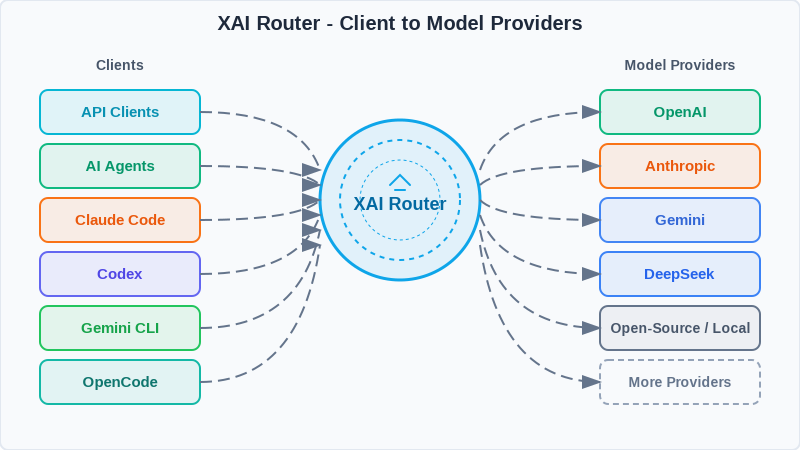


XAI 是一个在应用层透明接入的 AI API 路由与治理平台,内置完整的多租户管理体系,支持无缝接入并统一调度全球主流大模型与本地私有部署的开源模型。
- XAI Router(云端聚合,预充值):对标 OpenRouter 的即开即用聚合服务,注册后充值即可调用,无需管理密钥,按量计费。
- XAI Control(云端 BYOK):专属 BYOK 路由系统,完全使用官方密钥,零加价与完全控制。
- XAI Router Private(私有化部署):与 XAI Control 功能一致,数据与配置保留在本地,更适合合规与隔离场景。
- 统一路由:一个入口接入多家供应商与模型。
- 稳定性:负载均衡、故障切换、密钥轮换与模型映射。
- 多租户治理:子账户体系、权限控制与用量治理。
- 安全优先:100% BYOK、端到端加密存储、无超级管理员与密钥完全所有权。
- 快速验证:无需管理密钥,快速测试多模型。
- 生产环境:BYOK 模式下的大规模调用与成本敏感业务。
- 合规与隔离:私有化部署,数据与配置本地留存。
- API Gateway:统一路由入口。
- Admin Console:配置管理后台(路由、供应商、策略等)。
- Management Console:账户、密钥、账单与用量管理。
- 访问 m.xairouter.com 注册账号。
- 充值并创建 API Key。
- 立即开始调用。
export XAI_API_KEY="your-xai-router-api-key"

# OpenAI-compatible
curl https://api.xairouter.com/v1/chat/completions \
  -H "Content-Type: application/json" \
  -H "Authorization: Bearer $XAI_API_KEY" \
  -d '{"model":"gpt-4o-mini","messages":[{"role":"user","content":"Hello"}]}'

# Anthropic-compatible
curl https://api.xairouter.com/v1/messages \
  -H "x-api-key: $XAI_API_KEY" \
  -H "anthropic-version: 2023-06-01" \
  -H "content-type: application/json" \
-d '{"model":"claude-sonnet-4-5-20250929","max_tokens":256,"messages":[{"role":"user","content":"Hello"}]}'- 访问 a.xaicontrol.com(配置管理)与 m.xaicontrol.com(账户管理)完成注册。
- 添加官方 Provider Keys(OpenAI、Anthropic、DeepSeek 等)。
- 统一入口调用:
https://api.xaicontrol.com。
- 服务器要求:Linux x86_64;1–2 核;1–2 GB 内存;4–8 GB 磁盘;可访问外网。
- 域名准备:准备 3 个已解析到服务器公网 IP 的域名:
api-xai.your-domain.com(API 服务)manage-xai.your-domain.com(账户管理)admin-xai.your-domain.com(配置管理)
- 安装 Docker
curl -fsSL https://get.docker.com -o get-docker.sh
sudo sh get-docker.sh- 安装 Docker Compose
curl -L https://github.com/docker/compose/releases/latest/download/docker-compose-$(uname -s)-$(uname -m) -o /usr/local/bin/docker-compose
sudo chmod +x /usr/local/bin/docker-compose- 生成
docker-compose.yml
curl -X POST https://deploy.xaixapi.com/xai?raw=true \
  -H "Content-Type: application/json" \
  -d '{
    "xai_mail": "your@email.com",
    "xai_api": "api-xai.your-domain.com",
    "xai_manage": "manage-xai.your-domain.com",
    "xai_admin": "admin-xai.your-domain.com"
}' > docker-compose.yml- 启动服务
docker-compose -f docker-compose.yml up -d核心服务会在服务器内部监听 3443(API)、3080(配置管理)、3081(账户管理)。这些端口无需对公网开放。
- 配置 Nginx 反向代理
# Ubuntu/Debian
sudo apt update && sudo apt install nginx -y

# CentOS/RHEL
sudo yum install nginx -y
sudo mv /etc/nginx/nginx.conf /etc/nginx/nginx.conf.bak
curl -X POST https://deploy.xaixapi.com/nginx?raw=true \
-H "Content-Type: application/json" \
-d '{
"xai_api": "api-xai.your-domain.com",
"xai_manage": "manage-xai.your-domain.com",
"xai_admin": "admin-xai.your-domain.com"
}' > /etc/nginx/nginx.conf
sudo systemctl restart nginx && sudo systemctl enable nginx- 验证部署
docker-compose ps- 账户管理后台:
http://manage-xai.your-domain.com - 系统管理后台:
http://admin-xai.your-domain.com
建议为所有域名配置 HTTPS 以保障传输安全。
- XAI Router:账户管理 m.xairouter.com,API
https://api.xairouter.com - XAI Control:配置管理 a.xaicontrol.com,账户管理 m.xaicontrol.com,API
https://api.xaicontrol.com
XAI is a transparent, application-layer routing and governance platform for AI APIs. It provides a complete multi-tenant management system to connect and orchestrate leading global foundation models as well as privately deployed open-source models.
- XAI Router (Cloud, Prepaid): An OpenRouter-like hosted aggregator. Register, top up, and call APIs within minutes—no key management required, pay-per-token.
- XAI Control (Cloud, BYOK): Your dedicated BYOK routing system. Bring your own official provider keys with zero markup and full ownership.
- XAI Router Private (Self-hosted): Same core capabilities as XAI Control, with all data and configuration kept on your own infrastructure.
- Unified Routing: One API entry point for multiple providers and models.
- Reliability: Load balancing, failover, key rotation, and model mapping.
- Multi-tenant Governance: Sub-accounts, fine-grained permissions, and usage controls.
- Security by Design: 100% BYOK, end-to-end encrypted key storage, no super-admin access, and full key ownership.
- Rapid Prototyping: Try multiple models quickly without managing keys.
- Production Workloads: Cost-sensitive, large-scale usage with BYOK.
- Compliance & Isolation: Private deployment with data and config retained on-prem.
- API Gateway: Unified routing entry for all model calls.
- Admin Console: Configuration management for routing, providers, and policies.
- Management Console: Accounts, API keys, billing, and usage.
- Register at m.xairouter.com.
- Top up and create an API key.
- Call the API immediately.
export XAI_API_KEY="your-xai-router-api-key"

# OpenAI-compatible
curl https://api.xairouter.com/v1/chat/completions \
  -H "Content-Type: application/json" \
  -H "Authorization: Bearer $XAI_API_KEY" \
  -d '{"model":"gpt-4o-mini","messages":[{"role":"user","content":"Hello"}]}'

# Anthropic-compatible
curl https://api.xairouter.com/v1/messages \
  -H "x-api-key: $XAI_API_KEY" \
  -H "anthropic-version: 2023-06-01" \
  -H "content-type: application/json" \
-d '{"model":"claude-sonnet-4-5-20250929","max_tokens":256,"messages":[{"role":"user","content":"Hello"}]}'- Register at a.xaicontrol.com (config) and m.xaicontrol.com (account).
- Add your official provider keys (OpenAI, Anthropic, DeepSeek, etc.).
- Use the unified API entry:
https://api.xaicontrol.com.
- System requirements: Linux x86_64; 1–2 vCPU; 1–2 GB RAM; 4–8 GB disk; internet access.
- Domain setup: Prepare 3 domains pointing to your server’s public IP:
api-xai.your-domain.com(API service)manage-xai.your-domain.com(account management)admin-xai.your-domain.com(configuration management)
- Install Docker
curl -fsSL https://get.docker.com -o get-docker.sh
sudo sh get-docker.sh- Install Docker Compose
curl -L https://github.com/docker/compose/releases/latest/download/docker-compose-$(uname -s)-$(uname -m) -o /usr/local/bin/docker-compose
sudo chmod +x /usr/local/bin/docker-compose- Generate
docker-compose.yml
curl -X POST https://deploy.xaixapi.com/xai?raw=true \
  -H "Content-Type: application/json" \
  -d '{
    "xai_mail": "your@email.com",
    "xai_api": "api-xai.your-domain.com",
    "xai_manage": "manage-xai.your-domain.com",
    "xai_admin": "admin-xai.your-domain.com"
}' > docker-compose.yml- Start the services
docker-compose -f docker-compose.yml up -dCore services listen internally on 3443 (API), 3080 (config), and 3081 (management). These ports should not be exposed publicly.
- Configure Nginx as a reverse proxy
# Ubuntu/Debian
sudo apt update && sudo apt install nginx -y

# CentOS/RHEL
sudo yum install nginx -y
sudo mv /etc/nginx/nginx.conf /etc/nginx/nginx.conf.bak
curl -X POST https://deploy.xaixapi.com/nginx?raw=true \
-H "Content-Type: application/json" \
-d '{
"xai_api": "api-xai.your-domain.com",
"xai_manage": "manage-xai.your-domain.com",
"xai_admin": "admin-xai.your-domain.com"
}' > /etc/nginx/nginx.conf
sudo systemctl restart nginx && sudo systemctl enable nginx- Verify the deployment
docker-compose ps- Account management:
http://manage-xai.your-domain.com - System administration:
http://admin-xai.your-domain.com
We recommend enabling HTTPS for all domains.
- XAI Router: m.xairouter.com (account),
https://api.xairouter.com(API) - XAI Control: a.xaicontrol.com (config), m.xaicontrol.com (account),
https://api.xaicontrol.com(API)