I've long used a shell script to quickly push my dotfiles (configuration files for UNIX programs) from my workstation to the servers that I manage. The Python script sync-dotfiles is the latest incarnation of that shell script and it adds one feature to the mix. When I push my dotfiles certain files are rewritten in transit so that:
- All interactive command prompts on a single machine use the same color.
- Every machine uses a unique color for interactive command prompts.
In my case the dotfiles for the Z shell, the Bash shell and the Python, Lua and SQLite interactive prompts are rewritten because I've added prompt definitions with ANSI escape sequences to the relevant configuration files.
Now whenever I want to be absolutely sure I'm not executing a destructive command in the wrong context (terminal window) I only have to look at the prompt colors to know where I am. Over time this association has grown so strong that I rarely lose track of my context nowadays. Here's a screenshot of my local terminal with a blue prompt:
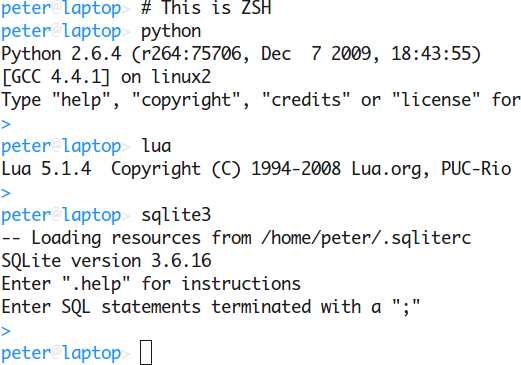
And here's the equivalent session on one of my servers which uses a red prompt:
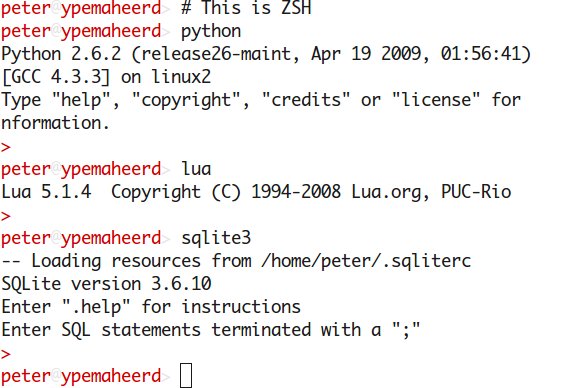
To use this script you'll need to create a ~/.sync-dotfiles.conf file. Start with a line files: and add the names of your dotfiles on the lines below that. Directories are also allowed and will be included recursively. Then add the line hosts: and below that line list your hosts (SSH aliases), each followed by a colon and then one of the supported color names. Make sure to also add the host local with the color you've used in the dotfiles on your local machine (so the script knows which ANSI escape sequences to rewrite). As an example here are my ~/.sync-dotfiles.conf and ~/.sqliterc files:
$ cat ~/.sync-dotfiles.conf
files:
  .bashrc
  .ctags
  .gitconfig
  .inputrc
  .profile
  .pythonrc
  .screenrc
  .shell_aliases
  .shell_prompt
  .sqliterc
  .vim
  .vimrc
  .zshrc

exclude:
  .vim/.netrwhist
  .vim/.VimballRecord
  .vim/GetLatest
  .vim/sessions
  .vim/tags

hosts:
  local: blue
  server1: red
  server2: green
  server3: magenta

$ cat ~/.sqliterc
.prompt "��[0;34m�> ��[0m�" "��[0;34m�>> ��[0m�"
As you can see above I synchronize my ~/.vim directory using the sync-dotfiles script. This directory contains some unwanted (large) files which I've excluded using an exclude: section. Given the above configuration, this is the output of the sync-dotfiles script:
$ sync-dotfiles
Building tarball for server1:
 - .bashrc
 - .ctags
 - .gitconfig
 - .inputrc
 - .profile (customized colors)
 - .pythonrc (customized colors)
 - .screenrc
 - .shell_aliases
 - .shell_prompt (customized colors)
 - .sqliterc (customized colors)
 - .vim/ (long list of files omitted)
 - .vimrc
 - .zshrc
Uploading tarball to server1 ..
Building tarball for server2:
 - .bashrc
 - .ctags
 - .gitconfig
 - .inputrc
 - .profile (customized colors)
 - .pythonrc (customized colors)
 - .screenrc
 - .shell_aliases
 - .shell_prompt (customized colors)
 - .sqliterc (customized colors)
 - .vim/ (long list of files omitted)
 - .vimrc
 - .zshrc
Uploading tarball to server2 ..
Building tarball for server3:
 - .bashrc
 - .ctags
 - .gitconfig
 - .inputrc
 - .profile (customized colors)
 - .pythonrc (customized colors)
 - .screenrc
 - .shell_aliases
 - .shell_prompt (customized colors)
 - .sqliterc (customized colors)
 - .vim/ (long list of files omitted)
 - .vimrc
 - .zshrc
Uploading tarball to server3 ..
All done!
With a dozen dotfiles and three servers the script finishes within a few seconds.
If you have questions, bug reports, suggestions, etc. the author can be contacted at peter@peterodding.com. The latest version is available at http://peterodding.com/code/sync-dotfiles and http://github.com/xolox/sync-dotfiles.
This software is licensed under the MIT license.
© 2010 Peter Odding <peter@peterodding.com>.