An open-source, AI-native SSH client built with Rust.
以 SSH 协议为底座,打造 AI 时代永不断线的云端智能工作平台。
SSH is the wire. What flows through it is your entire AI-powered workflow.
Connect from any device. Punch through any network.
AI keeps working while you're away. Reconnect, and pick up right where it left off.
Devices are temporary. Your workspace is permanent.
Installation • Features • Shortcuts • Development • Roadmap
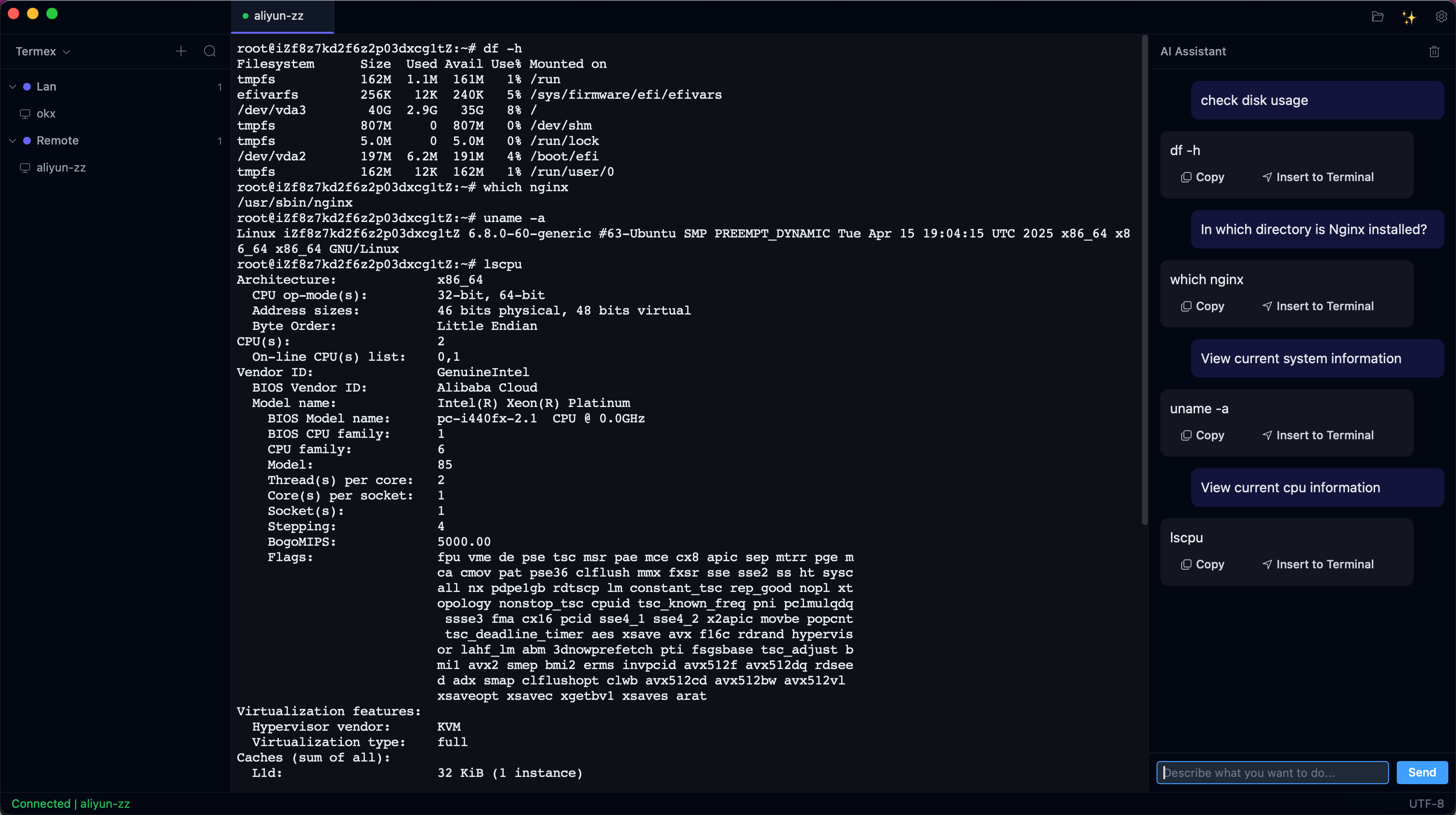
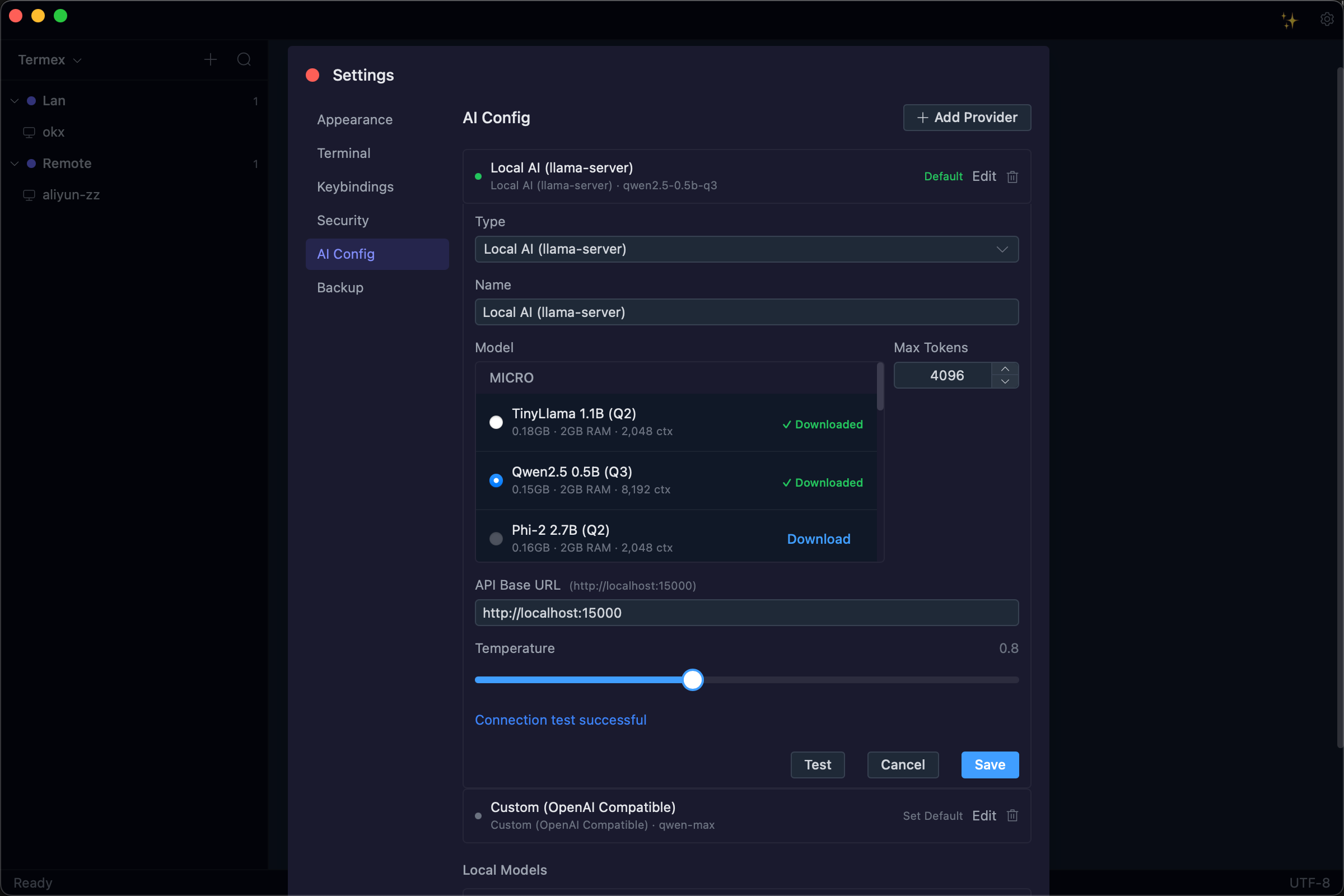
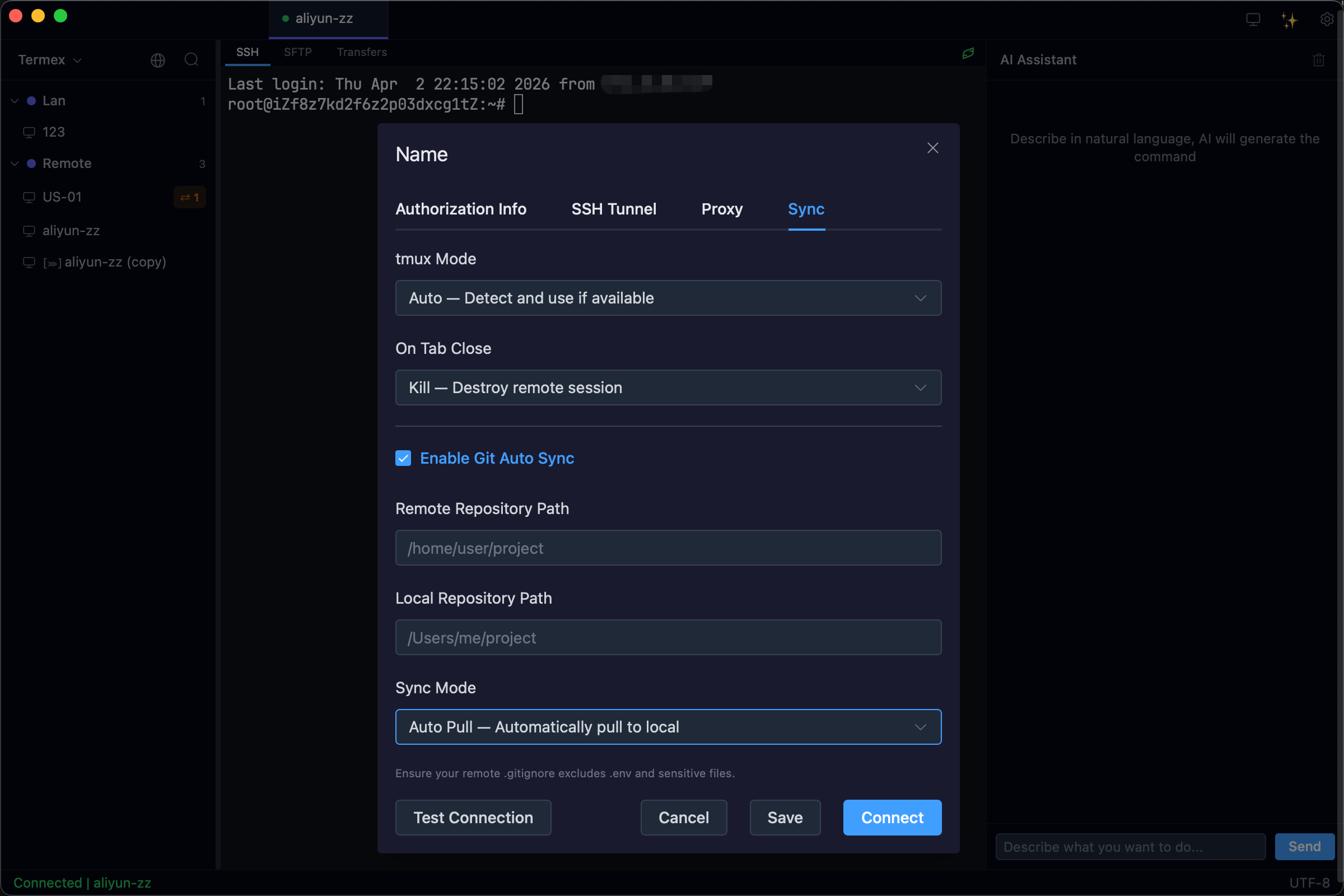
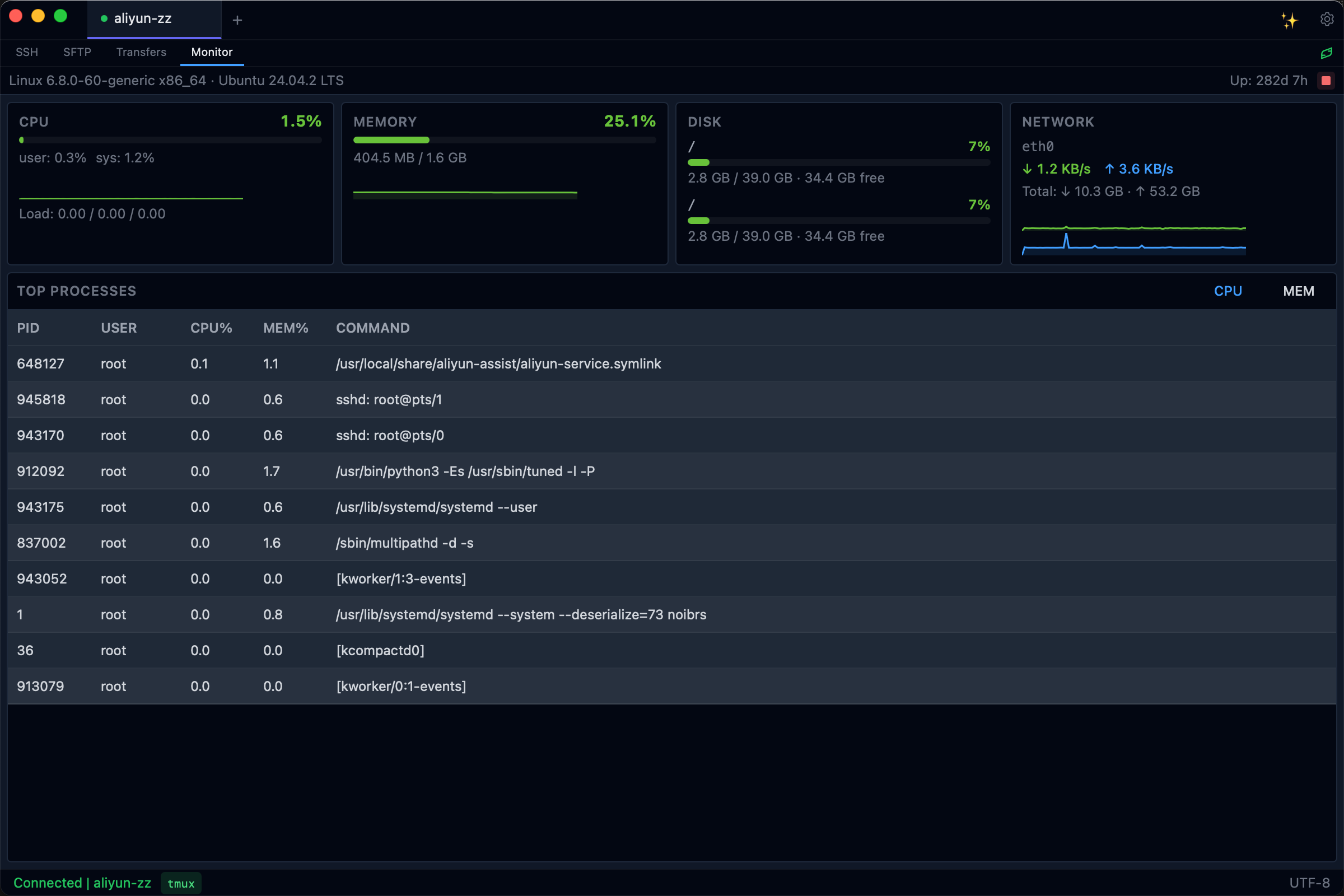
| Termius | Tabby | WindTerm | Termex | |
|---|---|---|---|---|
| Beautiful UI | Yes | Yes | No | Yes |
| Native Performance | Yes | No (Electron) | Yes | Yes (Tauri/Rust) |
| AI Integrated | No | No | No | Yes |
| Free & Open Source | No | Yes | Yes | Yes (MIT) |
| Encrypted Config | No | Partial | Partial | Yes (OS Keychain + AES-256-GCM) |
Download the latest release for your platform from GitHub Releases:
| Platform | Architecture | Format |
|---|---|---|
| macOS | Apple Silicon (M1/M2/M3) | .dmg |
| macOS | Intel | .dmg |
| Windows | x64 | .msi / .exe |
| Linux | x86_64 | .deb / .rpm / .AppImage |
| Linux | aarch64 | .deb / .rpm |
git clone https://github.com/user/termex.git
cd termex
pnpm install
pnpm tauri build- SSH Terminal -- WebGL-accelerated xterm.js, multi-tab, 60fps, password & key auth
- Server Management -- Tree view with groups, search, drag & drop, encrypted credential storage
- SFTP File Browser -- Dual-pane with context menu, drag & drop, copy/cut/paste, chmod, file info
- SSH Tunnel -- ProxyJump / bastion host support (multi-level), port forwarding (local/remote/dynamic)
- AI Assistant -- Dangerous command detection, command explanation, natural language to shell
- Local AI -- Built-in llama-server with 12 GGUF models, fully offline, no API key required
- Terminal Search -- In-terminal search (
Cmd+F), keyword highlighting, cross-tab search (Cmd+Shift+F) - Customization -- Dark/Light themes, 6 built-in fonts + custom upload, customizable keybindings
- Security -- OS Keychain (macOS/Windows/Linux), AES-256-GCM fallback, SQLCipher encrypted database
- Config Backup -- Encrypted export/import (
.termexformat), cross-device migration - i18n -- English and Chinese out of the box
⚠️ Tauri/Vue desktop stack is retiring (v0.69+ deprecation announcement, 4-phase plan over 24 months → physical removal at v0.80). New installs should use the Flutter desktop packages. Existing Tauri installs continue to work; data & credentials are fully shared so switching to Flutter requires no manual migration. See the Tauri retirement plan for the timeline and MIGRATION.md §v0.69 for the user-facing switch guide.Repository state: Functional parity between the legacy Tauri/Vue desktop app and the Flutter rewrite reached at v0.68.0. v0.69.0 is restructure-stabilization + deprecation announcement. The Flutter packages live under
app/+packages/termex_shared/+termex-mobile/; the legacy stack lives insrc-tauri/+src/. Seedocs/iterations/v0.51.0-pc-remediation.mdfor migration history anddocs/iterations/v0.69.0-pc-restructure-stabilization.mdfor the current stabilization status.
Tauri v2 + Rust          Backend, SSH, encryption, storage
Vue 3 + TypeScript       Frontend framework
Element Plus             UI components
Tailwind CSS             Styling
xterm.js (WebGL)         Terminal rendering
SQLCipher                Encrypted local database
russh                    Pure-Rust SSH2 protocol
ring + Argon2id          AES-256-GCM encryption & key derivation
Flutter 3.24+ (Dart)     Self-drawn UI, no Material/Cupertino
flutter_rust_bridge v2   FRB bindings (Dart <-> Rust)
Riverpod                 State management
Custom VT100 emulator    Terminal rendering (Dart, no xterm.js)
Rust core (shared)       Same russh/ring/SQLCipher, extracted to crates/termex-core/
All shortcuts are fully customizable via Settings → Keybindings. Click any shortcut label to enter recording mode and press your desired key combination.
| Action | macOS | Windows / Linux |
|---|---|---|
| New Connection | Cmd+N |
Ctrl+N |
| Open Settings | Cmd+, |
Ctrl+, |
| Toggle Sidebar | Cmd+\ |
Ctrl+\ |
| Toggle AI Panel | Cmd+Shift+I |
Ctrl+Shift+I |
| Action | macOS | Windows / Linux |
|---|---|---|
| Close Current Tab | Cmd+W |
Ctrl+W |
| Next Tab | Cmd+Tab |
Ctrl+Tab |
| Previous Tab | Cmd+Shift+Tab |
Ctrl+Shift+Tab |
| Go to Tab 1–9 | Cmd+1 ~ Cmd+9 |
Ctrl+1 ~ Ctrl+9 |
| Action | macOS | Windows / Linux |
|---|---|---|
| Search in Terminal | Cmd+F |
Ctrl+F |
| Search All Tabs | Cmd+Shift+F |
Ctrl+Shift+F |
Termex uses the operating system's native credential manager to protect all sensitive data:
| Platform | Backend | Protection |
|---|---|---|
| macOS | Keychain Services | Hardware-level (Secure Enclave + Touch ID) |
| Windows | Credential Manager (DPAPI) | User login password |
| Linux | Secret Service (GNOME Keyring / KDE Wallet) | User login password |
How it works:
- SSH passwords, private key passphrases, and AI API keys are stored in the OS keychain -- never in
termex.db termex.dbonly stores a keychain reference ID (e.g.,termex:ssh:password:{uuid})- Even if
termex.dbis stolen, no credentials are exposed - No master password required -- the OS login session provides the security boundary
- Fallback: If the OS keychain is unavailable (headless Linux), Termex falls back to AES-256-GCM encryption with a user-provided master password
- Credential fields encrypted with AES-256-GCM (ring crate) in fallback mode
- Fallback master password derived via Argon2id (m=64MB, t=3, p=4)
- Database encrypted with SQLCipher
- AI requests never include passwords, keys, or tokens
- No telemetry, no analytics, no phone-home
termex/
├── .github/workflows/         # CI + cross-platform release
├── docs/                      # Requirements, design, prototype
│   ├── iterations/            #   Version iteration plans (v0.1.0 ~ v0.51.0)
│   └── migration/             #   Flutter migration roadmap
├── scripts/                   # Version bump + FRB codegen utilities
│   └── frb-codegen.sh         #   Regenerate Flutter bindings from Rust API
├── flutter_rust_bridge.yaml   # FRB codegen config
│
├── src-tauri/src/             # ── Production (Tauri/Vue v0.34.x) ──
│   ├── commands/              #   Tauri IPC handlers
│   ├── ssh/  sftp/  crypto/  storage/  ai/  team/  recording/
│   └── state.rs
├── src/                       #   Vue 3 frontend
│   ├── components/  composables/  stores/  i18n/  types/  utils/
│
├── crates/                    # ── Migration (Flutter/Rust WIP) ──
│   ├── termex-core/           #   Shared Rust business logic
│   │   └── src/ (14 modules: ssh, sftp, crypto, storage, ai, team, ...)
│   └── termex-flutter-bridge/ #   flutter_rust_bridge v2 layer
│       ├── src/api/           #     29 API modules (≈7,200 LOC)
│       └── lib/src/           #     Dart bindings (stub until codegen runs)
└── app/                       #   Flutter app
    ├── lib/
    │   ├── features/          #     server_list, ai, sftp, team, cloud, ...
    │   ├── terminal/          #     Custom VT100 emulator
    │   ├── widgets/           #     Self-drawn design system
    │   ├── design/  system/   #     Theme tokens, sentinel flags, updater
    │   └── main.dart
    ├── test/  integration_test/
    ├── pubspec.yaml
    └── distribute_options.yaml
Production stack (Tauri/Vue):
- Rust (stable)
- Node.js (22+)
- pnpm (10+)
- Platform-specific Tauri v2 dependencies
Migration stack (Flutter):
- Rust (stable)
- Flutter SDK (3.24+)
cargo install flutter_rust_bridge_codegen --version '^2.0'
git clone https://github.com/user/termex.git
cd termex
pnpm install
pnpm tauri devgit clone https://github.com/user/termex.git
cd termex
./scripts/frb-codegen.sh # generate Dart bindings from Rust API
cd app
flutter pub get
flutter run -d macos # or -d windows / -d linux| Command | Stack | Description |
|---|---|---|
pnpm tauri dev |
Tauri | Start dev server with hot reload |
pnpm tauri build |
Tauri | Build production app |
pnpm dev |
Tauri | Start frontend dev server only (Vite) |
pnpm run build |
Tauri | Type-check + build frontend |
cd src-tauri && cargo test |
Tauri | Run Rust tests |
cd src-tauri && cargo clippy |
Tauri | Lint Rust code |
cargo test --workspace |
Both | Run all Rust tests across workspace |
./scripts/frb-codegen.sh |
Flutter | Regenerate Flutter <-> Rust bindings |
./scripts/frb-codegen.sh --check |
Flutter | CI: verify bindings up-to-date |
cd app && flutter test |
Flutter | Run Flutter unit/widget tests |
cd app && flutter analyze |
Flutter | Static analysis |
cd app && flutter build macos --release |
Flutter | Build Flutter production binary |
pnpm version:bump patch |
Both | Bump version (patch/minor/major/x.y.z) |
# Full-stack development (frontend + Rust backend with hot reload)
pnpm tauri dev

# Frontend only (no Rust backend, useful for UI work)
pnpm dev

# Run Rust backend tests
cd src-tauri && cargo test

# Run with verbose Rust logging
RUST_LOG=debug pnpm tauri dev

# Build production binary
pnpm tauri build

# Build in debug mode (faster compile, larger binary)
pnpm tauri build --debug# Semantic version bump (syncs package.json, Cargo.toml, tauri.conf.json)
pnpm version:bump patch # 0.1.0 → 0.1.1
pnpm version:bump minor # 0.1.0 → 0.2.0
pnpm version:bump major # 0.1.0 → 1.0.0
pnpm version:bump 0.2.0 # explicit version
# Commit and tag
git add -A && git commit -m "chore: release v0.2.0"
git tag v0.2.0
git push origin main --tags # triggers GitHub Actions build- v0.1.0 -- MVP (SSH + Terminal + Server Management + Encrypted Storage)
- v0.2.0 -- SFTP File Browser
- v0.3.0 -- Port Forwarding + Config Export/Import
- v0.4.0 -- Theme System + Settings Persistence + UX Polish
- v0.5.0 -- AI Core: Danger Detection + Command Explanation
- v0.6.0 -- AI Advanced: NL2Cmd + Smart Autocomplete
- v0.7.0 -- Session Recording + Server Monitoring
- v0.8.0 -- Plugin System + Extensibility
- v0.9.0 -- Stable Release
- v0.10.0 -- OS Keychain Security (credential protection)
- v0.11.0 -- Local AI Models (llama-server, 12 GGUF models, fully offline)
- v0.12.0 -- SSH ProxyJump & Bastion (multi-level jump, connection pooling, SSH Agent)
- v0.13.0 -- SFTP Enhancement (context menu, clipboard ops, chmod, file info)
- v0.14.0 -- Font Management (6 built-in fonts, custom upload, live reload)
- v0.15.0 -- Terminal Search (in-terminal + keyword highlighting + cross-tab)
- v0.16.0 -- Custom Keybindings (record mode, conflict detection, persist)
- v0.17.0 -- Server-to-Server SFTP (direct file transfer between remotes)
- v0.18.0 -- Network Proxy (SOCKS5/4, HTTP/HTTPS CONNECT, mTLS, proxy+bastion chain)
- v0.19.0 -- SFTP Per-Tab (per-tab instances, layout switching, CWD sync)
- v0.20.0 -- Tor Proxy + tmux Sessions + Git Auto Sync
- v0.21.0 -- SSH Dynamic Port Forwarding (SOCKS5 proxy,
ssh -D) - v0.22.0 -- ProxyCommand (Cloudflare Tunnel, custom transport)
- v0.23.0 -- Portable Mode (USB drive, data relative to exe)
- v0.24.0 -- Connection Chain (multi-hop any-order, SOCKS5 exit routing)
- v0.25.0 -- Security Compliance (GDPR / ISO 27001 / GB/T 22239, audit logging)
- v0.26.0 -- AI Smart Autocomplete (inline ghost text, context-aware, local AI priority)
- v0.27.0 -- SSH Config Import + Snippet Manager (one-click
~/.ssh/configimport, command snippets with variable templates, quick palette) - v0.28.0 -- Server Monitoring Dashboard (real-time CPU/Memory/Disk/Network via SSH exec, process Top N, sparkline charts, threshold alerts)
- v0.29.0 -- Session Recording + AI Summary (asciicast v2 record/playback, speed control, AI-generated session summary)
- v0.30.0 -- Team Collaboration v1 (Git-based config sharing, team encryption, selective sharing, role-based access)
- v0.31.0 -- AI Operations Assistant (context-aware chat, error auto-diagnosis, multi-turn troubleshooting, command orchestration)
- v0.32.0 -- Terminal Split Pane (horizontal/vertical split, broadcast input to all panes, focus navigation)
- v0.33.0 -- Cloud Native Integration (kubectl exec, AWS SSM, K8s pod browser, container log streaming)
- v0.34.0 -- Team Collaboration v2 (fine-grained role permissions, audit dashboard, conflict resolution UI)
- v0.35.0 -- Desktop v1.0 Stable (performance optimization, stability polish)
- v0.53.0 -- macOS Code Signing & Notarization (signed/notarized DMG via Apple Developer ID, no xattr workaround needed)
Termex follows two complementary product routes:
- Desktop (Route A · Terminal-first) — full xterm + SSH chain editing + AI sidebar; for long-form deep operations
- Mobile (Route B · AI Operator Console) — monitor and react to long-running AI tasks on remote servers; structured summaries are the primary view, terminal is "advanced details". See
docs/mobile-strategy.md.
Mobile retains terminal viewing as a baseline capability (Route A底座) but its main value is monitoring + feedback for long-running AI CLI tasks: voice-first dispatch with safety guardrails, structured outcome cards, WebSocket-primary push (FCM fallback for backgrounded apps), same-bastion network identity as your desktop.
- v0.40 – v0.61 -- Mobile foundation through App Store release (functional parity with desktop)
- v0.70.5 --
termexdremote daemon — single Rust binary on the remote, owns task state, WebSocket API, MCP-aware (prerequisite for v0.71+) - v0.71 -- Task monitoring MVP — task model + voice input + safety guardrails (PendingConfirmation) + structured summary primary view + WS-primary push
- v0.72 -- Structured summary view + terminal as advanced expansion
- v0.73 -- Network path parity (EgressProfile, PC-edited / mobile-consumed) + cost transparency + Cross-device handoff
- v0.74 -- Background execution + reliability + handoff completion (Android Foreground Service / iOS BGTask / network resilience)
- v0.75+ -- China-region push services (JPush / Xiaomi / Huawei / OPPO / vivo) + iOS Live Activity + Siri Shortcuts + voice summary announcements
Contributions are welcome! Please open an issue before submitting large PRs.