Node Texture Layer (v5.5)
Warning
This page is for Mutable v5.5. A newer version is available — see the v5.8 version of this page.
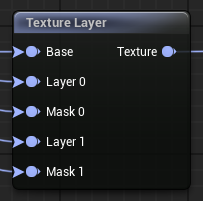
Combine multiple Mutable textures into a single texture, layer by layer using a merging function and a mask.
Create a shirt design with several independently modifiable patterns and colors.
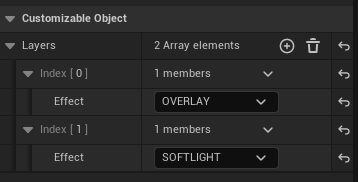
Layers (array): Add one for each texture to blend to the base texture.
Effect (array element blend mode dropdown): Blend mode that is used to mix this layer with the rest. It's applied to the result of blending the previous layers with the base texture. Layers with smaller indexes are blended first.
(WARNING)If the blend mode is "Modulate" and no mask is provided, this layer completely overrides the base texture and any layer with a lower index, so it's not recommended.
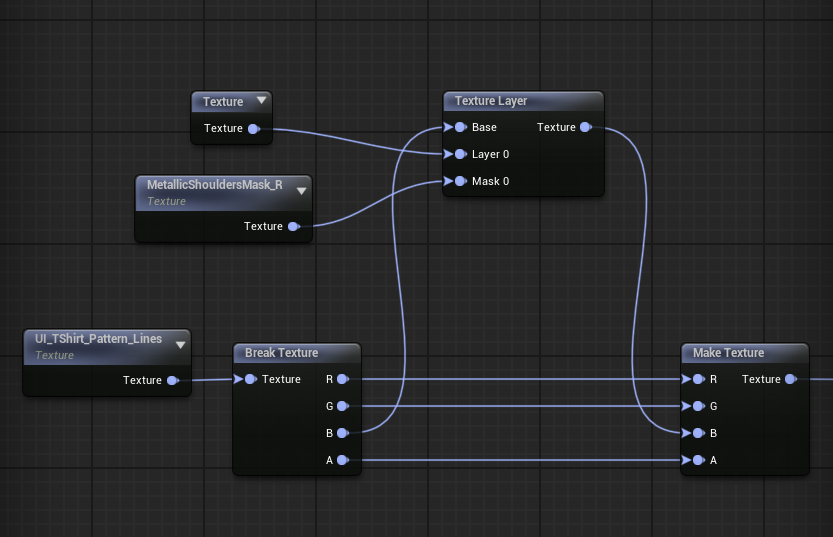
(NOTE)To apply an effect to a single channel, use the Texture To Channels and Texture From Channels nodes as seen in the following example:
Layer (index): Texture or color that is blended with the effect chosen at the node property with the same index. One appears for each element in the Layers array node property.
(WARNING)This texture pin is special, it can also take Color input directly. If the input of this pin is the result of a Texture From Color node, passing the color directly improves performance! This is okay:
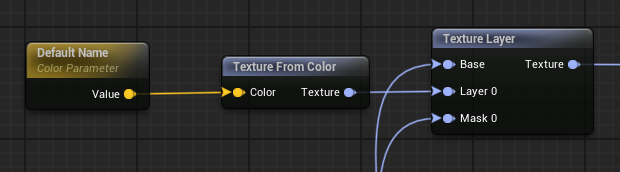
But this is perfect, as it gives more performance:
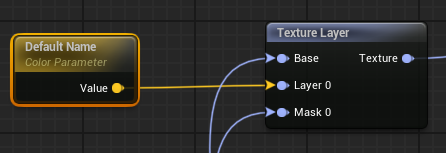
Mask (index): This texture controls the zones that are affected by the layer with the same index. White means full effect, black means no effect, grayscale partially applies the layer. One appears for each element in the Layers array node property.
Base: Base texture upon which all layers are applied, from lower index to higher index.
Texture: Texture resulting from the blending all layers, from low index to high index, applying the corresponding effects to each layer limited by the corresponding mask.
The texture blending effects are similar to some layer effects used in common image editing programs like Gimp or Photoshop.