Since forking a repository is so easy on GitHub, a number of people tend to do it thinking they want to play with the source, but then never actually push…
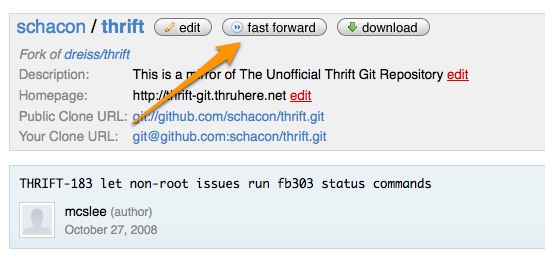
Since forking a repository is so easy on GitHub, a number of people tend to do it thinking they want to play with the source, but then never actually push back into their fork. Meanwhile, development continues on the main branch, and it’s a little annoying to have to add them as a remote and merge in order to get back up to date. So, we’ve added a new button to your repository details that will show up if you forked a project, didn’t push to it, and the source repo has moved on:
If you click on ‘Fast Forward’, it will move all your branches up to wherever the repository you originally forked from now is. Now all of those of you who forked Rails months ago and never did anything with it and are thinking of trying again, go forth and Fast Forward.
A11y Design Bootcamp is a live educational program that consists of exercises, discussions, and knowledge shares to raise awareness of web accessibility best practices, the role designers play in creating accessible products, and how to advocate for accessibility with cross-functional partners.
As part of GitHub's dedication to accessibility, we expanded our internal accessibility program and scaled up our assessment process to help remove or lower barriers for users with disabilities. Then, we empowered employees from various disciplines to drive accessibility efforts within their teams.
 Scott Chacon