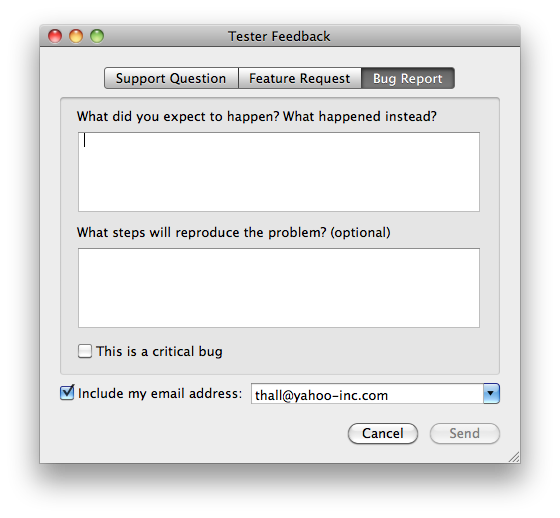
OpenFeedback is a Cocoa framework which allows your users to submit bug reports, feature requests, and ask support questions from directly within your application. It can also automatically submit crash reports from your app on restart. All of this data can be stored in Shine or connected to your own custom server-side script. And, like Sparkle, OpenFeedback can be integrated into your application in just a few minutes - no code required.



Linking OpenFeedback to your project
- Download and compile the lastest OpenFeedback source from GitHub.
- Drag the compiled OpenFeedback.framework into the Linked Frameworks folder of your Xcode project. Be sure to check the "copy items into the destination group's folder" box in the sheet that appears.
- Create a new Copy Files build phase for your app's target (Project > New Build Phase > New Copy Files Build Phase).
- Choose "Frameworks" as the destination for your new build phase.
- Click the disclosure triangle next to your app's target, and drag OpenFeedback.framework from the Linked Frameworks folder to the Copy Files build phase you just created.
Create the OpenFeedback object
- Open up your MainMenu.nib in Interface Builder.
- Go to File > Read Class Files... and choose all the files inside OpenFeedback.framework/Headers.
- Drag a generic Object (a blue cube) from the Library to your document.
- Select this object in your document window, and under the Information tab of the inspector, set the class of the object to OpenFeedback. This will instantiate your OpenFeedback object.
- Make a "Send Feedback..." menu item in the application menu; set its target to the OpenFeedback instance and its action to the appropriate presentFeedbackPanel...: action.
- Create a OFSubmitFeedbackURL string key in your Info.plist. It should be the full URL that OpenFeedback will deliver your feedback reports to.
You're done!
(FYI: The above instrctions were pretty much copied verbatim from the Sparkle wiki, as the setup process is identical.)
Added crash reporting. To use it, just send presentFeedbackPanelIfCrashed message to OpenFeedback instance sometime during your application startup (most often this will be in your application delegate's applicationDidFinishLaunching:). The method reads application's most recent crash report from the system log and presents feedback panel if found. Example:
#import <OpenFeedback/OpenFeedback.h>

@implementation AppDelegate

- (void)applicationDidFinishLaunching:(NSNotification *)notification {
	[openFeedback presentFeedbackPanelIfCrashed];
}

@end
The easiest way to get to the OpenFeedback instance you've setup in IB (as described in INSTALL section above), is to add an IBOutlet to AppDelegate and link it within IB. Above example assumes you've linked it to AppDelegate's openFeedback ivar.
Code is hosted at GitHub:
http://github.com/tylerhall/OpenFeedback
Much love to Tomaz for adding in the excellent crash reporting functionality.
The MIT License
Original implementation copyright (c) 2010 Tyler Hall.
Other code portions written by Tomaz and various contributors. (Please let me know if I've left off anyone's name.)
Permission is hereby granted, free of charge, to any person obtaining a copy of this software and associated documentation files (the "Software"), to deal in the Software without restriction, including without limitation the rights to use, copy, modify, merge, publish, distribute, sublicense, and/or sell copies of the Software, and to permit persons to whom the Software is furnished to do so, subject to the following conditions:
The above copyright notice and this permission notice shall be included in all copies or substantial portions of the Software.
THE SOFTWARE IS PROVIDED "AS IS", WITHOUT WARRANTY OF ANY KIND, EXPRESS OR IMPLIED, INCLUDING BUT NOT LIMITED TO THE WARRANTIES OF MERCHANTABILITY, FITNESS FOR A PARTICULAR PURPOSE AND NONINFRINGEMENT. IN NO EVENT SHALL THE AUTHORS OR COPYRIGHT HOLDERS BE LIABLE FOR ANY CLAIM, DAMAGES OR OTHER LIABILITY, WHETHER IN AN ACTION OF CONTRACT, TORT OR OTHERWISE, ARISING FROM, OUT OF OR IN CONNECTION WITH THE SOFTWARE OR THE USE OR OTHER DEALINGS IN THE SOFTWARE.