Repository navigation
Restoring general / layout Settings only works if option for restoring folders also active #107
Description

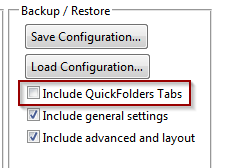
When using the "Load Configuration" button on the QuickFolders Pro tab:
Currently, both in Tb68 and Tb78 the layout / advanced settings are only loaded if the checkbox [x] Include QuickFolders tabs is also activated. Only then the prompt "This will delete all QuickFolders tabs and replace with the items from the file." is shown and when clicked Ok, all other activated settings are restored.
So loading with the following settings will not restore the previous (general / advanced / layout) settings:
Activity
[-]Restoring layout / general Settings only works if folders are also restored[/-][+]Restoring general / layout Settings only works if option for restoring folders also active[/+]RealRaven2000 commentedon Feb 3, 2021
Here is a quickfix so you can now restore colors / general settings while leaving your current folder structure intact:
Tb78 version: QuickFolders-wx-5.3pre20.zip
Tb 68 version: QuickFolders-wx-4.20pre22.zip
(to install, download the zip file and drag into Thunderbird Add-ons Manager)
RealRaven2000 commentedon Feb 4, 2021
Improved versions, adding visual feedback:
Tb78 version: QuickFolders-wx-5.3pre25.zip
Tb68 version: QuickFolders-wx-4.20pre38.zip
(to install, download the zip file and drag into Thunderbird Add-ons Manager)
RealRaven2000 commentedon Feb 22, 2021
Fixed in 5.3 - released 22/02/2021