You signed in with another tab or window. Reload to refresh your session.You signed out in another tab or window. Reload to refresh your session.You switched accounts on another tab or window. Reload to refresh your session.Dismiss alert
VSCode: Version 1.27.1 (1.27.1) 5944e81
Platform: macOS/ubuntu
When the user is stepping over his program, the CALL STACK view shows the program is PAUSED ON STEP, but the debug toolbar buttons are disabled. See the following screenshot.
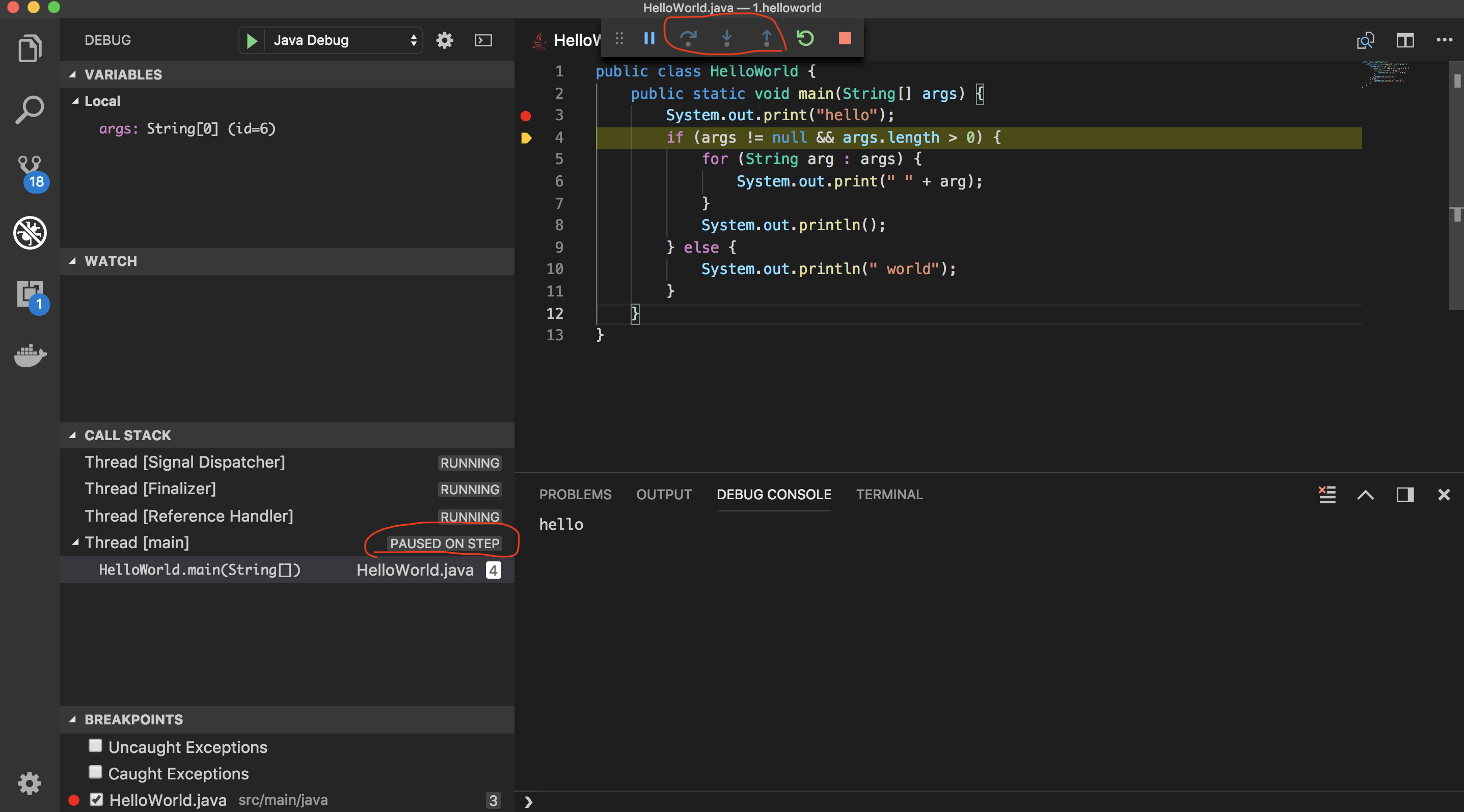
This issue is stably reproduced on macOS/ubuntu. Also there is some user reporting it occurs in Windows 10 sometimes, and downgrade to 1.26.0, the issue disappear.
Seeing this when attempting to debug a Java program using 1.27.2 on Windows 10. Essentially, debugging Java doesn't work at all. Reverting to VSCode 1.26 works around the issue for me as well for the time being.
Not sure if Jinbo Wang (@testforstephen) can repro with latest vscode insiders, but I just updated my vscode insiders install, and it does indeed still repro.
Andre Weinand (@weinand) In Java Debugger, we took asynchronous programming. One thread to handle the DA request, another thread to report event from JVM in real time. That means when the user is stepping, the possible DA sequence is [ContinueRequest, New StoppedEvent, ContinueResponse], or [ContinueRequest, ContinueResponse, New StoppedEvent]. I guess this may be the reason.
Ok, I see.
DAP requires that the ContinueResponse is received before the resulting StoppedEvent.
You can use any programming technique in the implementation of your DA. But you'll have to make sure that the order of events, requests, and responses remains logical. So if a stop event arrives before the corresponding continue request has finished, VS Code will get confused.
Could you try whether it makes a difference if you implement the step and continue requests like this:
protected continueRequest(response: ContinueResponse, args: ContinueArguments): void {
if (args are ok) {
this.sendResponse(response);
} else {
this.sendErrorResponse(response);
}
this._runtime.continue(); // do the continue (which may result in a StoppedEvent that arrives after the continueResponse).
}
And you will have to make sure that all DAP communication is not affected by thread scheduling. So with the above implementation of continueRequest it should not be possible that the StoppedEvent is sent from your DA before the continueResponse.
I assume that nothing has changed on your side, right? Isidor Nikolic (@isidorn) did we change anything in that area in 1.27.1?
through the screenshot we pasted above, apprently vscode knows the thread is paused on step, because the CALL STACK view/variable/code pointer are rendered correctly, except that the debug buttons don't respect the same status.
Besides, i did a quick test via keeping the stoppedEvent sent after StepResponse, it can mitigate the status issue for single thread. But the debug buttons still have the inconsistent status issue for multiple threads case.
For example, there are multiple threads suspending on breakpoints, continue one thread to make it's becoming running, then switch to the other thread, it's CALL STACK status/code pointer both are stopping at the breakpoint, but the step buttons are disabled. Just like the bug described. Looks like this is a status management issue that should be investigated at vscode side.
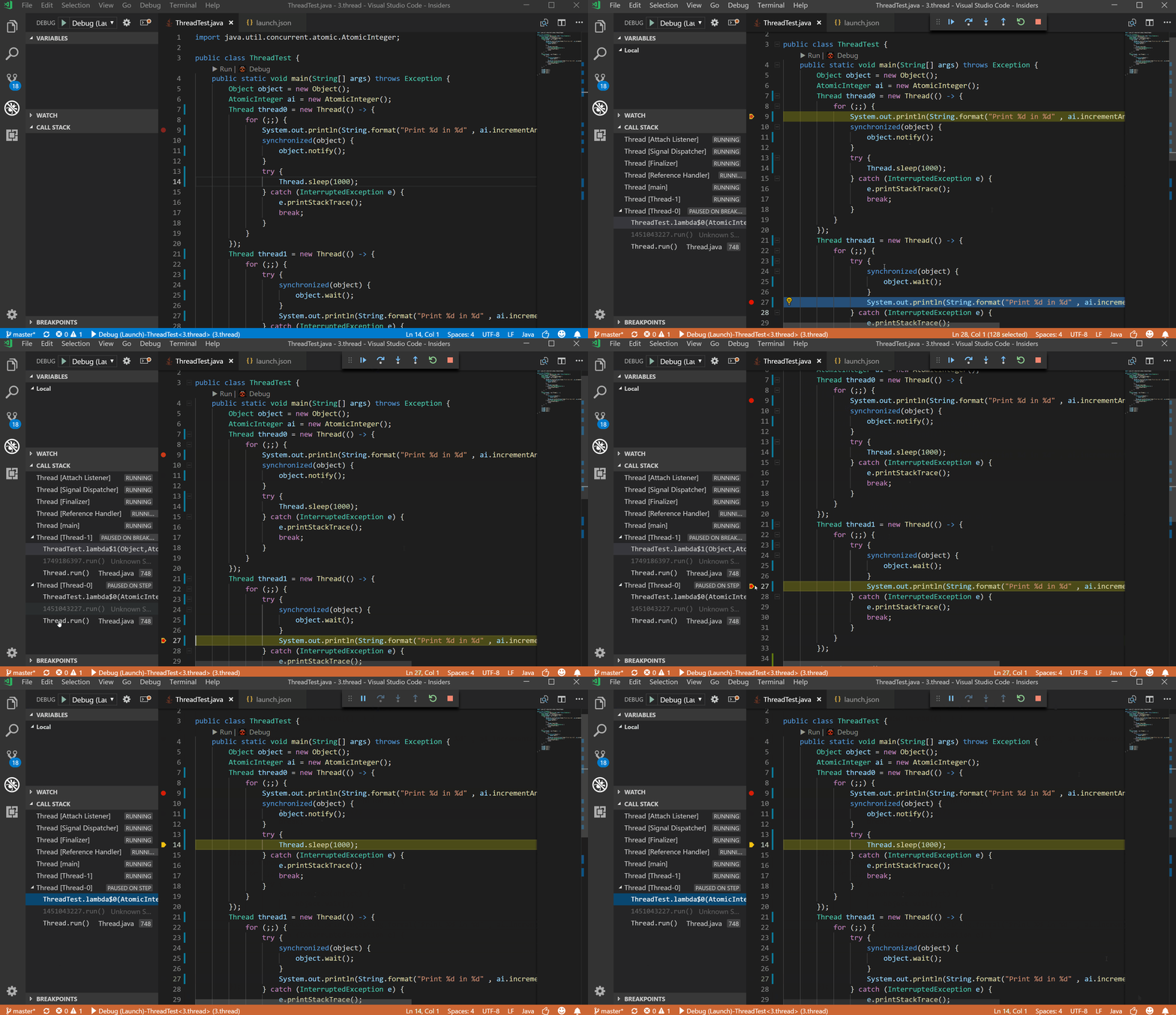
we submit a fix on java-debug side to fix the StoppedEvent sequence issue, now the debug buttons work well for the single thread scenario. But if it's multiple thread scenario, switching to other thread, VS Code probably lose the old thread's debug status. See the gif.
Jinbo Wang (@testforstephen) I just saw the comment in another issue about the debugger fix. I've updated to version 0.13 of the Debugger for Java and it works again for me now. Thanks!
Activity
madhavd1 commentedon Sep 12, 2018
The issue is coming in Win10 as well.
I'm using vscode 1.27 on Win10 Enterprise(Version 1607, build 14393.2430)
Sindisil commentedon Sep 13, 2018
Seeing this when attempting to debug a Java program using 1.27.2 on Windows 10. Essentially, debugging Java doesn't work at all. Reverting to VSCode 1.26 works around the issue for me as well for the time being.
testforstephen commentedon Sep 17, 2018
Isidor Nikolic (@isidorn) Any updates about this bug?
isidorn commentedon Sep 17, 2018
Jinbo Wang (@testforstephen) I was on vacation, sorry for the slow response.
First of all can you reproduce this with the latest vscode insiders?
Sindisil commentedon Sep 17, 2018
Not sure if Jinbo Wang (@testforstephen) can repro with latest vscode insiders, but I just updated my vscode insiders install, and it does indeed still repro.
testforstephen commentedon Sep 18, 2018
Isidor Nikolic (@isidorn) yes, this issue can be easily reproduced in 2018-09-17 windows insider version.
weinand commentedon Sep 18, 2018
Any idea why this problem only affects Java debugging? We have no other reports of this.
testforstephen commentedon Sep 18, 2018
Andre Weinand (@weinand) In Java Debugger, we took asynchronous programming. One thread to handle the DA request, another thread to report event from JVM in real time. That means when the user is stepping, the possible DA sequence is
[ContinueRequest, New StoppedEvent, ContinueResponse], or[ContinueRequest, ContinueResponse, New StoppedEvent]. I guess this may be the reason.weinand commentedon Sep 18, 2018
Ok, I see.
DAP requires that the ContinueResponse is received before the resulting StoppedEvent.
You can use any programming technique in the implementation of your DA. But you'll have to make sure that the order of events, requests, and responses remains logical. So if a stop event arrives before the corresponding continue request has finished, VS Code will get confused.
Could you try whether it makes a difference if you implement the step and continue requests like this:
And you will have to make sure that all DAP communication is not affected by thread scheduling. So with the above implementation of continueRequest it should not be possible that the StoppedEvent is sent from your DA before the continueResponse.
I assume that nothing has changed on your side, right?
Isidor Nikolic (@isidorn) did we change anything in that area in 1.27.1?
testforstephen commentedon Sep 18, 2018
The same logic works previously in a long time, we didn't change that part code recently. But i'll do some experiment on your suggestion.
testforstephen commentedon Sep 18, 2018
through the screenshot we pasted above, apprently vscode knows the thread is paused on step, because the CALL STACK view/variable/code pointer are rendered correctly, except that the debug buttons don't respect the same status.
Besides, i did a quick test via keeping the stoppedEvent sent after StepResponse, it can mitigate the status issue for single thread. But the debug buttons still have the inconsistent status issue for multiple threads case.
For example, there are multiple threads suspending on breakpoints, continue one thread to make it's becoming running, then switch to the other thread, it's CALL STACK status/code pointer both are stopping at the breakpoint, but the step buttons are disabled. Just like the bug described. Looks like this is a status management issue that should be investigated at vscode side.
bastlaca commentedon Sep 19, 2018
I can also repeat this problem:
After that Continue(F5) will turn into Pause(F6) and central buttons will be grays.
I use:
SGI495 commentedon Sep 19, 2018
I (and multiple colleagues) can also reproduce this issue.
Same description: Debugger stops on breakpoints, I step over once and then the thread is paused on step but debug controls are deactivated.
Let me know if I can try anything or send any info to help nail down the issue.
testforstephen commentedon Sep 19, 2018
we submit a fix on java-debug side to fix the StoppedEvent sequence issue, now the debug buttons work well for the single thread scenario. But if it's multiple thread scenario, switching to other thread, VS Code probably lose the old thread's debug status. See the gif.

SGI495 commentedon Sep 19, 2018
Jinbo Wang (@testforstephen) I just saw the comment in another issue about the debugger fix. I've updated to version 0.13 of the Debugger for Java and it works again for me now. Thanks!
weinand commentedon Sep 19, 2018
Isidor Nikolic (@isidorn) since this problem already occurred in 1.27 it is not related to my changes for 1.28
bastlaca commentedon Sep 19, 2018
It works again. Thank you.
testforstephen commentedon Sep 20, 2018
Verified the multiple threads case, it works in the 2018-09-20 windows insider.
isidorn commentedon Sep 20, 2018
Jinbo Wang (@testforstephen) thanks a lot for verifiing, adding verified label