Repository navigation
Add visible warning about impending license expiry #350

Description

There is currently no visible warning before the QuickFolders (both Pro and Standard) licenses expire. Instead the user will be met with restricted functionality of the non-licensed product - some users may even think this as a bug without realizing their license has expired until they get a warning when using an extra tab or feature.
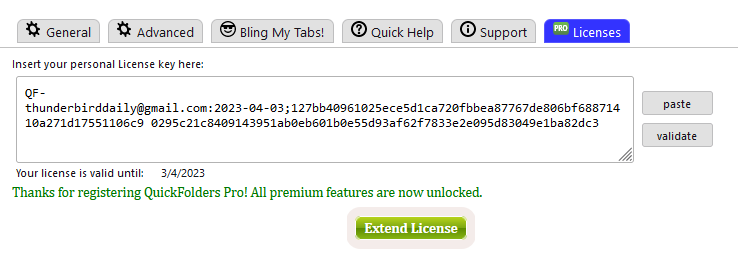
The only place the expiry date (and an extend license button) is visible is if the user goes to the license screen:
Therefore I propose we use the QuickFolders label to communicate a near future expiry:

Activity
jaysmithgit commentedon Mar 28, 2023
I very much agree that this is an important improvement.
RealRaven2000 commentedon Mar 28, 2023
that's great - I already implemented a version of this in quickFilters, see its issue 170 - which I released today. I had a bunch of changes queued up that also affected the way it looks once the license is expired, so I rolled in this change there:
I had changed the button from a simple pushbutton to a more obvious dropdown, giving more choices to the user. I will probably try to add the chevron (dropdown arrow) to the QuickFolders label as well to make it more obvious that there are consequent choices once it is clicked. It is never quite clear whether a user knows that they can click the QuickFolders label.
RealRaven2000 commentedon Apr 11, 2023
Here is a preview version, this is what it looks like. It will also add a menu item for checking the license status to the top of the tools menu:
The menu opens QuickFolders settings on the Licenses tab, which shows the real expiry date and a button for extending it.
Once the license is expired the label will look like this:
The preview version already has translations for the main locales (ca, de, es, fr, hu, it, ja, nl, pl, pt, ru, sl , sr, sv, vi, zh-CN, zv-TW):
QuickFolders-mx-5.16pre24.zip
To install, download the zip file above then drag into Thunderbird Add-ons manager (without extracting!). If anyone needs test licenses that expire soon, hmu via the support email!
issue #350 - Add expiry warning, issue #352 - correct Licensed days left
screenshots for license warning [issue #350]
RealRaven2000 commentedon Apr 22, 2023
implemented in 5.16 - published 21/04/2023