Add support for ASP.NET (non-Core) projects #2670
Comments

|
cc @davkean @davidfowl - we've discussed this a bit before as I beat my head on the wall making these things kind-of-work in testing the new system. |

|
One more: |

|
I'd love to move my projects over to the new system but I'm forced to stay with MVC5 until all dependencies work on .net core as they do today. Since EF code first migrations don't work with the new system the two projects that would benefit from this the most can't be updated (the website & the DAL). Because of this there's nothing to be gained if I migrate the other smaller projects. If web projects were supported then one of my two sites could be fully updated, and the other could allow for everything but the DAL project making it worth my time. |

|
For the immediate use case, the new project file format provides some great features such as transitive references. And for some reason, updating packages in a large solution with the old project file format takes ages. Just being able to hand-edit the csproj to update version numbers is one of the best features in it. |

|
As someone with a lot of MVC5 projects, I have considered migrating them to the new csproj, since there's a lot to like. Since NuGet package scripts don't work, this breaks or at least makes working with Entity Framework migrations an unsupported scenario. (See xt0rted's comment.) They are present in all or almost all of the projects I had in mind, so that's a roadblock. Additionally, some NuGet packages that insert themselves into the build process would probably need to be similarly adapted, not to mention any project-type specific tooling (Microsoft or otherwise). The features in the new project system would make my life easier - If this could magically be made to work, or if Microsoft would decide to make it a supported scenario and update EF(6) to work (or allow the community to help out), I would consider moving. As an unsupported it-seems-to-work-but-you-break-it-you-bought-it scenario, I wouldn't. |

|
At DevIntersection in May it was said by a MS high up in a session that the new project system was coming to older projects by the end of the year this year, FWIW. |


|
@scottsauber I seriously don't think this will happen based on this Repo Roadmap for milestone 16. |

|
I have a number of solutions that contain projects that cannot migrate anytime soon as they rely on things like signalR in its current form, MSMQ and EF code first. It would be nice to be able to start new work where possible in the new system until I have the manpower available to rewrite the main components that rely on things the team has decided not to support in a directly upgradeable manner or does not yet support. The library scenario would at least allow some work to begin moving in the right direction here. |
 davkean
added
the
Feature Request
davkean
added
the
Feature Request
|
Every time we reload the Stack Overflow project (git pull), Visual Studio 2017 crashes. Every single time. Everyone here experiences this, and every time we fix a bug, another pops up later causing the same. While not related directly to this issue, most of the time the project file didn't need to change. Simple support of globs would have prevented the vast majority of reloads in the first place. Can we please get an idea of if this will happen? It's the most upvoted issue in this repo and causes tangible daily pain. We want to move to ASP.NET Core, etc. but that's going to take probably a year+. I'm sure there are many, many people in the same boat. Please, add support for the current projects most ASP.NET developers are dealing with and will be for some time. |

|
Honestly I don't see this happening in the short term (this year). There are lots of kinks to work out with SDK projects and the new project system before we can bring them to older projects. Those kinks don't even have anything to do with ASP.NET so then there would be a bunch of work that needs to happen to port ASP.NET things to the new project system which is non trivial e.g. old razor editor, aspx editor, webforms designer??, build system (WAP projects have a hybrid msbuild + build manager build system), and any other quirks that System.Web requires. Some of those components are written in native code since the older project system was native. All of this to say, it's not a simple flip the switch, it's the same set of people working on new and existing project systems. When the SDK projects are near flawless, I'd look at bringing it to down level projects. |
|
@davidfowl I realize to support everything takes more work, but there's a lot of audience covered with far less than all of that. For example out of that entire list only the old razor editor applies to everything we have. But, I'm not sure what's even required there, as the razor editor appears to work as-is. Not listed is F5 debugging, which today results in:
I am using the new project system for sample applications in our library projects because I have to. You can't mix old and new (see migration issues in the initial post here). It mostly works, but you can't F5 it because it can't launch. The editors work. The build works. Everything we need for daily almost works, if only F5 would start and attach. How much work are we talking about to make that work? We don't have webforms, we don't have .aspx, we don't have build issues with WAP, and apps run fine in all our IIS setups (that's how we have to run them on the new project system). That's passable for sample apps (but really, what choice do we have?) but not for a team working together. I guess I disagree on what the minimum bar is here for a huge daily life improvement. If F5 worked for spin-up debugging (sometimes attaching isn't practical), we'd have moved over already. What would it take to make this work? |
|
It might be acceptable for you but I'm like 85% sure we need to have fully parity before claiming that something is a replacement. Those missing features are probably fine for your development but what about other people? Do we replace the default file new or this is just a hacky edit your csproj and hope it works solution for stackoverflow developers? If we can't replace the file new project templates for existing ASP.NET 4.x applications then it's not ready yet. You won't believe the sorts of things people rely on Day to day in their projects. Forget those basic features I mentioned, there's also other extensions and features that interact with our project system that would need to work. That said we could be making incremental progress but it's not a priority. It needs to work well for .net core projects and it really doesn't as yet. There's lots of performance problems that we're actively working on. To expand the scope of the project system before we worked out some of those major kinks would be a disaster It would be awesome if our web project system was OSS so people could contribute and help make this a reality. |
|
@davidfowl We're already in a very hacky state to even think about migrations, anything would be an improvement here. All MS effort appears to be going into a new system we can't realistically migrate to because the old system has been neglected. We have to use VS 2017 for current versions of C#, but to use it with old project systems we're crashing multiple times a day. We can't use VS 2015 unless we want to stick with We're stuck in a terrible position here. We can't move to the new stuff that works. Efforts to support the new stuff are quite obviously breaking the old stuff and we're suffering for it with zero benefits. I can honestly say: as things stand, we'd have been better off staying on Visual Studio 2015. Yes, I mean that. But it's too late to go back without significant work, we now use a C# version it doesn't support pervasively. There is no incremental migration story. The solution is all or nothing at the moment due to the new project system not supporting all the projects people already have. And let's not forget the clock is ticking. It's already been said that ASP.NET Core 3.0 will drop .NET Framework support and move to .NET Core. This means we have a time limit on an incremental migration story that we can't even begin yet. Due to issues like this migrations to ASP.NET Core remain a logistical nightmare. My teams are asking when we can upgrade and I don't have an answer for them because of these blockers. |
That's very far from the reality of the situation. I'm going to guess you're specifically talking about SDK projects and nothing more. PackageReference was actually ported to the old style csproj without requiring the use of SDK projects.
That sucks. I can't speak for what changed here that's causing the existing project system to crash multiple times a day. I assume you've given dumps to the appropriate people and they're looking at it?
This is confusing? Are you using both .NET Core projects and .NET Framework projects in the same solution? Is that the issue you're facing right now?
Do you mean that you can't move new projects to ASP.NET Core or .NET Standard because it requires the new project system? Can you be more specific here?
Yes this is true and I don't see this changing for a while. Changing all of the old things to the new project system will take years. Certain project types will be easier than others but it's not easy changing them all with full parity (see roslyn 😄 for a similar story, that took ~5 years).
That's absolutely false, that was never said. The thread that got out of control made tons of assumptions that maybe that was one of them. Nobody from Microsoft said that ASP.NET Core 3.0 is absolutely dropping .NET Framework support. Some questions for my education:
|
Correct, talking about this area.
For all but the latest yes. We've hitting yet another crash in the new preview. We're hopeful when hitting the update button that things will improve from one preview to the next but honestly it's 50/50. From a time standpoint though, we can only invest so much. We need to do our work, not fight with Visual Studio all day.
We can't move because we can't even start to move the solutions. We can't move things to libraries on the new system and migrate over in any reasonable way, because the build system won't build both. And there's a big mismatch on server build tools and what Visual Studio does here (see the fights we had with it above). Side note: those server build tools aren't labelled with a version.
Sure, but this isn't asking for full parity on day one. By removing the biggest blockers to starting migration on the way to parity, we can parallelize a lot here and end up with ASP.NET Core far sooner.
I'm fairly certain this was said in a community standup around the time all the changes were happening as the current thinking. If that's changed then great, but we've got no newer information AFAIK.
I'm assuming you mean in trying to make this work. Building (on a server, not in VS) and debug launching are the big 2.
Because you can't mix both styles in the same solution and have the tooling work (at least today). The project files are massive today (no globs), so it's a big bang change to move everything over. It also means we can't move to anything with the
See above.
We want to, but again, see above. The only things we can share are completely external to the solution (e.g. MiniProfiler, StackExchange.Redis, Exceptional, Jil, protobuf, etc.). Moving code outside of the solution that belongs to it in order to make the builds work would make dev time take even longer (e.g. unnecessary packages, publishing, and build time for every minor change). Can you list out some of the pains you have migrating (any pains really)? The above covers it mostly. We can't use I'm happy to work with someone and send our solution over (NDA style) if it'll help. |

|
@NickCraver I've reached out to you privately on the crash you are experiencing. The long delays are likely caused by a mix of slow design-time builds + the fact that we block the UI while waiting for them in the legacy project system. This experience should be much better in 15.5 as we've done some performance here to reduce the number of builds we do during solution load/reload/configuration change. If you have custom targets, I'd use the steps called out in the doc to make sure that they aren't increasing your design-time build time. Performance work we're doing for .NET Standard/.NET Core scenarios will also benefit these builds for legacy scenarios. Our intention, long term, is to have feature parity with the legacy project system, however, our biggest focus for the next couple of updates is to improve the performance and reliability of the existing scenarios we've already bitten off. Can you expand on the the "all or nothing" argument? You can continue to call |
Nope, it was never said and nothing changed.
It would be good to get more feedback here. Was the entire experience just error prone or were there specific issues?
Like @davkean asked, why can't you even begin to move? MSBuild 15 supports both old and new project types AFAIK, you can't use
The issue is asking for "support" we can't add a fraction of the features and claim support. Support means full parity. Like I asked before, knowing what specifics are absolutely blocking you from beginning the migration would be extremely useful.
This is the real crux of the issue. We need to figure out why this isn't working. Can you list out the issues with this? This absolutely needs to be fixed because this is key to people migrating existing solutions.
This isn't new and shouldn't be a blocker. MSBuild should work like it always did with both existing and new style SDK projects.
Can you just use the latest msbuild on windows?
This isn't new and I don't see how it's a blocker. Over time more projects will likely be converted when full parity can be reached, but it's not a short term thing. |

Adding @tmeschter. This sounds like a bug in |
Thanks! I've followed up and have many dump ready to send from hangs, stalls, and just-before crashes today.
We have no problem updating the build servers (we control them all), but updating to the latest MS Build tools released we never got to work. We were deploying manual target directories and overrides to get web applications working. To make a single project work, we ended up copying all targets from local installs over to a directory on each build server and overriding the targets path in MSBuild. The new build tools installed fresh did not work for web applications (missing their targets). On the mixing: we could never figure out how to build it. See opserver/Opserver@7ccf72f for similar issues on finding MSBuild itself. The major blocking problem we had (I'll have to re-attempt this with another solution to fully document as we go, trying from recall here) was various breaks on the new project system with old references. All the tooling either created or expected In short, there are several areas where bridging old and new worlds is painful or just something we couldn't make work. The authenticated feeds issues is hard for me to demonstrate in open source, unfortunately. |
|
@davidfowl Thanks for the replies, follow-ups:
Fair enough, if so that's my mistake, I swore this was said off-hand but maybe it wasn't by the team. My fault.
I'm honestly not sure what the contain. 15 to 15.3 had breaking changes you needed a newer version for, and installing the latest didn't work. I'll try a single new project in the SO solution soon as I'm able (likely next week, we're busy as hell atm) and better document step by step what breaks. See above response for some of the issues I can recall right now.
Again see above. Note: we're not asking for support (the official term), only bits that would unblock many. We built Stack Overflow on an MVC beta, test SQL in CTP in production, etc. no strangers to pre-release bits on the way to supported.
Yep, above. I'll do a full doc run on an SO branch with the current preview and build server tooling to see what we hit today (AFAIK nothing has changed, we were on the latest build server tooling on the last attempt), and write up what we're hitting. I don't want to mis-file a dozen issues though, how about I file a big one and we break it out into areas as you guys and gals see fit? If so: which repo?
I think so, but these aren't versioned like they need to be IMO. I'm both a developer and a sysadmin, and the sysadmins here are frustrated at the tooling downloads. For example go here and scroll to the bottom: https://www.visualstudio.com/downloads/ It's an unversioned installer (that needs an update immediately after downloading by the way, not an awesome experience). Since it's unversioned, we have to make some assumptions about which version is installed or blindly update it (current approach) which led to some mismatches of 15.0 vs 15.3 msbuild installs. Just for fun, it's not in the registry anymore either, so we have to install a whole other project just to find it (vswhere), and I guess check that into git or PATH it on every server (is this sounding crazy yet to do a simple build? it is to me). In the old world we could at least find where MSBuild is in the registry (in a PowerShell build script) and move along. Now even that's regressed. This isn't an issue if you're using But yes, we're free to use the latest version of MSBuild. Actually figuring out how to do so, which version is installed or where it is are all different questions we don't always know the answer to.
That's unfortunate. When we heard about the new project system it was the thing we were all excited about, because it results in the most pain. From an outside perspective (and maybe mine's way off) I don't believe that new project system being only for new projects/types was communicated well at all. It was a major let down to realize this was the case and now will be for quite some time. Still, I'll help debug here where I can but admittedly have practical time limits on fighting tooling vs. getting any work done. Most of this is done on my personal time at the expense of our OSS getting any love. |

Feel free to ping me directly at tom.meschter@microsoft.com. |
|
@NickCraver regarding the other issues:
The first issue sounds like a bug, but I'm confused. It looks like you can install the web targets: Giving you a folder ( The second issue is a general problem with everything in vs being harder to find because you can now install vs anywhere. However, you can control where things get installed on your build server. If you always install the build tools to |
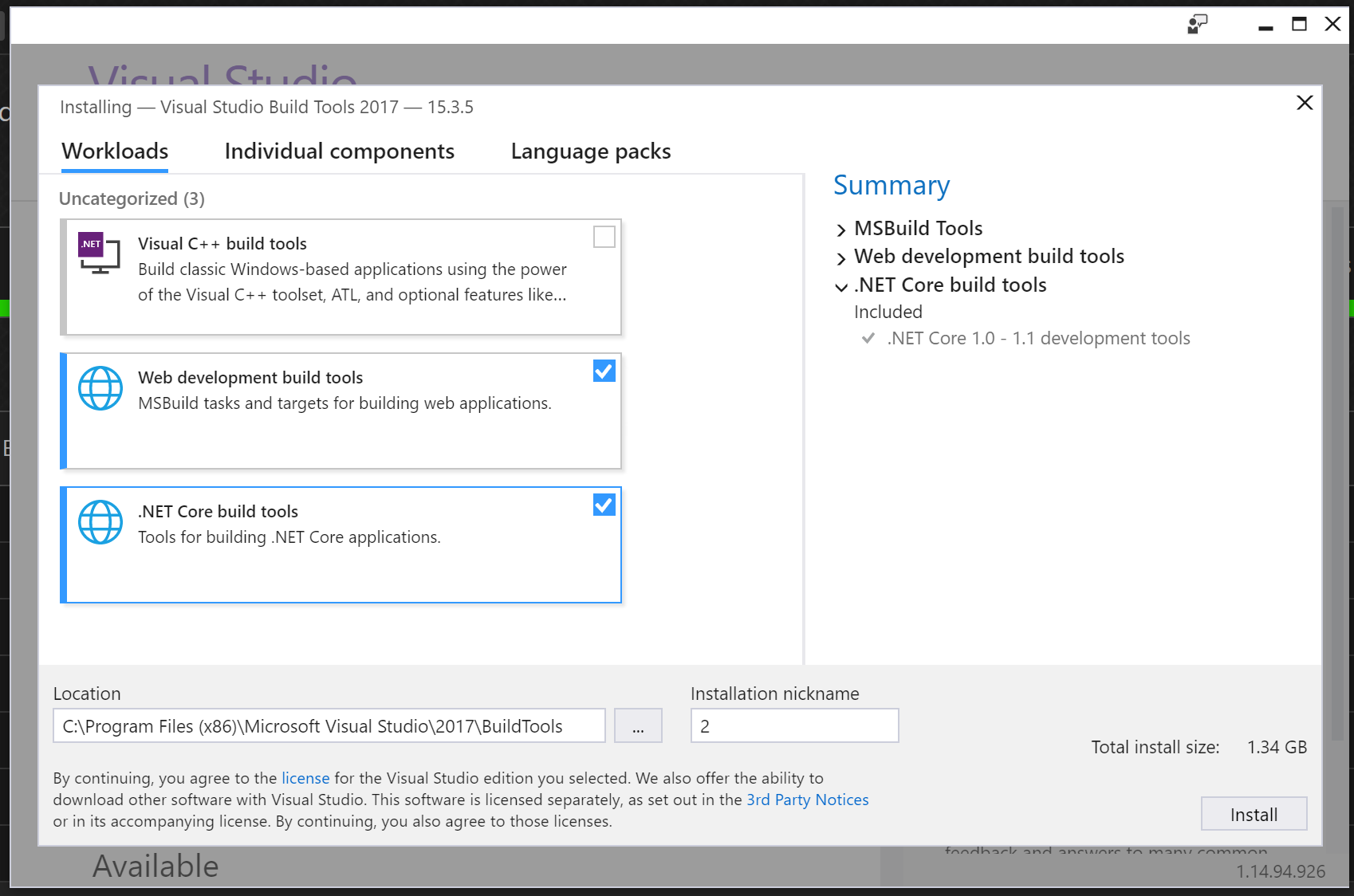
|
@jmarolf Here's what we ended up with to get building and not have gigs of extras to maintain and update (lengthening patch times). Tooling offline creation: .\vs_BuildTools.exe --layout \\path --includeOptional --lang en-US
--add Microsoft.VisualStudio.Workload.NetCoreBuildTools
--add Microsoft.VisualStudio.Workload.WebBuildTools
--add Microsoft.VisualStudio.Workload.MSBuildTools
--add Microsoft.Net.Component.4.6.TargetingPackServer install/update: .\vs_BuildTools.exe --includeOptional
--add Microsoft.VisualStudio.Workload.NetCoreBuildTools
--add Microsoft.VisualStudio.Workload.WebBuildTools
--add Microsoft.VisualStudio.Workload.MSBuildTools
--add Microsoft.Net.Component.4.6.TargetingPack
--noWeb
--passive
Sure, I agree. But in open source we don't control the build server. Thousands of people control thousands of build servers. This week we've had several major issues with Stack Overflow (including 2 outages) rooted in bad |

|
We don't currently have work to support not expanding globs in the old project system on our radar. Instead, we'd like to eventually be able to open old style projects with the new project system without also needing them to be converted to SDK projects. |
|
@Pilchie As an illustration of why this matters:
With So any, with globs something we experience merge pain with multiple times a week goes to nothing. I looked through our git history and I believe we would have had a merge conflict only once in the past 6 years (one simultaneous lib update race) in our main Please, reconsider some measures to improve life for all of the developers who are dealing with ASP.NET non-Core and will be for the foreseeable future. There are millions of us and eventually is a long time. This is by far the highest voted issue in this repo, so I'm curious: how is work and feedback prioritized? The User Voice forums for Visual Studio are, and I don't think I'm being extreme here, a wasteland. They're not maintained, there's a lot of duplication, and User Voice has no mechanisms for keeping up with issues. While problems are getting love in the new developer community site, missing things (like this) are closed as non-problems and the customer avenues for making suggestions are pretty grim. It's not specific to this issue, but as this is by far our biggest desire to improve every dev here's daily life, I'm asking. Note that Visual Studio is crashing on Please, please prioritize this. |
|
If I have to vote for one single thing, I like to get rid of all the individual file-references in our MVC5 project files (and class-libraries). They result in merge-conflicts in every other PR. Note: we can't move to .Net Core for the next years as our hoster/customer (federal gov.) does not have any plans to support .Net Core yet. That will take years then. |
|
@NickCraver The crash when the csproj reloads we should look at. You've mentioned this before but I'm yet to see feedback reports from your team about it - can you get them to individually report issues (you don't need to catch the crash, just report that it occurs) and we'll go through the watson reports to see what the underlying cause is? Understand the pain here here with merging, but as @Pilchie mentioned we have no intention of supporting globs in the old project system. The work there is much harder than the new project system due to it being native (and we have double-wrap all the new globbing-based APIs from MSBuild) and unlike the new project system it has its own in-memory model of the project separate to the MSBuild model. We would rather spend that time and resources on adding features to the new project system that will enable you to move your existing projects over to it. |

|
@NickCraver given your new job, can you talk to your new workmates about this issue? 😜😜😜 |

|
There's also reserved ports for HyperV, has bitten me once or twice. The ports aren't open (so don't show up in netstat for instance), but you can't use them. |


|
@mycroes I don't have any VMs on my machine at the moment except the Docker ones. But yes - I did investigate that myself when I was having problems. |


|
any news? |
|
No there is no news from Microsoft here. |
|
Not perfect but ... https://github.com/CZEMacLeod/MSBuild.SDK.SystemWeb |
|
Not speaking for Microsoft here (I'm not on the teams related to this), but FWIW as a user @CZEMacLeod's work above is by far the best option I've found and I'm using it currently in many places. |

|
pinging @davkean @davidfowl , @BillHiebert :any update on the status of this after finishing the spike? |


|
What a great thread! |

That sounds like the correct behavior to me, though? |
|
I created a new ASP.NET Web Application (.Net Framework) in Visual Studio 2022 and right clicked Publish to a Folder, and I get all dlls published to a /bin subfolder as in the image: but with Sdk format, I have all dlls in the root instead of |


|
Just ported a bunch of legacy projects over to @CZEMacLeod solution & it basically works, nice work :) Not sure what has to happen to have the C# Dev Kit support it. It complains with: Anyway it would be neat if it could be made to work somehow. |
|
@brad-jones did you remember to include the launchProfile information? I'm not sure if vscode devkit supports IIS / IISExpress profile types and/or net framework, but that file is what makes debugging work for a library in VS. If you want to, raise an issue on the project and we can either mark it as a known issue/limitation or try and resolve it. |

|
@brad-jones @CZEMacLeod |
|
Yeah @bartlomiejmucha, running |
|
FWIW the following VsCode launch config worked for me. I'm pretty happy, now I can dev on the old stuff without having to fire up full on VS. {
"configurations": [
{
"name": "IIS Express",
"type": "clr",
"request": "launch",
"preLaunchTask": "build",
"program": "C:\\Program Files\\IIS Express\\iisexpress.exe",
"args": [
"/path:${workspaceFolder}\\project\\Payroll.Timesheets.Web",
"/port:51867"
],
"env": {
"ASPNETCORE_ENVIRONMENT": "Development"
},
"cwd": "${workspaceFolder}/project/Payroll.Timesheets.Web",
"serverReadyAction": {
"pattern": "Successfully registered URL.* \"(https?://\\S+|[0-9]+)\"",
"uriFormat": "%s",
"action": "openExternally"
}
}
]
} |


|
I'm trying to convert our ASP.NET MVC5 project to sdk-style, while still targeting net48 (we will move it to .net 8 later). I tried the MSBuild.SDK.SystemWeb by @CZEMacLeod and the project compiles fine, but I am unable to run or debug it from VS. We use and want to use full local IIS, not IIS Express. The error is:
To get the project to debug, I have to attach to process w3wp.exe which is very cumbersome. I would like to preserve developer experience of just pressing the Run or Debug button, which opens the browser with website from local IIS. I think that launchsettings.json needs to be configured somehow to do this automagically, but is it even possible? |
|
@Mek7 It is certainly possible to use MSBuild.SDK.SystemWeb to have the F5 experience with IIS Express. I'm not entirely sure if it would work with IIS full or not. Is there a specific reason for not using Express for development reasons? I used to use the full version for a long time, but switched to express as it was easier to manage. The MSBuild.SDK.SystemWeb.Templates project includes blank templates which include F5 with IIS Express functionality. I would recommend starting with one of those and then adding in the rest of your existing project and settings. I think if you change the |
|
@CZEMacLeod thank you for your answer. |
|
@Mek7 IIS and IIS express did not always work the same way for some specific scenarios like custom handlers, security or anything else tying into the very early events in the request lifecycle. Some of those things did not work in IIS express as they would in IIS and others would give you different results under debug depending on which host they were under. While this has improved over the years it is still not fully gone so YMMV on how successful moving to IIS express would be. If your project is old, or uses older components or if the project has a lot of low level custom handlers it may very well be that way for a very good reason. |

|
Hi, I tried |

|
@AlleSchonWeg You could copy the default templates into the sdk templates if you want. I'd happily accept a PR for that, although it is not the best for handing new code in webforms as it doesn't easily hook-up new components and events etc. due to the limitations of the IDE. |


 and others
We routinely run into cases where the new project system and ASP.NET MVC 5 collide (or rather, don't) - I'd like to see support added. Here are the main use cases I'm aware of, I hope others add more to this issue:
Use Case: Migration
One of the awesome features of the new .csproj system is glob patterns (and Visual Studio not replacing them on every save). This was something we really looked forward to as a real time saver and merge reducer, but in practice we can't use the new project system because a lot of functionality for ASP.NET MVC 5 apps is missing, e.g. even hitting F5 to run it.
When we migrate a large solution to ASP.NET Core, it's a stop-the-world endeavor as are most major changes. Swapping any fundamental framework piece will need to be a big swap, so you want to reduce that window and risk as much as possible. In the case of ASP.NET to ASP.NET Core, you need to swap the project file, all references, port controllers, views, etc. This is a lot to do at once, and every change since you started that path is a royal pain.
A large part of this pain is in the project file itself, since nearly every commit adding or removing files is a merge conflict. And when moving from non-glob to blog worlds, it's a huge pain to manually sync everything into that major change branch.
Again, merge pain. A large change like this necessitates moving files around quite a bit and that's the same merge pain between users as exists in 1 world today.
Use Case: Library Projects
We also have several projects that need to support ASP.NET and ASP.NET Core, there are hundreds of thousands of users on the old systems and we need to support them. In the ASP.NET cases specically, we need to have a ASP.NET and an ASP.NET Core sample. In all of these, the only use of the old project system is the ASP.NET (non-core) sample projects. We have to choose between:
Adding support for ASP.NET MVC 5 projects for example would help tremendously in porting to ASP.NET Core. In our case, it'd help now for library projects (needed dependencies for main websites to move), and later for those sites like Stack Overflow. We've been working on the .NET Core story for quite a while now, but the daunting task of upgrading the main applications would be made much easier if we could get on the new project system first.
For today examples, I'm using the new
.csprojin MiniProfiler and Exceptional MVC 5 Sample projects. The upside is management and simplicity, the downside is users constantly asking why F5 doesn't work. At the moment I'm considering changing them to the old system since the main point of a sample is a bit missed when they can't test it.Use Case: Immediate
Additionally, it'd just make life easier today in itself, apart from upgrade reasons, by:
Can we please consider adding support for these project types? Such support would make life easier both immediately and for upgrading in the future.
The text was updated successfully, but these errors were encountered: